
In this article, we’ll highlight the 10 Google Ads updates you should know about as soon as possible. We’ll share practical tips for adapting your strategy.
Add us to your preferred sources.

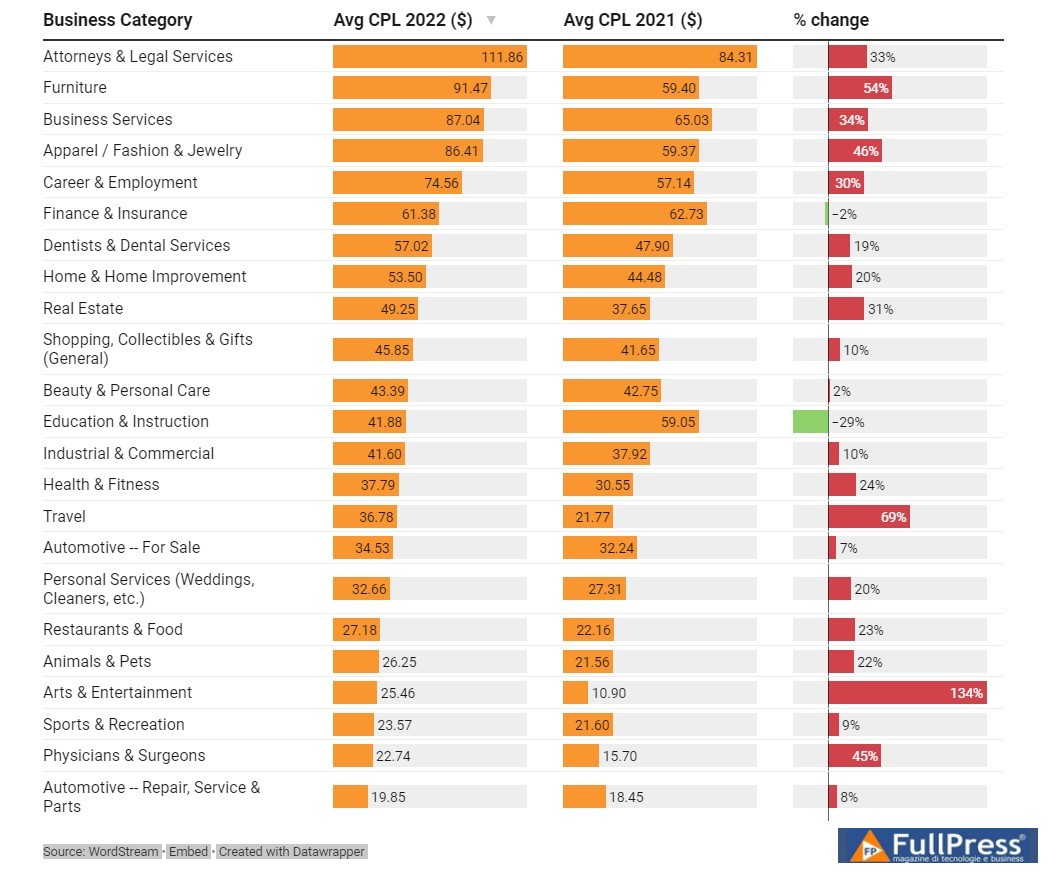
The recently published Google Ads benchmark report from WordStreamshows that cost per lead has increased significantly, for 91% of industries. While the overall average increase is 19%, the Art/Entertainment, Travel, and Furniture sectors saw increases of 134%, 69%, and 54% respectively.
Data suggests that factors such as high pricing due to inflation, as well as ads being shown for low commercial intent queries, have led to a decrease in conversion rates and thus, an increase in CPL.
What to do
Utilize no-fail tips to lower your cost per lead in Google Ads, regardless of the state of the economy.
The last two years have forced several industries to constantly shape their strategies as supply chain issues, pandemic restrictions, and economic turbulence continue to disrupt our lives. While some changes to Google Ads have felt like adding insult to injury, there have been some that have been positive. For instance, to help these industries adapt to the ever-changing needs, Google has implemented several unique ad formats for specific verticals.
Google introduced vehicle ads to help car dealerships showcase existing new and used cars that they had on their lot. Similar to a local inventory ad on Google, this new vehicle listing ad is prominently displayed at the top of the SERP and showcases the car’s image, price, condition, and location.
Microsoft Advertising has also introduced a similar automotive ad format for local dealers. The travel industry has also benefited from ADS updates.
These new vehicle-feed ads are managed almost identically to Shopping ads and require an active inventory feed to be regularly submitted and approved via Google Merchant Center. Previously, Google Merchant Center had stringent policies that prohibited most motor vehicles from their platform.
What to do
Ultimately, every industry is being impacted by the pandemic and its economic aftermath. Here are some super helpful posts from LocaliQ to help you navigate economic challenges.
- Marketing During Inflation: How to Adapt and Thrive
- Marketing During a Slow Economy or Recession
- Why You Need a Digital Marketing Budget in Any Economy
Every marketer prides themselves on creating the perfect ad copy and for the last 22 years, advertisers have manually written, tested, and optimized their PPC ads on Google. Over the years, Google has introduced several new search ad formats. In 2016, Google doubled the size of its standard text ads with Expanded Text ads. And in 2018, Expanded Text ads got even bigger. But after several years of change, Google has finally eliminated Expanded Text ads in June—no longer allowing advertisers to create the format that has defined PPC advertising for years.
Google’s new default ad type is the Responsive Search Ad (RSA) which allows advertisers to provide Google with multiple different text assets to mix and match to make the ad that is served on the SERP for each search.
This machine-learning-driven, asset-based ad format has a notable potential to serve over 40,000 unique variations of an ad with enough assets. But critics are quick to note that RSAs can create some duds and may not always perform well. The change effectively limits brands’ control over their ad messaging and in-SERP testing processes.
What to do
Utilize Responsive Search Adresponsive search ad template to find perfect assets for Google to combine.
E-commerce advertisers know Shopping ads well. In 2018, Google released its Smart Shopping campaign type to help businesses promote their Shopping ads across Search, Display, and YouTube. With a simple product feed in Google Merchant Center, Google’s reach of high-value placements on the web was readily available for all small businesses. Similarly, Google introduced Local campaigns in 2019 to help local businesses promote their Google Business Profile across Google Search, Maps, Gmail, Display, and YouTube.
Both of these campaigns delivered great ROI for small businesses on small budgets and helped to automate much of the campaign management. However, Google has now stopped allowing advertisers to create both of these campaign types and began automating their upgrade to Google’s new campaign type,Performance Max.
Google’s Performance Max campaigns have several unique features and offer even greater reach through new ad placements, including Google’s Discovery feed. And for many, this is much to celebrate! More reach, more placements, and more automation allow many advertisers to boast a significant increase in conversions with a lower CPA without the hassle of managing multiple campaigns.
But not all advertisers are celebrating the loss of Smart Shopping and Local campaigns. Google’s fully automated Performance Max campaigns require a good amount of data and budget before they run smoothly. While you can technically run these campaigns on any budget, advertisers see better results with larger budgets of at least €100 per day. This new ad inventory included in Performance Max can be celebrated as incremental reach for some while others may complain about the uncontrolled additional costs.
What to do
Google keeps rolling out new features and tools for its new flagship campaign type, but should you use them?
- Google Ads Performance Max: 10 Do’s, Don’ts, Observations, and Workarounds
- Should You Use Google Ads Performance Max? Pros and Cons
Google introduced Similar Audiences nearly a decade ago to supplement advertisers’ reach beyond their remarketing audiences. The success of Facebook’s Similar Audiences prompted Google to double down on its Similar Audiences. They have since become a cornerstone of many advertisers’ Google advertising campaigns. However, new privacy standards have hit Google and Facebook’s audience solutions hard. This is why Google announced plans to sunset Similar Audiences for “more powerful and durable” audience solutions.
Advertisers have about six months more to use Google’s Similar Audiences in their campaigns. Then, starting in May 2023, Similar Audiences will no longer be available to add to new campaigns or ad groups. Shortly after, in August 2023, they will be removed from targeting for all campaigns.
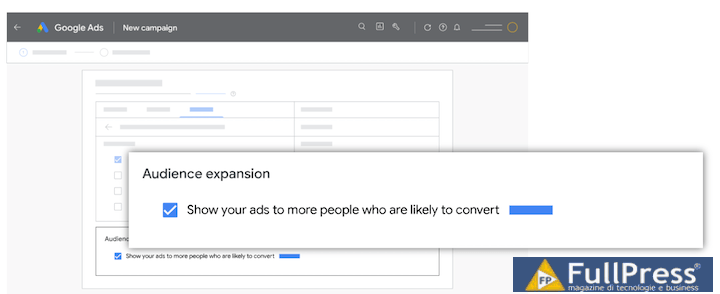
Google urges advertisers to update their audiences ahead of the migration. Google advises all advertisers to rely on their first-party data, such as Customer Match data, for creating new audiences for their campaigns. Additionally, Google recommends leveraging Smart Bidding strategies and Optimized Targeting to continue optimizing their campaigns’ performance. Advertisers looking to expand their reach beyond their first-party data may benefit from expanding Google’s Audience after Similar Audiences sunset.
Interestingly, Microsoft doesn’t seem to be following Google’s lead here. On the same day Google announced its plans to sunset Similar Audiences, Microsoft Advertising announced that it would be extending its Similar Audience solutions to more markets internationally.
What to do
Make use of the Google Ads audience targeting cheatsheet to fully understand all the options available to you and leverage their power. You have plenty to work with.
In 2021 Google announced it would expand its advertiser verification program and offer more ad transparency to users viewing ads targeted on and off the SERP. With these efforts, Google launchedMy Ad Center enabling users to explore how advertisers are reaching them.
Among the features ofMy Ad Center is a powerful new tool called “Advertiser Pages.” These Advertiser Pages allow users to see all other ads run by the advertiser in the last 30 days.
To view an advertiser’s page for a business, you must click on the three stacked dots next to an ad. From there, you can view details of verified advertisers, such as the company’s legal name and location. You can also click “See more ads from this advertiser.” From here, you can see all ads the advertiser has run in the last 30 days. You can even filter these results between text, image, and video ads.
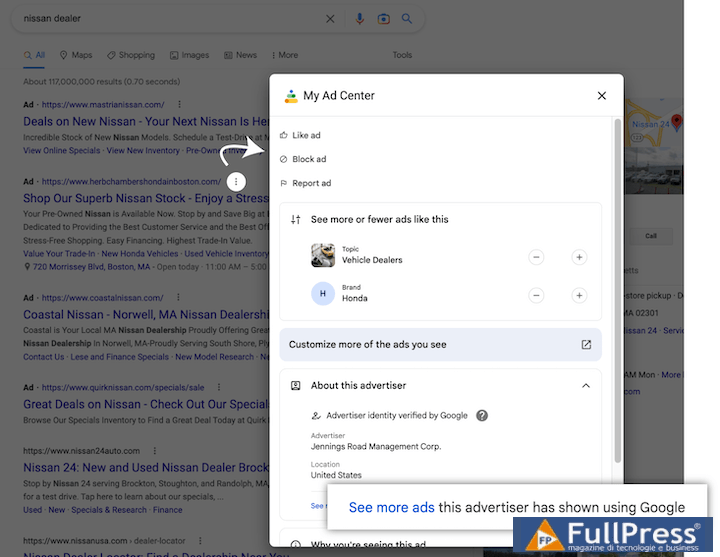
This new tool is designed to offer more transparency to Google users, but it has incredible potential to help existing advertisers spy on the competition too!
What to do
We know that search network advertising space is becoming more competitive every year, aim to stand out from the crowd with these posts:
- How to compete in Google Ads (without bidding up!)
- 3 creative (and cheaper) alternatives to targeting competitors with search network ads
Companies often struggle to differentiate themselves on a crowded SERP and sometimes have to defend their brand from competitors or other advertisers seeking to act illegitimately. Verified advertisers are now receiving some protection from Google with thenew business name and logo ad assets on the SERP.
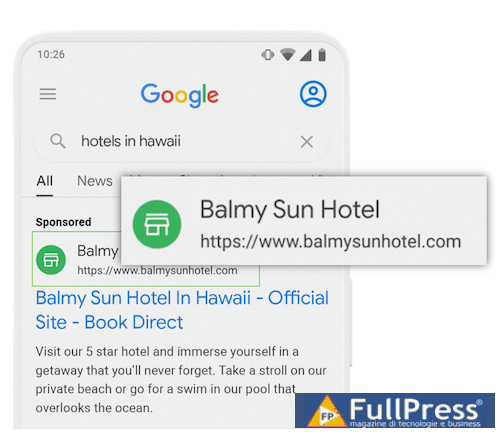
These new assets are exclusively available to verified advertisers. Not only are these new ad assets a visually appealing addition to their ads that should help improve performance, but Google also hopes itspolicies for these business name and logo assets will help reduce misrepresentation and fraud. To use these new features, advertisers must complete the verification process with Google.
Additionally, advertisers can only use this feature to highlight their legal business name or a strict match to their domain name. Logo assets must also be clear and match the verified advertiser’s identity.
What to do
- Did you know that Google renamed extensions to be called assets this year? Learn more about theGoogle Ads extension changes here.
- And if you are in the market for a new logo, check out ourtips for creating a perfect small business logo.
Partly driven by the rapid rise of TikTok and its easily accessible editing features, Google has introducednew features for its video ad content. Advertisers can now add a voiceover to their existing YouTube video ads without additional editing. According to Google research, including a voiceover in these ads can increase ad recall by 25% and reduce the cost per user acquired by 50% compared to the original ads.
Advertisers can choose from eight different voices (four male, four female) for their voiceover and provide their script, preview, and edit their voiceovers directly within Google Ads without any additional video editing software or video experience.
What to do
Video marketing is becoming more popular every year and Google isn’t the only platform helping us create better video ad content:
- Use ourguide to advertising on YouTube with professional tips from Jyll Saskin Gales.
- Save money with these three tips for creating video ads on a budget by Joe Martinez.
- Stay up-to-date on some subtle nuances with these four fine print settings in video campaigns to be aware of.
As streaming content and other OTT services become the norm for most consumers, many advertisers are beginning to shift their strategy and budget. Google excitedly announced that it would be catering to this demand from its growing audience of music and podcast listeners on YouTube earlier this year with its new audio ad campaigns.
This new video campaign subtype is designed to allow advertisers to reach users while they are listening to music or podcasts, where highly visual video content would generally not perform well.
What to Do
- Google’s best practices for audio ads recommend using a static image or simple animation and leaning into sound quality, a conversational tone, and a brief, effective call-to-action.
- To complement this new audio ad format, Google has also rolled out targeting for new content placements on YouTube, such as “Music Mood Lineups” and “Podcast Lineups,” so advertisers can direct their audio ads to the placements where they are most likely to find their target audience listening.
In October, Google launched a limited beta feature that permitted advertisers to turn on broad match keyword targeting at the campaign level. This is not surprising, given its constant push for broad match plus Smart Bidding, but it was a bit scary to see an option without match types, even if only a beta test.
Is there a future without keyword match types in sight? We don’t know. Google has confirmed that keyword match types are not going anywhere, but Ginny Marvin’s statement that “We don’t have anything else to share at this time” doesn’t exactly clear things up.
What to Do
While keyword match types are still going strong, here’s some popular reading to help you make the most of them:
- Should You Really “Upgrade” to Broad Match + Smart Bidding?
- Google’s Changes to Keyword Match Types Explained
Source: Wordstream
Pubblicato in Digital Marketing

Be the first to comment