
I will guide you through the SEO process of content optimization based on the example of this article.

Add us to your preferred sources.

As an SEO or site owner, you are probably regularly checking the performance of your pages. Sometimes, you might notice that one of your pages has been demoted or worse, never ranked high. There can be several reasons for such a mishap:
- you chose the wrong keywords to optimize for
- you encountered a “keyword cannibalization” issueissue with keywords
- you targeted the wrong search intent
- you have under-optimized the page.
To prevent this from happening, you need to know the basics of content optimization. So today I will guide you through the process of content optimization based on the example of this article.
1. Target Keyword Research
You surely have an idea of what your general topic is. So choosing a “seed” keyword won’t be hard. For example, my copywriting for this article was “tell users how to optimize content”, so I chose content optimization as my seed keyword.
A seed keyword is usually a short-tail keyword consisting of 1-3 words, and it describes the topic as briefly as possible, without any modifiers. For example, if you plan to write about “how to make Neapolitan pizza dough,” your seed keyword might be pizza dough recipe.
Remember that seed keywords serve no other purpose than your future keyword research. Don’t confuse the term with the “target keyword“.
However, you can also quickly check the traffic potential of your seed keyword to get an idea if you should cover the topic. For this, check your seed keyword’s search volume and keyword difficulty (KD). Ideally, its search volume should not be zero, and its KD should not be too high. However, checking the seed keyword is not informative enough to draw any worthy conclusions.
Keyword Research
Now, you need to gather your target keywords based on that initial one. I suggest using Rank Tracker’s keyword research methods. The tool offers over 23 different methods that provide reliable data to model and validate your keyword research strategy. Start with Keyword Planner to gather relevant keyword suggestions directly from Google.
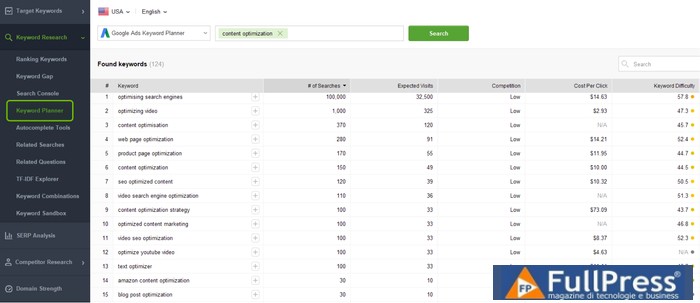
Then, try other methods like Google’s autocomplete tools and related searches to further expand your list.
Cleaning the list of ineligible keywords
Now move to
Keyword Sandbox
where all the collected keywords are waiting for their time. You can’t use them all: there might be thousands of keywords in your list. At this stage, you need to be very picky and leave the following behind :
Irrelevant keywords. For example, my article won’t discuss YouTube optimization, so I’ll remove all keywords containing
- video and youtube . If you spot many keyword phrases containing the same irrelevant word, use filters to discover and eliminate them all faster.Grammatically incorrect keywords. Sometimes query misspellings can become quite popular, but you shouldn’t choose them no matter how big they are. For example, gogole analytics has a search volume of 100k, but will you optimize for it? No. Otherwise, you risk your page quality and your site’s credibility as the
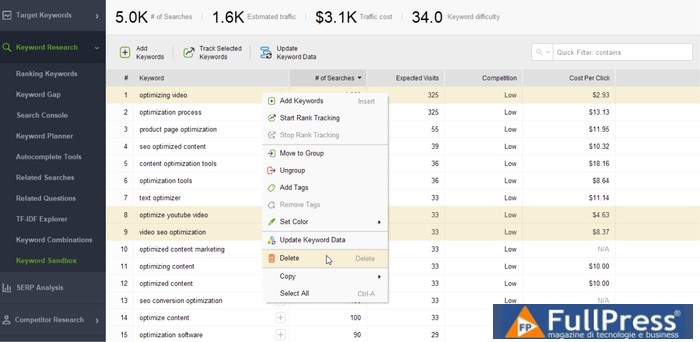
- SERPs for wrong and correct keyword phrases will be identical (Google corrects wrong queries automatically).
I would also count American and British spelling variations here; it’s a good practice to stick to one variant depending on where your target audience comes from. There is such a variation in my case: I prefer to stick to optimization
(AmE) rather than (optimisation (BrE).
Keywords with the wrong search intent
- . The search intent is one of the most important things when it comes to keyword targeting. You should target a search intent with a page.
- Negative keywords. There’s also a quick filter in the top right corner to remove any unwanted keywords or break out the terms you want to exclude from the very start of your keyword research.
For example, you’ll never find the content optimization how-to guide (informational intent) ranking for a commercial keyword phrase like the best content optimization tools.
If there are valid keywords with different Intents of Search, consider creating different keyword groups, thus different pages for them.
Now you need to create a folder in your Keyword Groups section and drag your top keywords into this group.
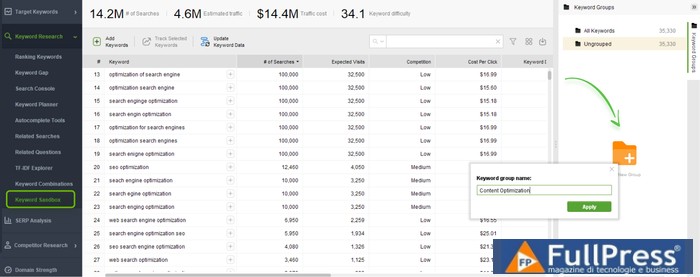
This way, you have your final keyword list. Here’s what mine looks like:
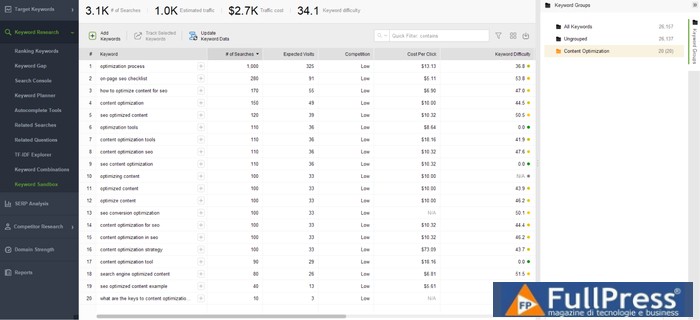
Estimate your ranking and traffic potential
At this point, you can roughly estimate your traffic potential. I recommend looking at your keyword group as a whole: pages never rank for just one particular keyword, they rank for a group of them. So, right in your keyword group, find the top widget with all the basic metrics, including:
- Number of searches (search volume for your keyword group). This way, you’ll get a general idea of how popular your topic is.
- Estimated traffic. This metric shows how much traffic you can get if you rank in the first place for all the terms in your group.
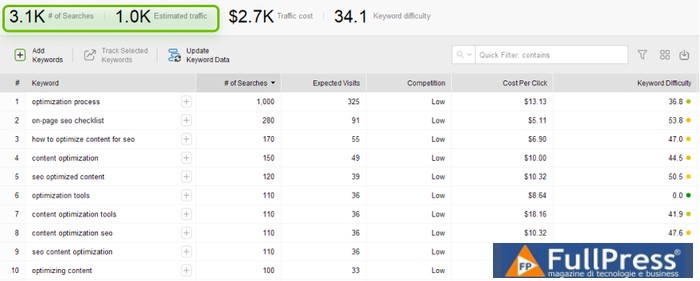
Besides that, you need to estimate how difficult it will be for you to rank for these keywords. For this, you need to check the Keyword Difficulty (KD) score of your keyword group:
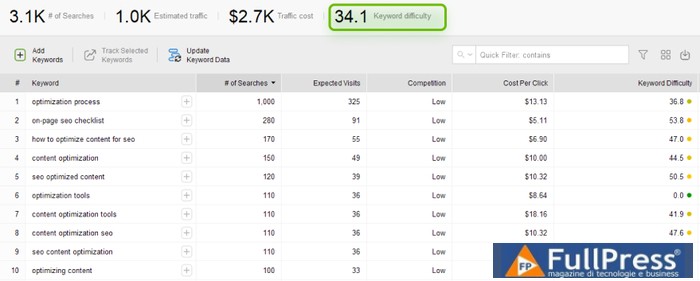
Roughly, you can just check the keyword difficulty score and think of it as “less is more”. But that won’t be effective.
What you need to do is first identify the approximate keyword difficulty your site can actually handle. For this, look at the keywords your site already ranks for, and then check the average keyword difficulty of those keywords.
For example, I checked all the top keywords for which link-assistant.com ranks, summed up the keyword difficulty scores, and then divided the sum by the number of keywords. This way, I calculated the average keyword difficulty to be 38.4. I compared it with the average of my current keyword group (KD=34.1) and concluded that I can totally rank high for these keywords.
2. Conduct competitor research to establish benchmarks
Once your keyword group is ready, you might want to start writing copy for it immediately. But wait. You first need to establish a couple of benchmarks for your future content. For this, you need to analyze what already ranks for this keyword.
Find top SERP competitors
First, you need to identify those competitors that truly stand out in the SERPs. Later on, you’ll use these results to replicate their success. Ideally, we should check the SERPs for every keyword collected, see who ranks on top, and then spot the 5-10 pages encountered most frequently. But what if you’ve collected more than 50 keywords? That would be tedious.
If you value your time and are not an Excel professional, you can cheat a bit by using Content Editor inWebSite Auditor.
When creating your page draft and specifying all target terms, the tool scans the top 100 results for each of your mapped keywords, collects the top 30 pages with the highest level of keyword intersection, and picks the top 10 out of those for current analysis.
So, go to WebSite Auditor > Page Audit > Content Editor, add your keywords, and create your page draft. Then switch to Settings > Manage Competitors.
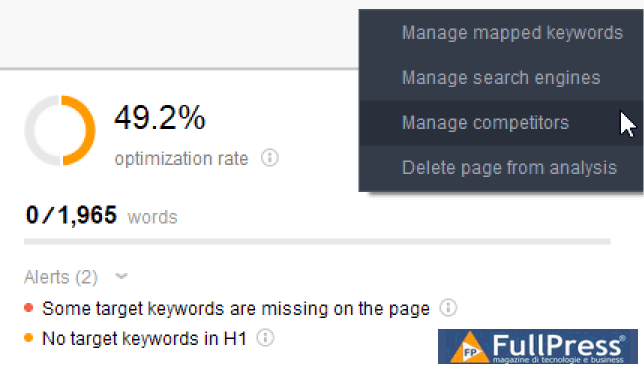
You’ll see a list of your top competitors and all the necessary metrics: page backlink, domain inLink Rank, number of keywords, and even its optimization rate by WebSite Auditor.
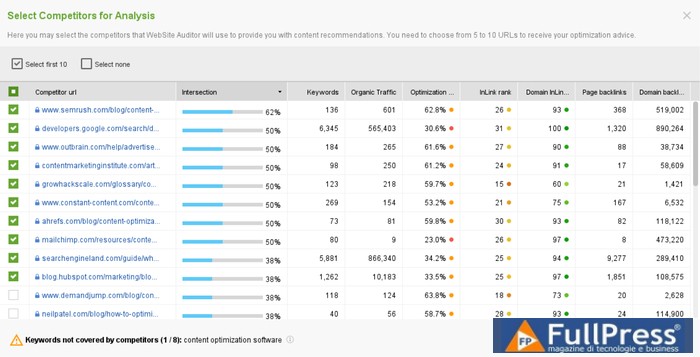
You can choose up to 10 competitors. The tool will analyze their content and provide you with content optimization advice based on this.
Don’t leave the window just yet, you’ll need to look for a couple of things here.
Defining Competitors’ Page Types
Now you need to define the type of content that is necessary to rank high. Scroll through your competitors’ list, click on each URL and check what type these pages are:
- product pages
- online tool pages
- help pages
- blog posts: lists, how-tos, research, reviews, etc.
Define the most frequent page type. Keep this info in mind: you’ll need it when creating content. For example, in my case, most pages are definitive guides and how-to posts. So, I decided to go for a step-by-step guide. Don’t close the page tabs in your browser yet, you’ll need them for further research.
Checking Competitors’ Content for Setting Benchmarks for Yourself
From your list of competitors, uncheck those who have written a page of a different type than the one you have recently chosen. In my case, these are glossary and help pages, as well as Google’s introductory guide.
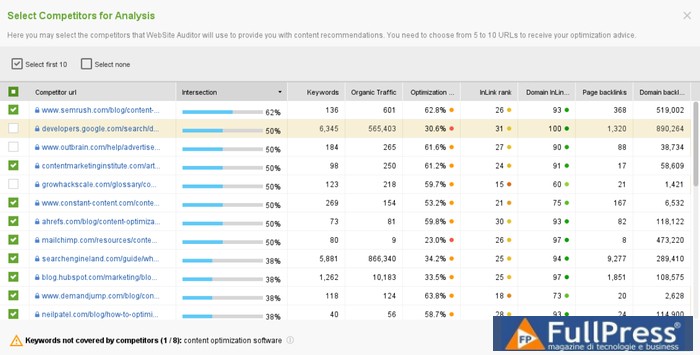
This way, the tool will better calculate the target word count for me (as glossaries and help pages are typically too short) and generate better keyword recommendations.
Next, look at how your competitors structure their copy and what angle they choose to cover the topic. This is the working structure, you should consider creating something similar or at least including some of the structural points in your copy.
For example, this is how I found out that most competitors include conversion optimization information in their copy. So, later in this guide, you will also see some tips on this.
You can also examine the keywords, their variations, and how they are used in the competition’s copies. But, as I said earlier, the tool has already generated its recommendations based on your competitors. So, here you can save a couple of minutes or even hours.
3. Copywriting
Outline the structure of your copy based on your ideas, yours, and those borrowed from your SERP competitors. In the Content Editor, mark your structure hierarchically in H2-H6 HTML tags.
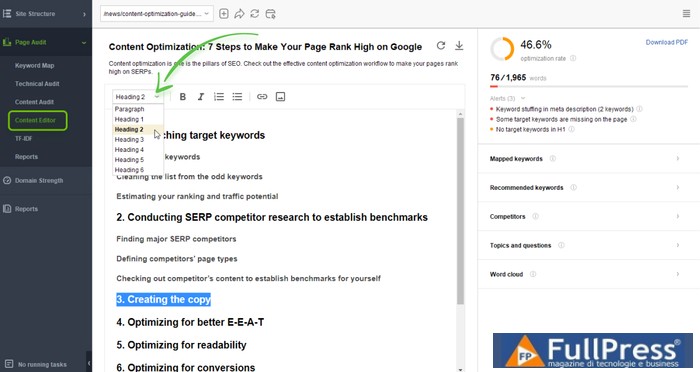
Then start writing your copy, disclosing the topic to the best of your ability. Try to follow the tool’s recommendations on keyword usage:
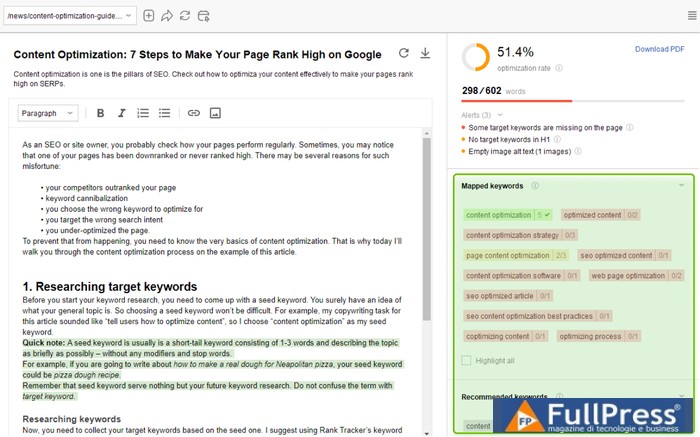
If the tool detects any SEO optimization issues, you will see the corresponding warnings:
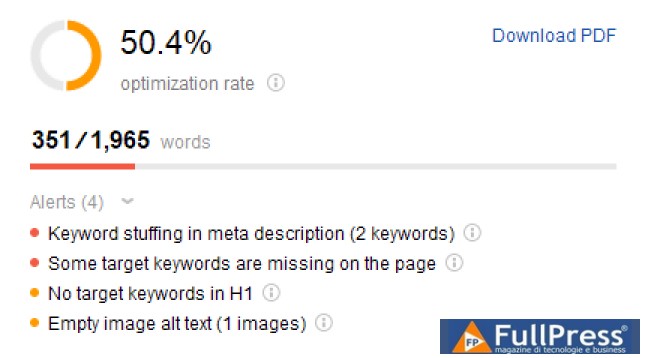
Here, keep in mind all the standard optimization tips and tricks:
- Pay attention to keyword saturation.Place the most important keywords closer to the beginning of the text and avoid keyword stuffing.
- Specify alt texts.If you embed any images (and you absolutely should), always add alt text. It’s great if you can add a keyword there, but follow common sense: your alt text should describe the image as it is.
- Add metadata.Annotate the meta title and description using the target keyword. The tool will allow you to preview the “snippet ” of your page and even compare it with those of your competitors.
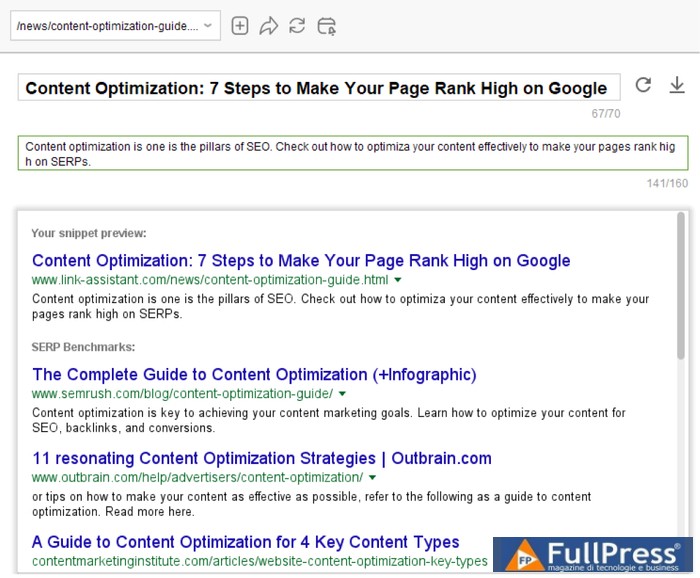
You can find more tips in our blog post listSEO guide to a perfectly optimized landing page
. Even now, that’s not all. Remember that well-optimized copy is not just great text with a few keywords in it. You also need to take care of things like page “authority“, readability, and conversions. You might even want to go the extra mile by optimizing your copy for future link building and social sharing.
4. Optimization for better EEAT
Let’s not forget that content quality is the primary requirement for Google to rank your pages high. We can get some hints on what Google considers “quality” from their “Search Quality Rater Guidelines“. The term EEAT (Experience, Expertise, Authoritativeness, and Trust)plays the main role here
.
Here are a couple of tips for sending the right EEAT signals to Google:
- Write highly detailed copy. If you go in-depth while covering a topic, you will naturally send relevance signals to search engines through keywords, thus ranking for more keywords.
- Link to trustworthy external resources. There is plenty of evidence that even outbound links positively impact rankings..
- Link to other relevant pages on your site to build authority.The most valuable property of internal links is that they pass link juice that tells Google which pages on your website are more important.
Note: using keywords in theanchor text might be a good practice. However, when you do internal linking, make sure you use different anchor texts. Otherwise, you might seem a bit spammy. Hope you’ve noticed that I followed these tips in my copy too.
5. Optimize for Readability
First of all, you create content for people: they are your target audience, not search engines. So, you need to make sure people understand your copy and its message.
Here are a couple of best tips to follow to increase the readability of your copy:
- Pay attention to grammar and syntax. Avoid grammar errors and typos, keeping your sentences simple and easy to read. Tools like Grammarly and Hemingway will be of great help here. This will also improve your EEAT.
- Stick to a uniform writing style throughout the copy. You can choose to follow the Associated Press Stylebook (AP) or the Chicago Manual of Style (CMOS), or any other writing style.
- Make sure to write short paragraphs as users tend to scan the very first words of every paragraph. This way, they will better grasp the essence of your text.
- Add Images and Videos as they improve readability. They break up the text, give it some air, and let the text “breathe”.
Note: you also need to optimize your images and videos for SEO: add alt texts and captions for better accessibility. More on this in our Image SEO Optimization Guide.
- Use Bullet Points and Numbered Lists to make information more digestible. This is exactly what I did in this article, multiple times.
- Bold and Italicize Your Text when appropriate. It draws attention and helps search engines better understand your text (though it doesn’t impact ranking much).
After making the key point bold, scan the text again and ensure users can get the key message solely from your bold and italicized text. - Add a Hyperlinked Table of Contents (ToC). It’s good for both UX and SEO. It improves navigation and can increase CTR as the index sometimes influences the search snippet.
- Add a table of contents or TL;DR blocks to your text. This way, you show your visitors that you value their time. You will also find a summary at the end of this article.
6. Conversion Optimization
If the search intent of your copy is commercial or transactional, it is worth optimizing it 100% for conversions. But this does not mean that if you write an informational post, you should not use CRO techniques.
In fact, everything you have done so far (structuring and formatting the text) has already helped you optimize for conversions. However, there are a couple of other things you can do:
- Add a CTA to your text. It can be links, banners or buttons.
- Provide social proof. Add positive reviews from your users and customers.
- Integrate the comments section or live chat window. In case your visitors have questions, you can use the opportunity to push them deeper into the funnel.
For example, I want this article to attract a couple of new users to SEO PowerSuite. Therefore, I make conversion easier with the help of a discreet call to action (despite my post being purely informational). I use small CTA banners:
- before a text block

- under the screenshots of our software
You can do something similar on your site, or you can come up with something more intriguing.
7. Optimization for Natural Link Building and Social Shares
And finally, let’s think about how to promote our content to the masses. If you ask me what things most encourage natural link building and social shares, I’d say:
- Add social sharing buttons. This way, you make it easier for visitors to share your content. If you use a CMS, it is easy to do this via special plugins.
- Choose an eye-catching cover for social media . For social media, an image is much more important than a caption, so make an effort to create an attractive image.
- Add expert quotes. Getting a quote from a popular industry person will not only make your content more authoritative but also encourage network sharing.
- Use infographics. Things like tables, charts, and diagrams help your visitors understand complex concepts through visual aids and are totally “social media fodder.”
- Provide downloadable files. Templates, cheat sheets, checklists – anything that can be provided to users in PDF format sells like hotcakes on social media. People can download and use these files whenever they need them.
By the way, here is a PDF content optimization checklist , which you can:
- Save to your device for access whenever you need it faster.
- Print a physical copy to keep somewhere in your workspace.
- Share with friends and colleagues so they can optimize content effectively too.
Summary
Let’s recap what you’ve learned:
- Kick off the content optimization process by identifying your seed keyword.
- Do keyword research and build a list of relevant keywords for your copy.
- Find your top SERP competitors and set benchmarks for your content: page type, word count, keyword usage, and structural points.
- Write your copy and optimize it for SEO.
- Think about EEAT signals for Google.
- Also, think about your visitors by making your text readable.
- Make it easier for your site visitors to convert from your page.
- Encourage content sharing.
Remember, this article was optimized with the help of Rank Tracker e WebSite Auditor. They are perfectly cut out to guide you through your whole SEO career. You can download and use them right now.
for free. Taken from Link Assistant
Pubblicato in Digital Marketing, SEO
Be the first to comment