
Add us to your preferred sources.

Facebook ads are one of the most popular advertising options for people new to online marketing. However, despite 90% of marketers claiming they use Facebook Ads, there are still many who try and fail to generate positive conversion rate results. If you’re a person who often asks yourself “why aren’t my Facebook ads working?”, then this post is for you!
In this post, we’ll dive into some of the common Facebook ad mistakes that people make when running Facebook ad campaigns. We’ll look at why most ad campaigns tend to fail and what can be done to fix a campaign that isn’t bringing in any results. By the end, you’ll have a crystal-clear idea of what needs to be done if you want to fix your ineffective Facebook ads.
1. Poor Targeting
One of the main reasons marketers fail with Facebook ads is that they fail to target their ads properly. Facebook allows you to create a custom audience, but many people don’t realize this. More than 2 billion people use Facebook daily – it’s pretty difficult to say your ads aren’t working because your target market doesn’t frequent the site.
The main benefit of Facebook ads is that they give you the ability to target your ads so that they’re shown to a very specific audience who will be curious about your offer and will click through, ideally, to a specific landing page. This is why there are more than 3 million businesses advertising on Facebook.
However, the flip side is that if your ads are poorly targeted, your ads will be shown on social media to people who may not find them relevant, leading to a horrible site conversion. So, knowing how to target your ads to a custom audience is important. After all, you could fix everything else. But if your targeting is off base, nothing else will work. What good is a great-looking ad if the ad is being shown to people who don’t need it?
Think about it: If you’re not interested in buying dog food, but a poorly targeted ad tries to push some on you, even a great-looking dog food ad won’t change your mind on the matter. Sure, you might click on the ad, if only out of curiosity. Conversion tracking will show a positive conversion pixel, but your bounce rate will tell the real story. If you’re a marketer, this is one of the worst things that can happen. “Clicking out of curiosity” will only lead to uninterested people who will never buy from you, but by clicking on your ads, therefore, costing you money. So, knowing all this, what can be done to target your ads effectively?
If you want to target your ads correctly, you first need to take a look at who your customer is and build a custom audience profile. Knowing the traits and characteristics of your ideal customer will give you the ability to set up your ads so that they’re shown to the right people. Consider taking the time to build a buyer persona. A buyer persona will map out an “avatar” based on the traits, characteristics, and demographics of your ideal customer designed for site conversion. Ideally, you’ll want to jot down the following information when writing your buyer persona:
- Age and gender
- Location
- Who/what influences them
- Language
- Interests and hobbies
In some cases, you might not know your customer as well as you’d like. Fortunately, in situations like this, Facebook offers a tool you can use to research your ideal customer. This tool is called Audience Insights.
When you visit Audience Insights, go to Audience from the left-hand navigation menu. Then select Potential Audience at the top of the screen. You’ll notice that the estimated size of your audience is quite large. This is because we still need to filter to meet our audience’s needs. To do this, click Filter on the top right. You’ll then see a popup with a variety of demographic filter options. The more data you can provide, the better.
As you make your selections, you can click Create Audience to see your numbers become more reasonable.
2. Lack of Audience Data
One of the main reasons your Facebook custom audience isn’t working is that you’re using basic demographics. Buyer personas are great. But when it comes to Facebook Ads, buyer personas aren’t enough. They aren’t detailed enough to find scalable growth and profit. With that said, I’ve seen many marketers take data from buyer personas and use it to create a new custom audience.
Saved audiences on Facebook are great, but not when you stick to demographic targeting. Simple metrics like age and gender won’t get you qualified buyers. Trying to reach 1.2 million to 1.4 million people with a single ad set and a niche product won’t get you very far. Why? Because if 1.4 million people were interested in your product, you wouldn’t need Facebook to advertise.
You simply can’t appeal to everyone. And that’s okay! If anything, it’s a good thing. Larger audience sizes on Facebook often perform poorly because the targeting isn’t specific enough. You could be wasting a lot of money on clicks and impressions without ever seeing a dime in return. Part of this is Facebook’s fault. It asks you to create an audience when you create a new ad.
And the main options are demographics. So, if you see that your Facebook custom audience isn’t working, it’s likely because you’re only relying on demographics. Creating a custom audience that isn’t specific enough is one of the biggest mistakes you can make when running Facebook ads. Fortunately, there are literally a dozen or so different ways to create a custom audience that doesn’t focus on demographics. These include:
- Website data using a Facebook pixel
- User activity on your app
- A list of your customers
- Offline data that you collect in person
- People who watch your Facebook videos
- People who have engaged with your Instagram account
- People who have clicked on your Facebook or Instagram shopping experiences
I’ll touch on some of these in more detail below, and it doesn’t hurt to try them all! However, there’s one Facebook ad feature that I can’t stress the benefit of enough, and that’s lookalike audiences. Lookalike audiences are pretty straightforward. You create a custom audience from your mailing list, and Facebook replicates that audience with new people.
Facebook does this by taking your existing customer list, matching those emails to accounts, and then finding other users with similar data who would be interested in your products. And it works. It’s great for quickly building custom audiences without doing the work of interests, exclusions, or detailed remarketing optimization. Lookalike audiences give you the ability to choose what percentage of the population you want to target. The range is from 1% to 10%, with 10% producing the largest audience size, and 1% producing the most specific, smallest audience size. 10% will earn you 10% of the total population in the countries you choose, with those selected resembling your other audiences and customers the most.
Given that Facebook’s user base amounts to 2.96 billion people, you might think that a 10% lookalike audience sounds like a good idea. A broader custom audience will generate better results, right? Actually, the exact opposite is true.
AdEspresso proved this by spending $1500 on a lookalike audience experiment in 2017. They wanted to test the three most common lookalike audience tiers: 1%, 5%, and 10%. Then, they conducted a study over a 14-day period, using the same ad for each audience.
These were lead-based ads that aimed to capture emails via lead magnets. They offered deals to customers who had shown interest in their blog posts or services, but weren’t ready to convert yet. So, when someone clicked on the ad, they had to enter information to receive free e-books.
Next, they created a new campaign and used Facebook’s A/B testing feature to test their audiences against each other. With Facebook, you can split-test multiple audiences, which is what AdEspresso used to evaluate these three audience tiers simultaneously. Their timeline was 14 days with a budget of $1,500, which gave them $35 per day to spend.
They set up their three targeting percentages. The results showed some significant data on why many marketers aren’t successful with this type of custom audience. Here is some of the most important insight and conclusive data they found:
The 10% lookalike audience was found to have a 70% higher cost per lead compared to the 1% audience. This could be a game-changer for improving the effectiveness of Facebook ads.
So, what’s the reason behind the results? Larger custom audiences aren’t specific enough to yield great results. The 10% audience sounds great in theory because it gives you the ability to lump in tons of users, but it simply doesn’t yield specific enough results. Targeting a vast audience usually works, but on Facebook, more users mean less targeting precision.
Creating your own 1% lookalike audience is easy. Simply go to the Audience section under your Meta Business Suite and select Lookalike Audience. Next, you’ll need to choose the source for your lookalike audience.
The source could be anything from a custom audience to an email list to a specific page or profile. Then select the location you want to target. After selecting both the source and location, be sure to select 1% as the audience size.
If you want to run an A/B test like AdEspresso, repeat the steps above two more times: once with a 5% audience size and once with a 10% audience size. Once you create your ads in Meta Business Suite, you’ll be able to split-test using the three new lookalike audiences you’ve created.
Remember, Facebook custom audience is all about specificity. Don’t make the cardinal sin of trying to cast too wide a net. The more specific your audience, the better your conversion rate.
3. Not Choosing the Right Bidding Option and Offering the Right Amount
Another reason Facebook ads tend to not work is that marketers aren’t bidding properly. If you feel your ads aren’t getting enough impressions or clicks, the bidding section is where you might need to make some adjustments. Now, the good news is that the Budget section of Ad Manager has been simplified.
If you feel your ad isn’t getting any impressions on your landing page, despite bidding within these numbers, you might want to increase it slightly.
This isn’t to say that there aren’t ways to optimize your budget and spend, though.
If you scroll up to the Conversion section, you’ll notice some additional options for spending. They are:
- Cost per result goal: If you’re aiming for a specific cost per result goal, this is where you can set that amount. We recommend, however, using cost per result data from previous campaigns with the same attribution and optimization event settings. Otherwise, you might limit your ad’s effectiveness.
- Attribution setting: The attribution setting ensures that conversions optimized by Facebook are the same as you wish to measure. For example, with a 1-day click and view setting, Facebook would learn from conversions that happened within a day and show ads to people who are likely to convert within a day.
- When you are charged: For some ad types, you can choose to be charged per impression (when you see the ad) or per action (e.g., someone clicks through to your website). The most common type is Impression, and there are many ad types that only allow this setting.
- Delivery type: Here you can choose between standard and accelerated pacing. Standard is the option that works best for most ad types as it ensures you don’t spend your ad spend too quickly each day. Accelerated is useful for time-sensitive campaigns like those advertising a one-day sale.
Of course, all of your selections above depend on what you can afford. So, it helps to calculate the lifetime value of a customer if you want to remain profitable. If, after bidding higher, you find that your ads continue to generate low impressions, you might need to look at your custom audience targeting. It might be too specific. Alternatively, it might be that your ad itself isn’t click-worthy, a concept we’ll discuss later.
Note: If you have a well-targeted campaign that’s generating lots of clicks and results, consider switching to charging based on impressions. This can potentially lower the cost of a campaign.
4. Failing to Create Click-Worthy Ads
If you’ve fixed the issues we’ve already discussed, but it seems your ads still need work, you might try changing the look of your ads. Most of the time, you can tell your ad creative is performing poorly if your ad has a low CTR. The average CTR on Facebook ranges from 0.75% to 1.5% depending on industry, funnel stage, and click type. However, if you’re running a news feed ad, you’ll want that to be higher than 5%, and 1% for a right-hand sidebar ad.
Facebook is a very visual platform, and you’ll want to make sure your ads are good at capturing your custom audience’s attention. If you don’t have a lot of experience creating Facebook ads, you might want to study what other advertisers are doing. Keeping a swipe file is a good way to keep a record of ads that have caught your eye.
What is a swipe file?
A swipe file is simply a collection of screenshots of anything that has caught your attention or compelled you to take action. You can use a tool, such as Evernote, to store these files securely on a cloud server. Keep in mind that you can also study people who aren’t in your niche. This is because if you find something that works in another niche, chances are that it’s transferable to your niche. A different ad style might also resonate with the people you’re trying to reach, making your ad even more appealing.
Sometimes, you can make your ad more click-worthy by placing a call to action within the image. Using text in an image can impact your ad’s reach. If you use too much text, you can decrease the chances of your ad being successful, as shown below. As with many types of online marketing, writing persuasive copy is essential. This is because you need to convince people to click on your ad. You can write better copy by understanding what your customers fear and desire. It also helps to know what objections they might have, in relation to an offer like yours.
When you know that type of information, you can write copy that speaks directly to them, while also reassuring them that your offer is something worth checking out. It’s essential to always include a call to action in your ad copy, so people know what to do next.
5. Launching a Cold Audience
Most people use a custom audience when running simple retargeting ads on Facebook. This is because you can quickly set up a new campaign and a retargeting audience based on website visits within Meta Business Manager. But, retargeting custom audiences often fail for one very specific reason: the default 30-day cookie window isn’t effective.
By default, Facebook uses the past 30 days’ custom audience. This is the number of days that you want people to stay in your audience after meeting the criteria or traffic goal. In plain English, this means that when someone visits your website, they will only remain in that audience for 30 days after that visit.
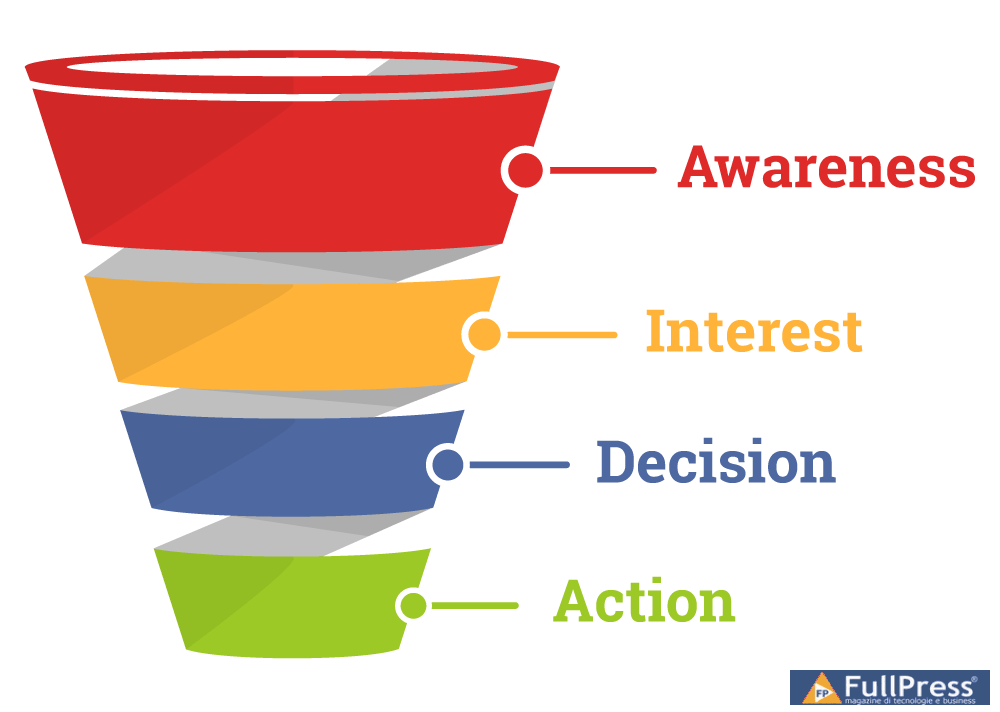
Most customers don’t make a purchase the first time they see your product. They will first need to go through the various stages of the buying process. In the awareness stage, customers are still trying to figure out what their problem is and how to solve it. They are just beginning their research. In the interest stage, they begin to explore various products or services to solve their problem. They haven’t committed to a purchase yet and are considering your competitors.
Next, they decide which business they think will help them the most. They haven’t made a purchase yet at this stage. It’s only when they finally take action that you see a return on investment and a full sale completion. And that conversion cycle can last much longer than 30 days in many cases. In fact, research shows that nearly three-quarters of B2B sales to new customers take at least four months to close.
If you’re lucky enough to convert leads into sales in less than 30 days, you’re probably fine with the default settings in Meta Business Manager. If you’re like most of us who can’t convert a brand-unknown user into a customer in under a month, you should use a much longer window for your audience. BigCommerce first noticed this mistake while running ads for clients and found that conversion windows were heavily delayed.
Lots of sales for their client weren’t coming in until 12-30+ days out. So a 30-day window wasn’t the most efficient option. If your retargeting Facebook ad isn’t working, use a longer window like 30–90 days instead.
Experiment with this number by creating two custom audiences with different cookie windows to see which performs better over the course of two months. Another great way to fix a faulty custom audience is to simply add another parameter: frequency.
In theory, the more times someone has visited your site, the higher the chance that they will buy from you. First-time visitors are not likely to convert. In fact, it can take 2-4 visits for a user to convert. So, if you aren’t ordering by frequency, you continue to risk targeting too broad of an audience.
It can sometimes take more than five ads to convert a customer. And it’s the same way with your website. If you can’t expect new visitors to purchase, you shouldn’t waste ad spend on those who haven’t visited your site more than once. This is why you need to enable frequency targeting when running Facebook ads. Enable frequency tracking by clicking “Further refine by” when creating a custom audience. Then, select frequency from the menu.
You can now layer an additional buffer on your custom audience to give yourself an even better chance to convert users with less money and fewer ads.
We know demographics don’t cut it. Even adding interests and exclusions might not be enough. When all else fails, you need to start your campaign with visitors who are highly likely to purchase from you. And thankfully, with custom audience targeting on Facebook, you can target users who take incredibly specific actions from your website.
6. Lack of Experimentation
Experimentation is a huge part of fixing a Facebook ad campaign that isn’t producing your desired website conversion results. Many of the highest-paid traffic experts in the world often fail to produce a winning ad on their first try. Many of them have to go through a process of testing in order to find an ad that yields them optimal results. When it comes to your campaigns, consider creating multiple variations of the same ad.
You should let the ad variations run for a couple of days and then check the data.
Chances are, you’ll find that one ad yields better website conversion than another.
Images aren’t the only elements of an ad that you can split-test. You can also experiment with targeting and ad copy.
There’s also the chance to see what happens when you use different ad formats, such as Instagram ads or right-hand sidebar ads.
When you’re split-testing, it’s essential to try and make some drastic changes to your existing ads.
This is because you’re more likely to see a dramatic increase in results from this than from small, incremental changes.
7. Lack of Landing Page and Ad Alignment
If you’ve fixed the issues above, and your ads still aren’t converting, there’s another element that’s often overlooked: landing page alignment.
What do I mean? The landing page that you choose as the URL for your ad can be a big factor in whether or not a user converts. When a buyer clicks on an ad, they do so with the intention of satisfying their curiosity about that particular ad. This usually relates to the call to action (CTA), such as “click to learn more” or “click here to see our latest colors.”
If the user clicks through and lands on a page that in no way satisfies the user’s intent, they will likely click off the site. This does two things:
- It breaks consumer trust in your brand;
- It costs you money for a wasted impression or click.
So, if you’re confident that your ad mechanisms are set up for success, then it’s time to look into things like your landing page URL and alignment with your ad message.
When considering how well your landing page aligns with your ad, ask yourself these questions:
- Does the landing page deliver on what the ad message promised?
- Is there a logical connection between the landing page’s messaging and my ad’s call to action?
- Would I be frustrated as a consumer if I were directed to this landing page from this ad?
Fortunately, aligning your landing page with your ad is one of the simplest fixes on this list. So, once all the above issues have been addressed, be sure to double-check your landing page and ad alignment for the best results.
Conclusion
Facebook ads can be a great way to increase traffic numbers for your website and boost essential conversions. However, if you haven’t seen an adequate return on investment yet, it’s possible that you’re making some common mistakes that are leading your custom audience to your landing page.
In this article, we covered some easy fixes you can take action on if you want to repair a Facebook ad campaign that isn’t working. We looked at how to make adjustments to targeting and ad copy. We also touched on the importance of testing multiple variations of the same ad in order to find a winner.
Source Neil Patel
Pubblicato in Business, Social Media
Be the first to comment