
Good keywords are hard to find. For every keyword that works, there are hundreds that don’t. And if you make the wrong choice, you’re stuck creating content that will never show up in search. That’s why this guide was made.

Add us to your preferred sources.

Use it to navigate the perilous path of keyword research and focus your efforts on those keywords that truly matter.
This guide outlines a detailed process for generating keyword ideas and selecting those with the highest ranking potential. If you follow the steps, you will end up with a list of profitable terms associated with your pages and an understanding of the traffic thesekeywordswill bring. But let’s learn the basics first.
What is Keyword Research?
Keyword research is the process of researching high-volume queriesthat people type into search engines. It aims to capture what people need and helps tailor website content to their expectations. If chosen and implemented correctly, the right keywords have the capacity to deliver a measurable increase in website traffic. So, without overstating it, we can say that keyword research is the cornerstone of search engine optimization.
How to do Keyword Research?
Keyword research should be aligned with your SEO strategy and goals. Before you start your keyword research, review your website’s profile to assess its strengths and weaknesses.
Depending on your website’s authority, content quality, and your industry’s competitive landscape, it will take a different effort to optimize your pages. Keep your target audience in mind: you should focus on the value your website brings to users and how to satisfy their search intent.
When it comes down to it, keyword research is fundamentally a three-part process. First, you generate as many keyword ideas as possible. Second, you filter the researched terms to remove those that are too outlandish, too irrelevant, or too difficult to implement. Finally, you prioritize the remaining keywords to see which of them should be implemented first. To make this process a bit easier to follow, we’ve broken down each part into smaller steps, but the main message remains the same: generate, filter, prioritize.
Seed keywords are the simplest terms that broadly define your business. These are words you should already rank for. They are used to kickstart the process of developing more keyword ideas. As soon as you come up with a few seed keywords, you will be able to use SEO software to generate thousands more.
The simplest advice on how to find seed keywords is to jot down a few phrases that best describe your products and services. Break down your business into general topics and pick a couple of valuable keywords for each topic. As a result, you will get a set of more relevant keywords that will be the starting point for broader SEO keyword research.
A probably better starting point would be to examine your website’s navigation and look for keyword terms in the catalog:
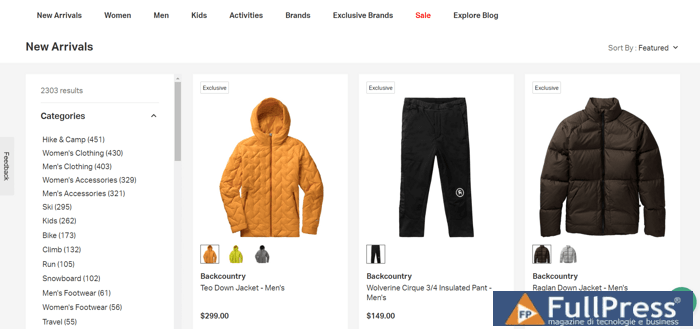
The example above is a catalog from an outdoor gear retailer, and almost every item in this catalog is a great seed keyword idea. Just match a few words together, and you have men’s apparel, women’s footwear, snowboard jackets — dozens upon dozens of terms. And you can get many more by exploring subcategories, product filters, and company descriptions.
How do I do keyword research for free, you might ask. There is a wide range of SEO tools on the market, both free and paid, simple and sophisticated. But, for this article, we’ll stick to a handful of the most popular and reliable keyword research tools. Four of these tools are provided by the search engines themselves, each with a slightly different focus, and the fifth is actually a collection of tools that combines not one, but nine different keyword research methods.
Google Ads Keyword Planner
Google Keyword Planner is probably the first place to dokeyword research. The way Keyword Planner works is that you add some of your seed keywords and it generates a huge list of similar words and phrases. You can evaluate your data using metrics like search volume, competition, and bid ranges, and you can clean up your data by removing adult results, brands, or negative keywords. In the end, you’ll likely be left with a narrowed-down list of keywords that are very similar to your initial keywords, but it’s still a good starting point.
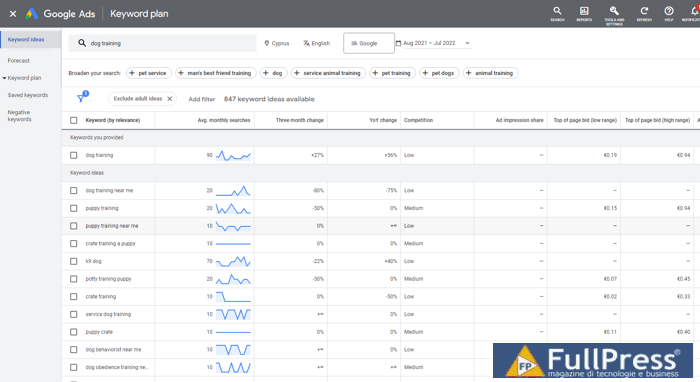
One thing to keep in mind is that Google Ads is geared toward advertising forecasts, so only relative judgments are possible. For example, if keyword A has 3500 queries per month and keyword B has 1500 queries per month, we cannot be sure about the accuracy of these numbers, but we can assume that the first keyword will likely bring more traffic than the second one. Google Ads shows the total number of Google forecasts for that keyword on the web, whereas Search Console only shows the queries that have returned your pages in Google’s search results.
While Google Ads is a powerful keyword research tool built by Google with search stats straight from the source, it provides very simple statistics: you would definitely need to supplement it with other SEO tools if you want your research to be comprehensive.
Google Search Console
Unlike Keyword Planner, Google Search Console is used to search for those keywords for which you are already ranking. The point is to discover keywords that are on the verge of reaching top positions in the SERPs and give them a small boost. If you think about it, those keywords are actually a better ranking opportunity than new ones—you are halfway there already.
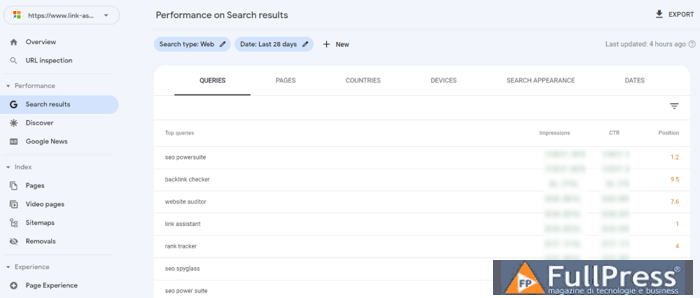
Go to Performance > Search results and select Impressions. Search Console shows the average position of each of the ranking keywords and the number of impressions and clicks you get from them. You can see what your audience is searching for by pages, countries, and devices. The tool allows you to filter up to 1000 keywords, but it makes sense to focus your efforts more on those phrases that can potentially rank higher — check the top 20 positions.
Google Trends
It takes some research into the competitive environment to estimate what to consider a sufficient amount of traffic. For example, in a broad area like tourism services, keywords can have 10k–100k searches per month, while in some specific industry niches like skydiving equipment, search volumes are far lower.
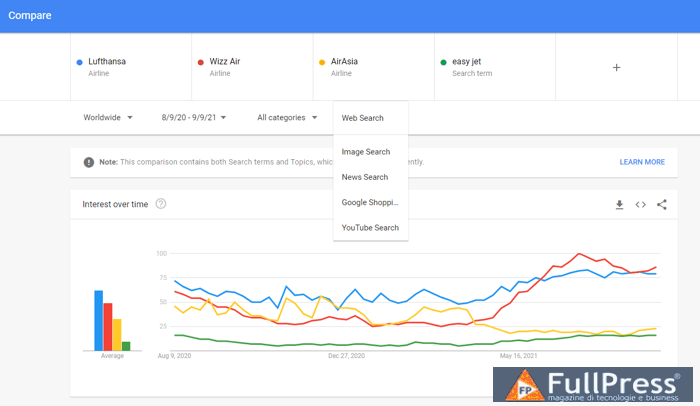
Google Trends provides an overview of how an topic performs over a selected time range and therefore lets you see which queries are seasonal. You can check what’s trending now, interest scores by location and for different web search channels; you can inspect and compare terms and analyze which related topics and queries formed a particular trend.
Bing Webmaster
In addition to Google, other search engines are not to be overlooked. According to Global Statcount, Bing and Yahoo occupy 10% of the search engine market in the US. So, pay attention to Bing Webmaster, which has its own strong features for analyzing search volumes.
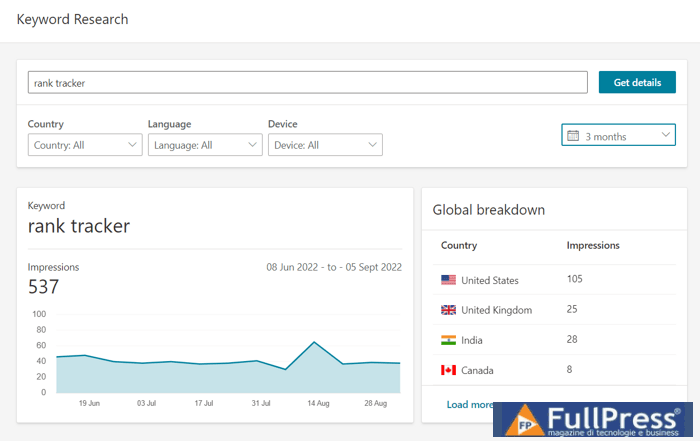
Bing provides an overview of search performance similar to Google’s. For example, you can check the performance of keywords on SERPs over a period of time or as the average position on the respective page is changing. Just like Google Ads, it shows search volume trends over a period of time and suggests ideas by showing related search keywords similar to your seed keywords. Keep in mind that Keyword Planner displays paid search, whereas Bing displays organic search.
Rank Tracker
Rank Tracker is truly a beastly tool for keywords. Nine different SEO keyword research methods, over twenty keyword research tools, numerous metrics, sorting and filter options, and rank tracking—all in one place. And it has both Google Search Console and Keyword Planner integrations.
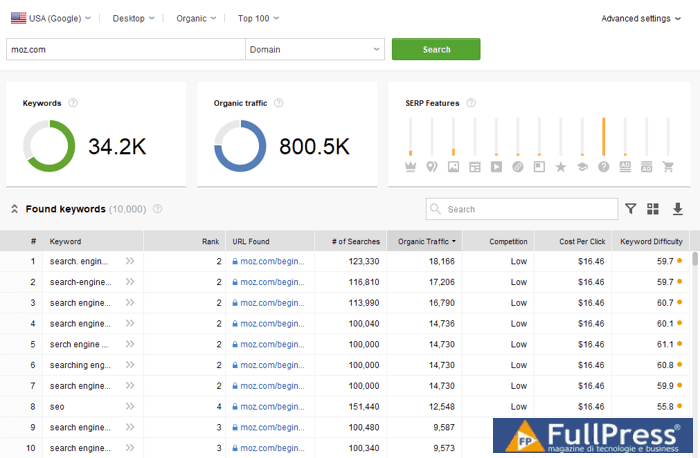
Depending on the keyword research method, you can use initial keywords or competitor websites to get new keyword ideas. Each researched entry is accompanied by a set of SEO metrics: search volume, competition, difficulty, and CPC information, among others. The workspace is customizable, you are free to add and remove criteria for your convenience.
This step requires Rank Tracker
Keyword Gap
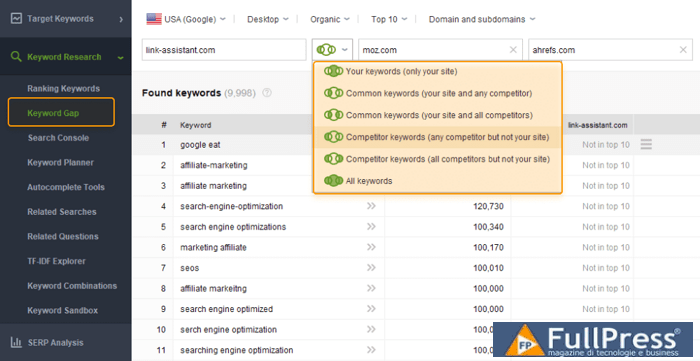
Keyword Gap is a fantastic method to check in which areas your competitors are outperforming your website. Just add the competitor’s domain (or multiple domains), choose the metric by which you want to compare, and you will see which of your competitors’ keywords are performing best.
Competitor Research
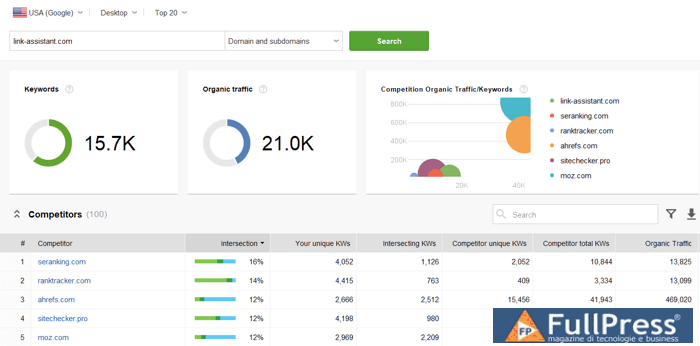
If your website is fairly new, there is the Competitor Research module where you can search for relevant topics and keywords by domain and topic. Find out how much you intersect with other competitors and discover their high-volume keywords: you can surely incorporate them into your content as well.
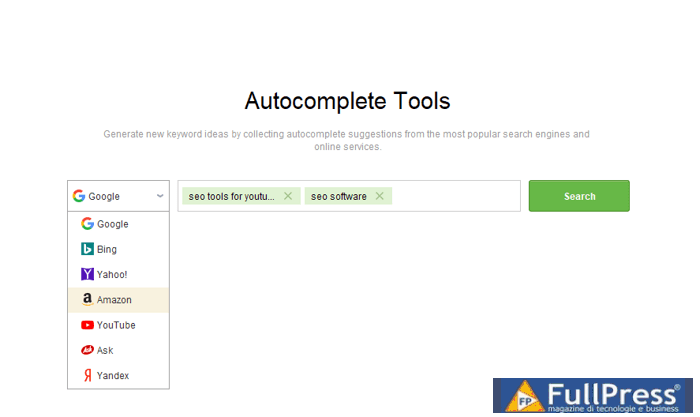
Autocomplete Query
Try the autocomplete tool based on search predictions from Google, Amazon, YouTube, etc. Use seed keywords to generate keyword suggestions based on how people tend to phrase their queries. Together with the related research method, try to get into the mindset of others.
Related Questions
This keyword research method extracts related questions from Google’s featured snippet. The thing with common questions is that they are strongly associated with voice search. Keywords generated this way are usually very long-tail keywords, which have a colloquial style; they can be great for creating Q&A pages and guides and for optimizing your pages for voice search.
TF-IDF
TF-IDF is a statistical method that evaluates the importance of a given word for a document. The importance increases proportionally to the number of times the word is cited. The tool analyzes 10 of your top competitors and collects the keywords they have in common. This feature will help you discover the appropriate context and optimize your page with synonyms and related terms.
Word Combinations
The Word Combinations function is basically a keyword randomizer. Enter a couple of words, and it will mix and match them until every possible combination is exhausted. The point is that you might not form queries exactly as other users do, so this way, you might discover a couple of keyword variations that have better chances of ranking.
This step requires Rank Tracker
Once your research is done, you will probably have thousands of potential keywords in your sandbox: this is where all researched keywords are automatically saved. Not all of them are a good match for your website, so our next goal is to refine the raw keyword list and reduce the amount of manual work in later stages.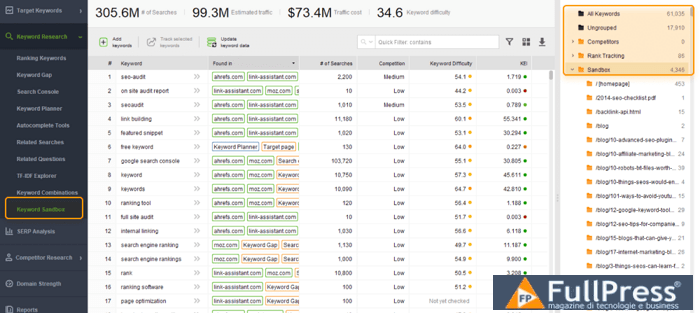
Define Filtering Parameters
There are many different ways to narrow down your keyword list to a manageable size, and the choice largely depends on your preferences. Below are some of the most common parameters used for filtering keyword lists.
The shorter the keyword, the broader the term and the more traffic it will bring, however, the fewer conversions you will get. Likewise, the longer your keyword, the less traffic it will bring, and the higher the conversion rate. According to our latest long-tail keyword study, over 80% of all search queries consist of 1-4 words. A typical SEO tip for a starter website would be: use long-tail keywords (3+) to level up, and then, as you grow into a stronger website, pursue both short-tail and long-tail keywords.
This is the keyword’s demand on search engines. Keywords with very low search volume don’t bring any significant traffic, and you can safely remove them from your search. Keywords with high search volumes are likely to bring more traffic, but the competition is likely to be more intense.
This metric shows how strong the top-ranking pages are for a given keyword, and therefore, how difficult it will be for you to beat them. Rank Tracker calculates the difficulty score for each page ranking in the top 10 for the keyword. Then, the average difficulty score for the 10 competitors is calculated, which represents the overall keyword difficulty. The higher the value, the more effort you will need to put in to rank for the keyword.
Another way to get rid of unwanted keywords is to apply filters for irrelevant words. You can exclude irrelevant locations, irrelevant brands, or any other words that you think are indicative of low-quality keywords. By the way, the tool has an option to apply the negative filter before starting keyword research: it works when you already know the terms you want to exclude.
Apply filters
Now that you know some of the most common filtering parameters, practice applying them in Rank Tracker:
1. In the Rank Tracker’s Keyword Research module, click the funnel icon in the upper-right corner of the workspace. A modal window will appear with filter options.
2. Click Add filter and select N. of searches > more than > e.g. 100 (searches per month per keyword phrase).
3. Click Add filter and select Keyword Difficulty > less than > 40 (feel free to increase or decrease for stronger or weaker websites).
4. Click Add filter and select Length > more than 3 (two or less are considered useless, but feel free to select longer keywords). I would add this filter condition with the OR operator, as long-tail keywords usually have lower search volumes.
5. Add any number of filters by excluding those words that you deem irrelevant.
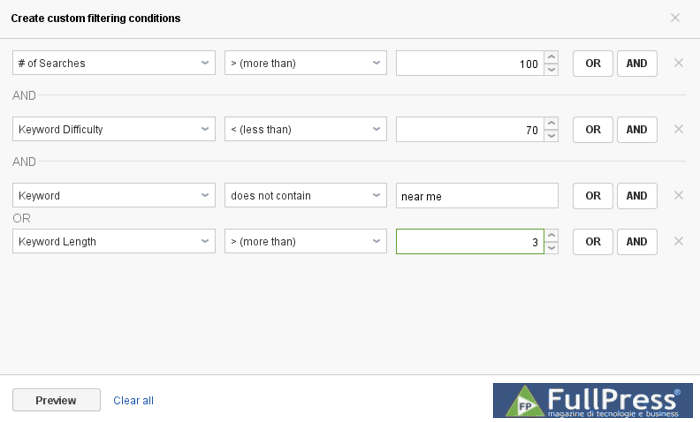
6. Then click OK. Your workspace will be updated and will show only those long-tail keyword phrases of more than three words, with a search volume of more than 100 searches, difficulty below 40, and devoid of irrelevant words.
7. Press Ctrl + A to select all keywords in the filtered view. Right-click on the selection and press Add tags to selected records and label them with a meaningful tag (like “High Search Volume”).
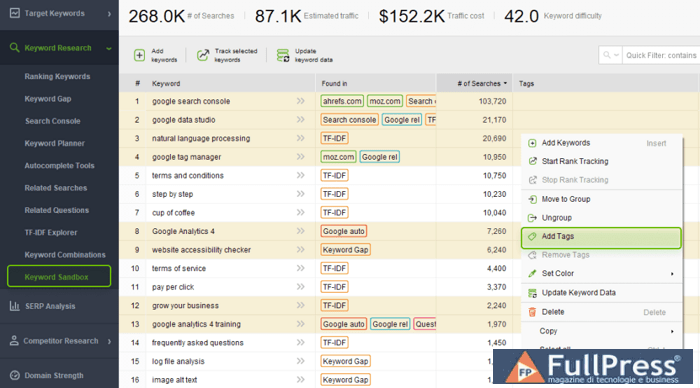
By now we have managed to find important keywords that could bring us traffic, and it took only a few minutes. You can apply other filters to quickly code or remove keywords that match specific criteria. Once ready, select the keywords that will become the semantic core of your website and click the Move to Target Keywords module button in the options pane at the top.
This step requires Rank Tracker
Segmentation is a good way to turn chaos into order. Let’s segment and prioritize your final selection of keywords so they are a bit easier to manage and implement in your SEO strategy. The universal criteria for SEO segmentation are semantics, searcher intent, search volume, and competition.
Semantic segmentation
Rank Tracker has automatically created semantic groups or topic buckets for your target terms. You can rename your keyword groups manually, create new ones, merge, group, and assign to rank tracking to be displayed in the target keywords page. Just recently, SEO PowerSuite updated Rank Tracker’s keyword grouping tool to provide more flexibility in managing keyword groups. One new feature is a drag-and-drop functionality that allows you to quickly move keywords between groups.
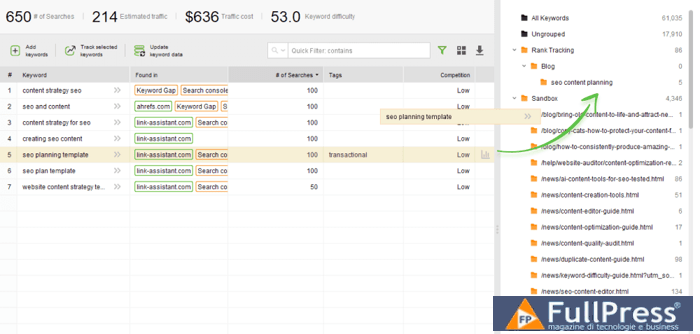
In the example above, Rank Tracker puts all keywords related to “seo content” into one topic bucket. At the top, we can see the aggregate number of searches, the competition level, and the projected visits for the entire keyword group. For example, if we add a page about SEO content planning and it ranks in the first position, we might get an additional 214 visits per month. And if we already have a dedicated page for SEO content planning, we can assign the entire group to this page. This initial semantic segmentation is a real time-saver.
Segmentation by intent
The idea of an efficient website is that it is visible on the web, appeals to the desired audience, and satisfies the general user intent. Three main types of search intents can be distinguished:
- Informational
- Investigative
- Transactional
For example, a searcher wants to find a “windbreaker jacket,” the “best waterproof windbreaker jacket,” and a “windbreaker jacket for kids to buy online.” All these phrases can be traced back to the common concept of ‘windbreaker jacket,’ but they are clearly characterized by different intents. Such keywords are unlikely to fit the same page well.
Moreover, many guides distinguish between navigation queries (when a user needs to navigate to a specific page) and branded queries (when the search phrase includes a brand name) when it comes to user intent.
There is a way to distinguish between informative, investigative, and transactional queries in terms of vocabulary. People build queries using somewhat fixed patterns for each type. All we have to do is distinguish these patterns in your data.
The following table summarizes the typical lexical indicators of each query type. Bear in mind that it is best to determine such indicators for your niche on a case-by-case basis because slang and specific expressions exist in every industry.
| Informational | Investigative | Transactional |
|---|---|---|
| best ways for I need where to what are the ways to how how how how to do how to do how to do how to how to … with [product name] how to build how to get rid of how to make guide tutorial what to do |
compare compare with comparison best best alternative alternatives for babies for couples for girls for boys for kids for men for beginners for seniors for students for women review reviews |
buy buy online for sale where can I buy where to buy where to buy for coupon coupon code discount for cheap in stock on sale overstock used promo promo code review special with credit card with paypal cheap clearance more cheapest |
Now we will refine our list of keywords in the Keyword Map module of Rank Tracker.
1. Click the funnel icon in the top right corner. The advanced filter dialog will appear.
2. Add a filter condition that contains or matches a specified limit.
3. Add the following filters using AND/OR functions for all your transactional “indicators” (use the table above as a reference):
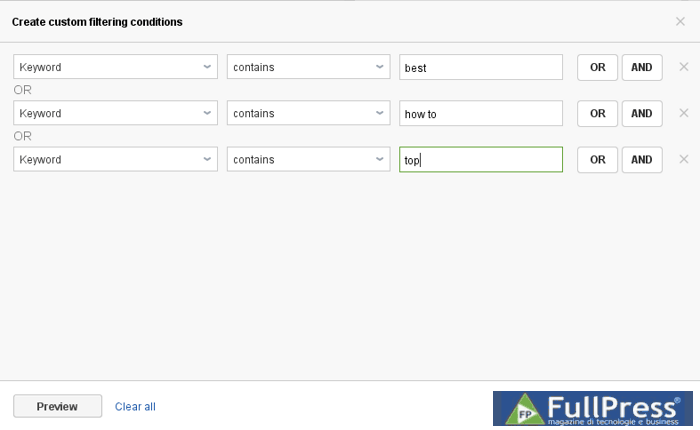
4. Rank Tracker will return the list of phrases containing any of the words you have provided. Press Ctrl + A to select all keywords and right-click on the selection.
5. Mark these terms with a meaningful title like “Transactional”. To make things even simpler and faster, you can color-code the keyword intent type by choosing Set color tag from the context menu.
Return to step 1 to filter and mark investigative and informational keywords similarly.
The process is universal literally for any niche, but the criteria based on which you might want to segment your keywords are numerous. Other common keyword phrase clusters can include:
- Branded and non-branded keywords
- ‘Low-hanging fruit’ (or ‘quick wins’)
- Top converters
- Keywords broken down by geographic location
Here you can read our in-depth guide to topic clustering and what mistakes to avoid in mapping SEO keywords to landing pages.
This step requires Rank Tracker
Keyword mapping is a process where you assign researched phrases to specific pages on your site. What is a keyword map for? This is not just a planning process.
Had you heard of keyword cannibalization? In a nutshell, if multiple pages on your website are relevant to the same search query, these pages will compete with each other in the SERPs for ranking. As a result, the chances of these pages reaching the top search pages decrease.
On the one hand, a keyword map helps you avoid cannibalization and ensures that keywords are used consistently and all your pages rank for the right keywords. On the other hand, mapping also makes it easier to detect page-specific issues.
To build a keyword map, a keyword’s difficulty is extremely important as it largely determines the probability of each of your pages ranking well in the SERPs. The trick is to use the indicator in conjunction with the page’s SEO authority so that you can target more “difficult” terms with more authoritative pages.
Scores below 33 are more likely to yield better search results. Those ranging from 34 to 66 are a bit tricky but still deserve to be on the list. Those over 66 are definitely not our brothers and go to the trash without regret.
In the Keyword Map module, choose a keyword and go to the difficulty tab. Click the Update button and you will see your website page ranking for the given keyword in a specific search engine and below the list of your top 10 competitors .
Let’s now look at an example of how to assign keywords to landing pages in the project and create a keyword map for a website.
1. In the Keyword Map submodule, select the keywords or topic clusters that you will target with a single landing page.
2. Right-click on the selection. In the context menu, press Map to landing page.
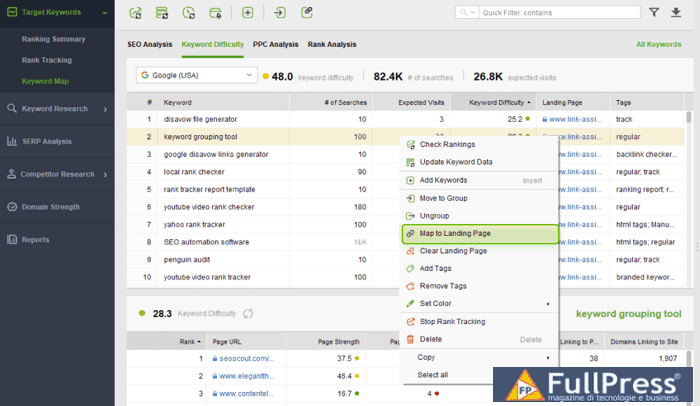
3. In the modal window that appears, enter the URL of the landing page. When in doubt, choose the page with the most traffic and authority.
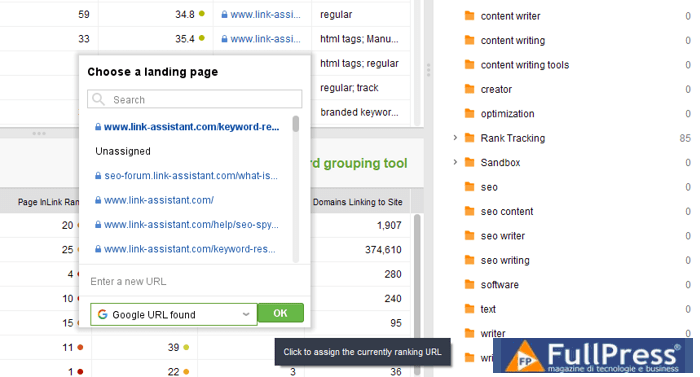
4. Repeat the previous 3 steps for each of your landing pages.
5. When finished, click on Landing Pages at the top of the topic clusters list. Here you will find your keyword map: the list of landing pages and the terms you will target for each page.
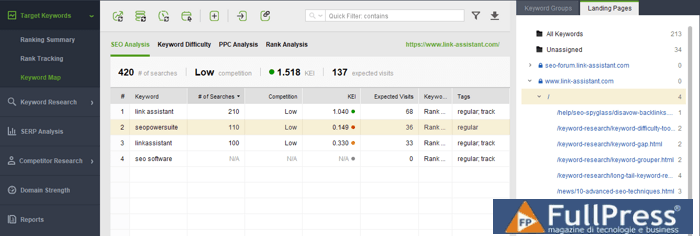
The keywords you have marked as transactional will fit pages where your potential customers can take valuable actions (buy, subscribe, and so on). And, surely, assign keywords only to web pages that are semantically relevant.
Keyword research for ranking and growth
Keyword research is a fascinating journey and should become not only part of search engine optimization, but also a source of inspiration for your business. With an efficient keyword list, you will surely rank and target the right audience, and this means you are on the right track for a trustworthy and reputable website.
Source Link Assistant
Pubblicato in Digital Marketing, SEO
Be the first to comment