
In this article, we will explore the concept of content pruning, its implications for SEO, and the best practices for implementing it successfully.

Add us to your preferred sources.

The success of a website largely depends on the quality and relevance of its content. In an ever-evolving digital landscape, maintaining a dynamic and up-to-date online presence is essential. However, simply adding new content isn’t always the best approach. Often, the key to improving SEO performance lies in the strategic “pruning” of outdated or underperforming content.
In this article, we’ll explore the concept of content pruning, its implications for SEO, and best practices for implementing it successfully. We’ll discover how this technique can help you get more traffic with less content while improving the overall quality of your website.
What is Content Pruning?
Content pruning is the process of removing outdated or underperforming content from your website. This SEO strategy aims to improve the overall quality of your site by eliminating pages that don’t significantly contribute to your goals.
The term “pruning” comes from gardening, where dead or excess parts of plants are trimmed to encourage healthy growth. Similarly, web content pruning removes elements that hinder site performance, freeing up space and resources to focus on higher-value content.
Why is Content Pruning Important for SEO?
In an era where “content” is king, many websites tend to publish more and more material in the hope of increasing traffic and search engine rankings. However, sheer content quantity doesn’t necessarily equate to SEO success. In fact, strong evidence suggests that strategically removing outdated or underperforming content can actually lead to much better results.
Here are three main reasons why content pruning is crucial for SEO.
- Content Decay: Topics and information become outdated over time, making some pages less relevant to users and search engines. Removing this “stale content” helps maintain the freshness and relevance of your site.
- Thin Content: The proliferation of short, low-value content can be perceived by search engines as “thin content,” harming overall SEO performance. Pruning eliminates these undesirable elements.
- Keyword Cannibalization: When a site has multiple pages covering the same topic, it creates a “cannibalization” phenomenon that can confuse search engines and dilute the value of each page. Pruning helps resolve this issue.
In summary, content pruning allows you to maintain a leaner, more relevant, and better-ranked site on search engines. It’s an essential “cleaning” process to ensure your content is high-quality and delivers value to users.
The first step in content pruning is to compile a comprehensive inventory of your website’s content. This audit process will help you identify pages that could benefit from revision or removal.
Here’s the data you should collect for each URL on your site:
- Page Title
- H1 Headings
- Ranking Keywords
- Organic Traffic
- Search Engine Cache Date
- Last Modified Date
- Social Media Popularity
This data will help you identify potential issues such as:
- Outdated or Unfresh Content
- Pages with Low Organic Traffic
- Duplicate or Similar Content
- Pages with High Bounce Rate
- Broken Links
- “Thin” Content with Low Word Count
Using SEO tools like WebSite Auditor, you can easily collect and organize this information into a spreadsheet. This will allow you to quickly visualize issues and prioritize pruning actions. First, run WebSite Auditor and add your site’s URL to start a scan. Once the scan is complete, the tool will display all your collected pages in the Site Structure > Pages.
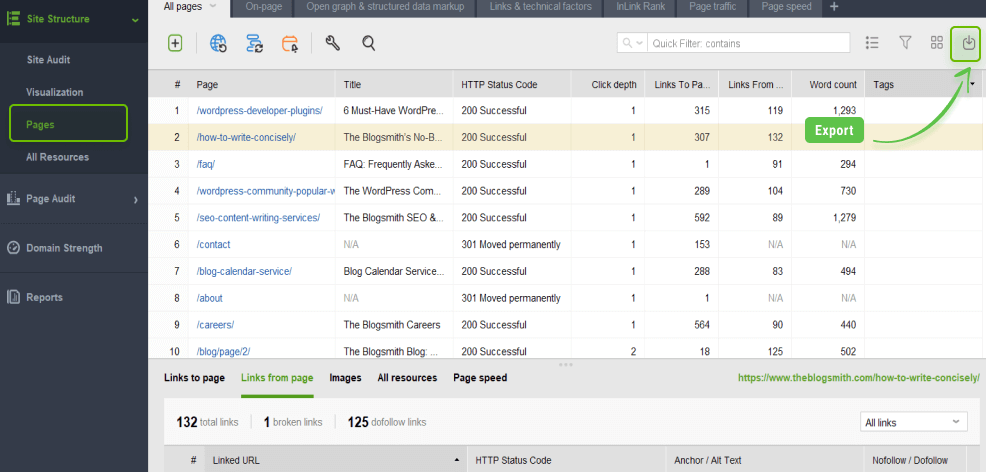
By clicking the dropdown arrow in the top-right corner of your workspace in WebSite Auditor, you can export all URLs in CSV format. This will make it easier to manage all URLs, consolidate their data, and prioritize pruning tasks.
This step requires WebSite Auditor. You can download it now for free.
WebSite Auditor will perform an SEO Audit and quickly report every issue on your site that can affect search engine indexing, rankings, and user experience. The audit tool looks for crawlability issues like broken links and images, duplicate content, crawl errors, poor mobile usability, site speed, redirect chains, internal linking issues, heavy pages and scripts, W3C validation errors, thin content, and more. The best part? Scroll through the list of SEO errors you find during the site audit: for each error, you’ll get a list of affected pages, along with simple instructions on how to fix it.
WebSite Auditor only extracts visible records from the workspace. Therefore, you can filter out certain statistics that may not be necessary for content verification. Or, conversely, you can go through the site audit sections and take note of content-related issues. If there are any, you can extract them into the same sheet (or a separate sheet and later merge them into one working table).
Click the Visible Columns Edit icon in the top-right corner and add the data you might need. For example, these can be columns with Title, H1 Headers, Ranking Keywords, Organic Traffic, Cached Date in Google (or Bing, Yahoo, or any targeted local search engine), Last Modified or Social Media Popularity.

The next step in content pruning is to check your website’s content and identify pages that are not adding any SEO value. For example, these can be:
Underperforming URLs
You will find this in the Google Search Console > Performance. Here, you need to filter and identify (make sure to select a longer period than the default month term):
- URLs that have many impressions and zero CTR.
- Queries with an average position between 10 and 50.
- Pages with declining impressions and clicks (compare within a selected timeframe, e.g., the last six months against the previous period).
- Pages with the lowest impressions and clicks (which can likely be simply deleted).
These queries are your low-hanging fruit that can bring positive impact faster and are the main target of a broader content audit.
Pages with no traffic
Another place to check during the pruning process is Google Analytics. Go to Behavior > Site Content > Landing Pages and identify those with the least number of sessions over time. Since they don’t get any views, they are likely a waste.
URLs with high bounce rates
User experience is also a factor to consider. If a page has a high bounce rate it means it’s not bringing any value to visitors. It likely has some issues on the page or could even be low-quality content. Find this metric next to your sessions in the same section of Google Analytics. You can also consider user engagement in GA4 for the same purpose.
Duplicate content
Duplicate content is an issue for SEO as it wastes crawling budget. The main source for revealing your duplication issues is the Indexing > Pages report in Search Console. Look for URLs flagged as:
- Crawled – currently not indexed
- Alternate page with proper canonical tag
- Duplicate, submitted URL not selected as canonical
- Duplicate, Google chose a different canonical than user
Also, let WebSite Auditor crawl your site and find all duplicate titles and meta descriptions.
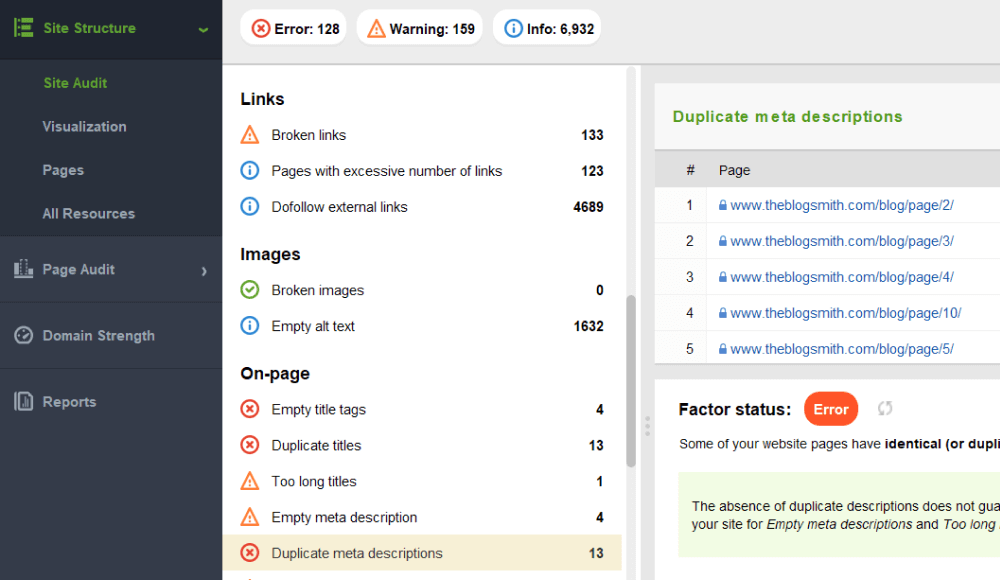
Thin content
While word count isn’t a ranking factor, lots of thin content on a site can be a sign of poor quality to Google. Also, the desired word count metric is flexible for different types of pages. For instance, a product page normally has fewer words than a blog post. Meanwhile, long-form content tends to rank for more keywords.
So, in the Pages section of your Website Auditor, find the Word Count column and filter URLs in descending order. This way, you’ll easily find posts lacking words.
Outdated titles
Years in titles increase click-through rates, and you’ve surely added some to your URLs. Here’s a content cleanup tip: use WebSite Auditor’s custom search to find all URLs that contain past years in their titles. You can probably refresh them to be current for the current year when possible. However, some of them might just be too outdated to keep.
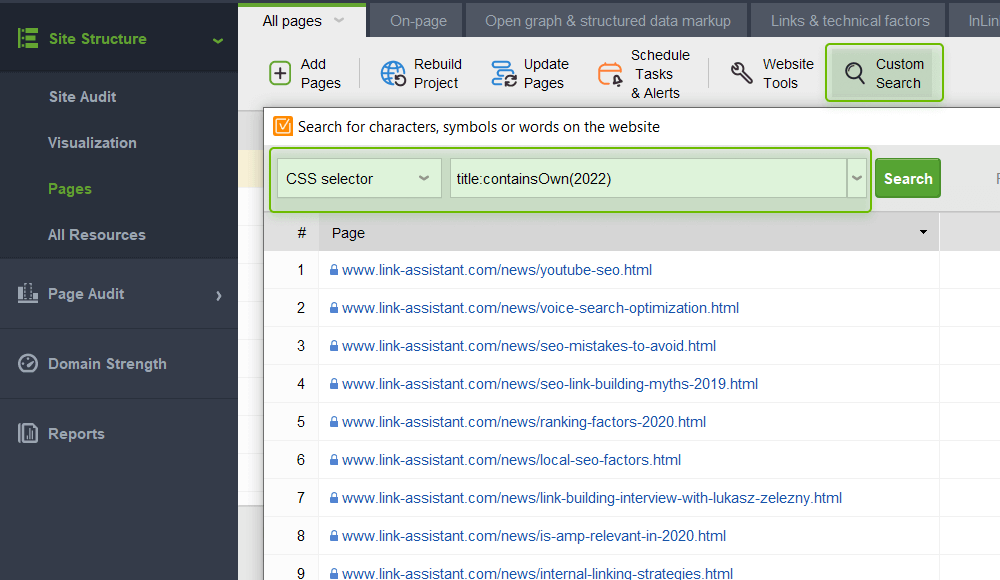
Orphaned pages
Another issue is having too many unlinked pages, meaning they are hard for searchers and bots to find. You can spot them in the visualization tool of your Website Auditor. Keep in mind that you need to enable the option to find orphaned pages in Preferences > Crawler Settings before running the content audit.
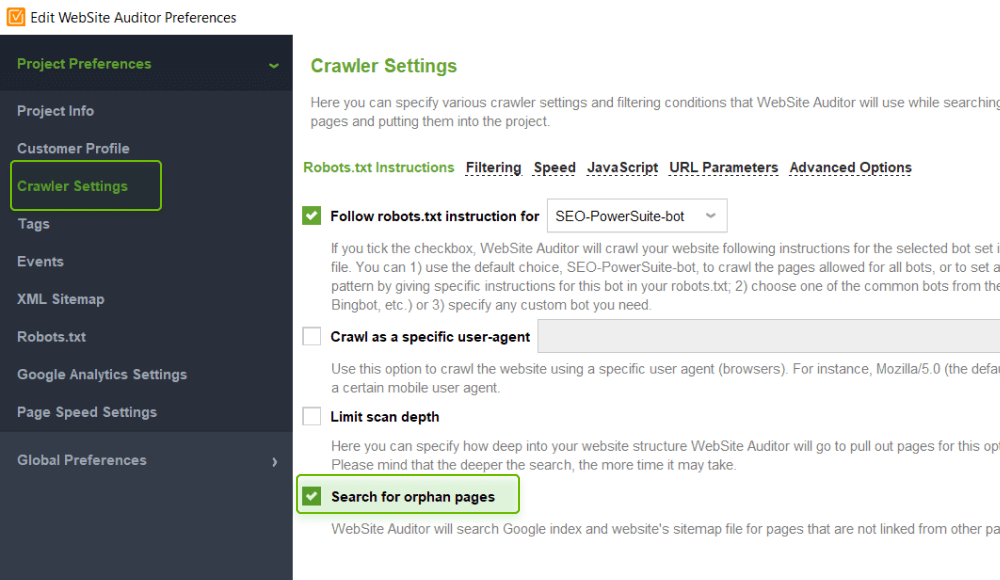
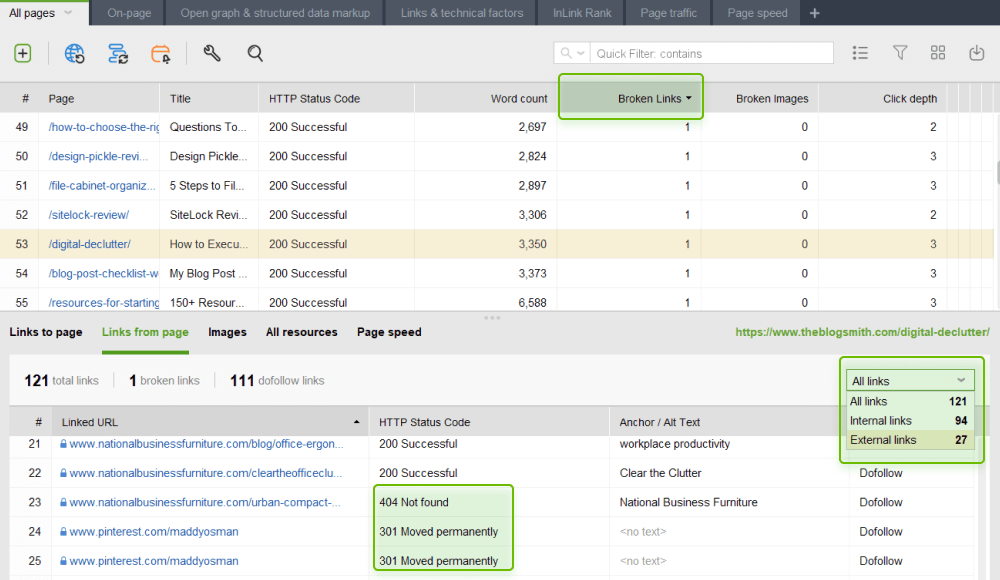
Broken links
Make sure you check your content for broken links from time to time because you might be surprised how often URLs go bad.
Add broken links to the visible columns and click the column header to filter them, starting with the ones with the largest number. The dropdown menu helps filter internal and external links. By analyzing each page, you can find all broken outbound links that you can easily fix.
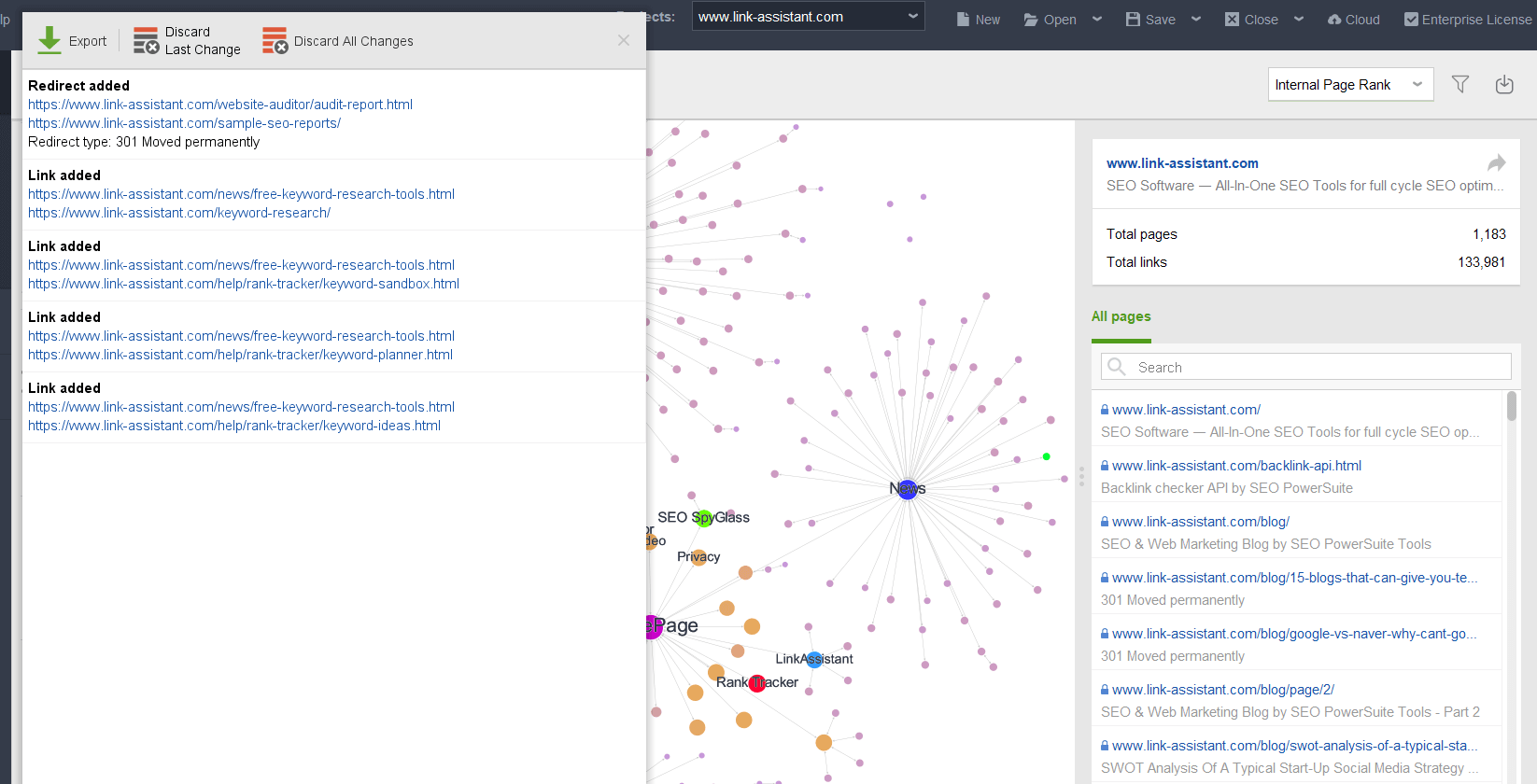
After identifying the content to be removed or improved, it is important to assess the impact that the changes will have on your website’s performance. This will help you prioritize and maximize the benefits of pruning.
Some factors to consider are:
- Expected traffic. Use tools like Rank Tracker to estimate the potential increase in traffic after removing or improving a page.
- Implementation difficulty. Assess the time and effort required to make changes, such as rewriting content or configuring redirects.
- Urgency. Prioritize content that can yield faster results, such as pages with low traffic or broken links.
- Ranking potential. Analyze the strength of competing pages to determine if you need to improve content or the backlink profile to achieve a better ranking.
By annotating this information in your spreadsheet, you can create a strategic and targeted content pruning plan.
There are several content pruning techniques you can use to improve your website’s SEO performance. Let’s look at a few:
Identify and update evergreen content
Evergreen content is content that remains relevant over time and can be regularly updated. Identifying and keeping these pages up-to-date can be a great way to ensure your site always offers useful and current information.
For example, you might have a page summarizing the main Google algorithm changes. Although it requires ongoing effort, keeping this type of content fresh can bring great long-term benefits.
Manage publication dates
Content dating is an important aspect to consider in pruning. Search engines often prioritize more recent content, but it’s important to strike the right balance between freshness and relevance.
Ensure you clearly display the initial publication date and the last modification date of each article. This will help users understand the timeliness of the content. However, avoid artificially manipulating publication dates, as this could be considered a violation of Google’s guidelines.
Update author attribution
Author expertise is an important factor for content quality, especially in specific industries. If a new author has made significant contributions to an article, consider updating the attribution to reflect their involvement.
This helps demonstrate your website’s authority and can positively impact search engine rankings. Additionally, you can enrich your content with quotes or interviews from industry experts to further strengthen your credibility.
Consolidate related content
Often, over time, a series of related articles on the same topic accumulates. In these cases, it may be beneficial to consolidate the content into a single, more comprehensive, and valuable article.
This approach allows you to eliminate redundant content, improve information organization, and offer users a more cohesive and in-depth experience. Tools like the Content Editor from WebSite Auditor can help you identify keywords, related topics, and optimal length to create a high-quality article.
Manage duplicate and thin content
Duplicate content and “thin” content (i.e., content with little value for the user) can be detrimental to your site’s SEO performance. Use audit tools to identify these pages and decide whether to delete them, redirect traffic to more relevant destinations, or consolidate them into a single, higher-quality piece of content.
Remember that simply deleting a page is not always the best solution. In some cases, it may be preferable to set up a 301 redirect to maintain backlink value and ensure a smooth user experience.
Manage broken links
Broken links, both internal and external, can negatively impact user experience and your website’s credibility. Take the time to identify and fix these broken links to provide seamless navigation.
You can use audit tools to quickly identify pages with broken links and plan corrective actions. Also, consider creating a visual sitemap to get an overview of your structure and more easily identify linking issues.
Once you’ve identified the content to remove or improve, it’s time to take action. However, it’s important to balance available resources with expected benefits. Content pruning can require varying amounts of time and effort, depending on the complexity of the changes to be made. To measure the impact of your pruning strategy, use tools likeGoogle Analytics e Rank Tracker. Add annotations to track changes in traffic, user behavior, and search engine rankings after implementing changes.
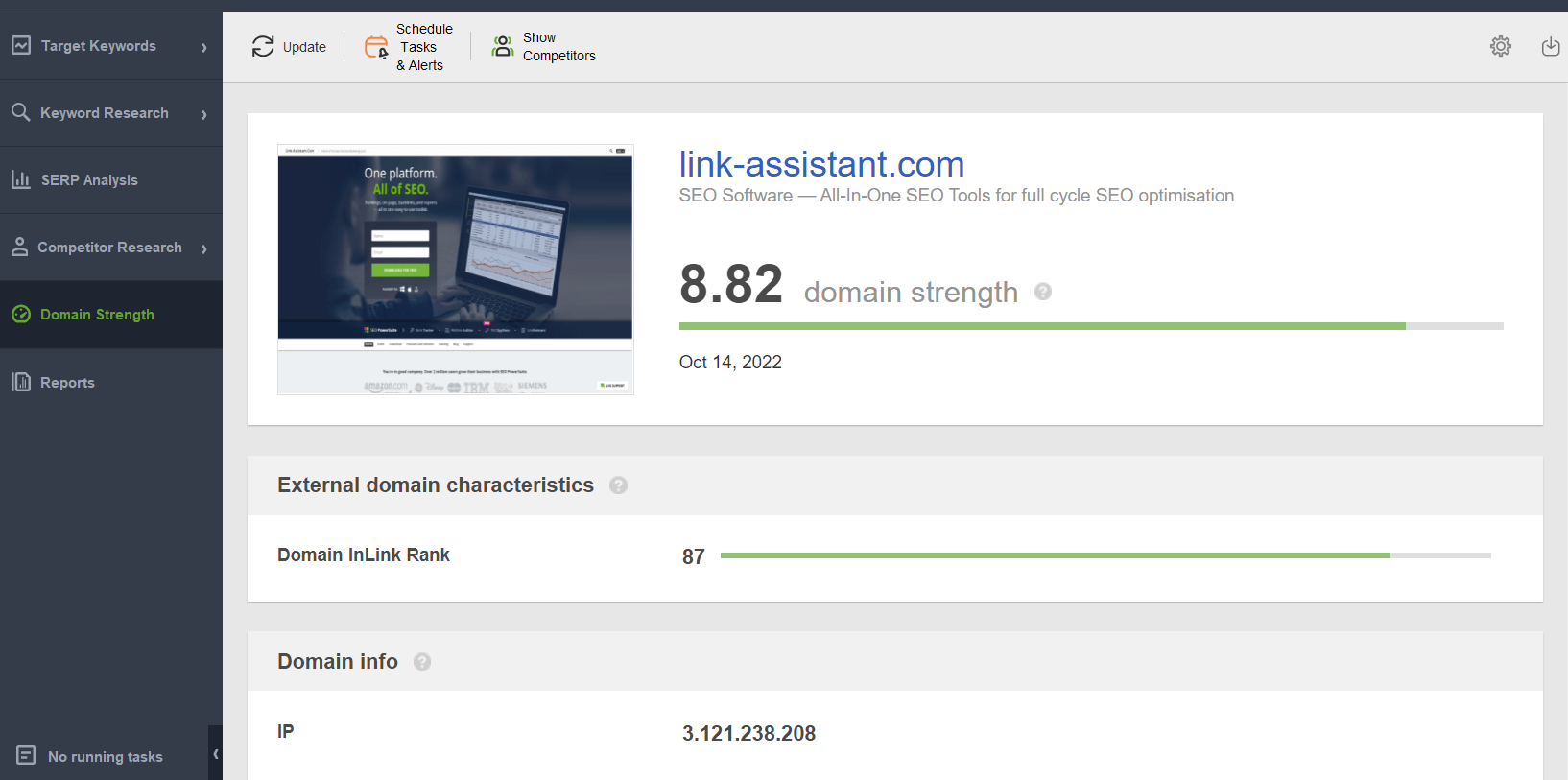
Additionally, carefully monitor your “Domain Strength“, which is your domain’s authority. This metric, available in the SEO PowerSuite tools, will help you assess whether content pruning has had a positive impact on your website’s reputation and credibility.
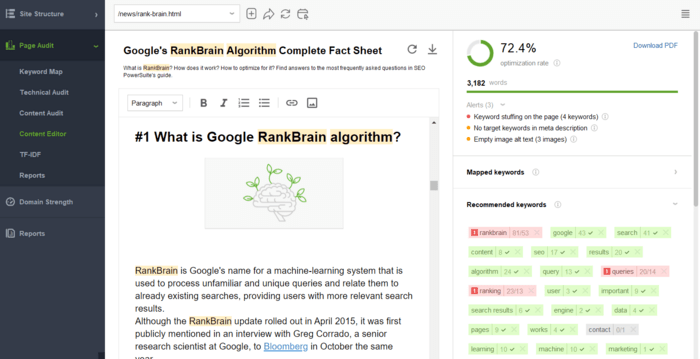
To create a better article, you can use SEO writing tools like Content Editor in WebSite Auditor. It will suggest relevant keywords, related questions, and topics. It will also handle your meta titles and descriptions to create well-optimized SEO content copy. The tool also recommends word count by examining the range between the lowest and highest word count among ranking articles. Finally, the word cloud will show the main keyword for which the page should rank. You can map the keyword and save the URL in the keyword map to later check how rankings and traffic improved after you entered all the changes.
The final step of content deletion involves adding the changes. In this case, you need to balance available resources with expected benefits. It’s clear that deleting a page or improving text requires different amounts of time and effort. Therefore, pruning the entire website might take from a couple of days to several weeks.
You need to measure the impact of your content pruning process, so set benchmarks in your SEO tools. You can add annotations in Google Analytics to see how traffic and behavior change after adding content modifications.
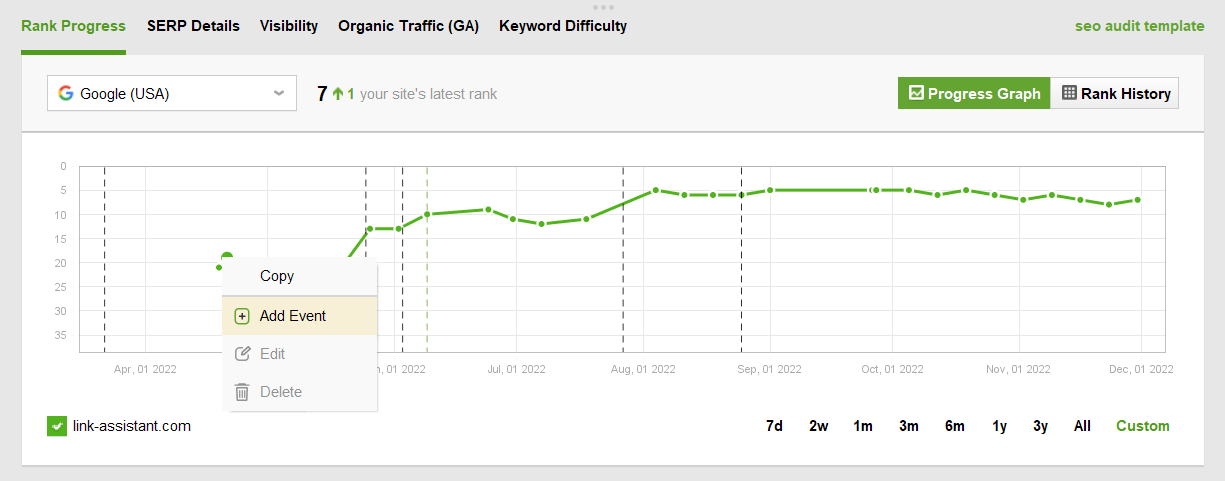
Additionally, in Rank Tracker, you can also add the content deletion date as an event in the monitoring graph and see if rankings change. If you haven’t already, read this guide on how to start to monitor keyword rankings.
The frequency with which you should perform content pruning depends on the size and type of website you manage. Some possible approaches include:
- Periodic pruning: perform a content “spring cleaning” once a year or at regular intervals.
- Continuous pruning: integrate content pruning as a constant activity within your content strategy. Create a plan with a list of topics to prioritize based on urgency and potential.
Regardless of the approach chosen, it is important to maintain content pruning as an integral part of your SEO strategy. This will help you ensure that your website remains fresh, relevant, and well-positioned on search engines over time.
Conclusion
Content pruning is a fundamental SEO technique for maintaining a high-quality website that ranks well on search engines. By eliminating outdated or underperforming content, you can improve user experience, strengthen your brand’s authority, and achieve better SEO results with less effort. Through a process of strategic auditing, evaluation, and implementation, you can free your website from elements that hinder its performance and focus on the content that truly matters. Remember that content pruning is not a “one-time” activity, but rather an ongoing commitment to keeping your online presence fresh and relevant. Make the most of this SEO technique, and you will see your efforts rewarded with increased traffic, rankings, and user trust in your brand.
Pubblicato in Digital Marketing, SEO
Be the first to comment