
Add us to your preferred sources.

White Balance
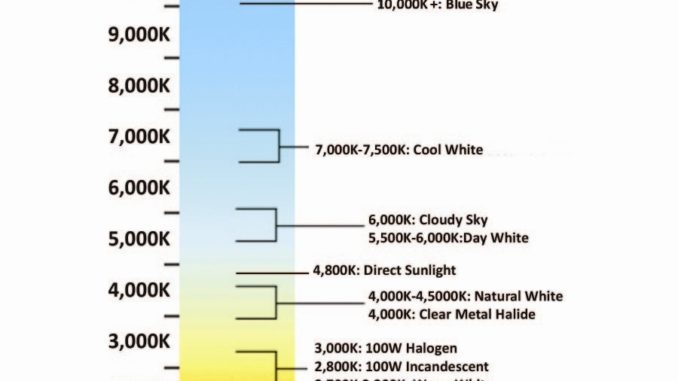
First, ensure your photograph is well-exposed and has correct white balance. Whether shooting in daylight or overcast conditions, or in environments lit by tungsten bulbs (traditional household bulbs), fluorescent lights (commonly called neon lights), or even candlelight, color casts change because the color temperature of the scene being captured changes.
The light from a tungsten filament is warm (with red casts) and has a color temperature of approximately 2700° Kelvin, while a snowy landscape in the high mountains has cold light (with blue casts) and a color temperature around 8000° Kelvin.

To avoid post-processing with editing software, it’s often best to use your camera’s automatic settings and presets, as they are specifically designed to handle common situations effectively. Therefore, whether it’s for *fireworks*, birthday photos of children, landscapes, or anything else, select the setting on the dial that best matches the scene, focus on the composition, and trust the result.
If, however, you want to “personalize” the shot, you’ll need to consider the results you want to achieve as well as what might hinder your idea.
Regarding white balance, as I’ve already mentioned, I suggest always leaving it on automatic because the results are consistently quite accurate.
Camera: Sensitivity
You can increase sensitivity up to *800 ISO* before electronic noise becomes bothersome. The shutter speed must strictly match the focal length you are using, even if your camera has a vibration reduction system. Therefore, if you’re using a *focal length* of 35mm, use 1/30 of a second; if you have a powerful zoom lens, you’ll need to adapt the shutter speed even more to the focal length: are you shooting with a 200mm lens? Well, never go below 1/200 of a second.
If you are forced to use a slower shutter speed due to low light and the aperture is wide open, you can increase the sensitivity beyond *800 ISO* and subsequently remove electronic noise with specific software: “Noise Ninja” is one of the best available, but unfortunately, it’s paid.
Remember also that *noise* is more evident in *shadows*, so if the scene you are photographing has darker areas, it’s advisable to overexpose by 2/3 of a *stop*. If you are shooting in manual mode (meaning you set both the shutter speed and aperture), you won’t have problems adjusting the exposure. However, if you are using the camera in automatic mode, whether with shutter or aperture priority, you will need to find the exposure compensation function in the settings, usually marked with +/- symbols, to overexpose or underexpose.
Camera: Shutter Speed/Aperture Combination
When shooting in automatic mode, also pay attention to the shutter speed/aperture combination you choose. To satisfy your request, the camera might set a very high sensitivity, unexpectedly increasing electronic noise.
To fully leverage your lens’s capabilities, try not to set the *aperture* at the extreme ends of the scale. Instead, prefer an intermediate value, between *5.6 and 8*, because lenses are manufactured to perform best in the mid-range rather than at the edges or center.
Therefore, by keeping the aperture moderately closed, you will best utilize the ‘cleanest’ part of the lens, with reasonably limited chromatic aberrations and barrel distortion. When shooting in backlight, try to use the built-in flash to brighten up foreground subjects, otherwise, you’ll have very dark subjects with perfectly exposed backgrounds, and no editing software will be able to fix that.
If you are in the *mountains* and want to photograph a river with a “motion blur” effect, use a shutter speed of 1/10 of a second or slower and a very closed aperture. If there’s too much light, lower the sensitivity to the minimum. If you still can’t achieve a slow enough shutter speed, mount a neutral density filter on the lens to further reduce exposure. For *compact* cameras that don’t have threading, pressure-fit versions are also available. Don’t forget to put the camera on a tripod and use the *self-timer* to prevent *camera shake*.
Overexposure and Underexposure
Finally, in another article, we touched upon the fact that the light meters in all cameras are calibrated to correctly reproduce 18% gray. Therefore, anything lighter will appear darker, and vice versa. What should you do? Overexpose lighter scenes and underexpose darker ones. The example we all know is a photograph taken in the snow or on a beautiful white beach in full sun, which, for some reason, always comes out dark! Well, to get the desired result, simply overexpose by a couple of stops.
Complete Photography Course
- Photography Course: Which Camera to Choose?
- Photography Course: The Beginning: Useful Tips
- Photography Course: Sensitivity
- Photography Course: Out of Focus or Blurred?
- Photography Course: The Circle of Confusion
- Photography Course: Apertures
- Photography Course: The Battery
- Photography Course: How to Hold the Camera


Be the first to comment