
Are featured snippets correct? Absolutely not. But they exist, they are here to stay, and we have no choice but to learn to take advantage of them.

Add us to your preferred sources.

A featured snippet is nothing more than a trick. Google cheats when it passes off our content as its own. Users cheat when they get the information without visiting our websites. But, more importantly, we cheat when we manage to snag a featured snippet and completely obliterate all of our search competitors.
What is a featured snippet?
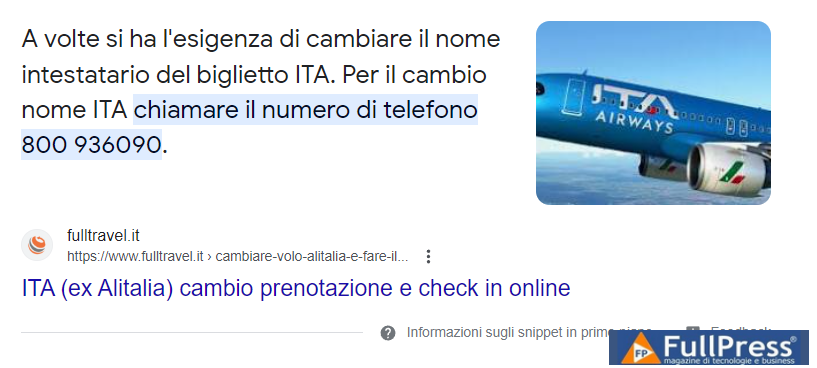
A featured snippet (also called zero results) is a search result that has been elevated to the top of the Google search results page. It tends to have more content than a normal snippet. A featured snippet might show an entire paragraph of text, but also a list, video, or image gallery. The goal of a featured snippet is to provide a concise answer to the search query without having to visit any website:
Why should SEOs care about featured snippets?
For an SEO, the worst thing about featured snippets is that they provide information right there in the SERP. When there is a featured snippet, a user no longer needs to click on the search result and visit the page. It means there is an additional chunk of organic traffic that never makes it to your website.
Another problem with featured snippets is that they take up a lot of space. Whenever there’s a featured snippet in the search results, it fills up most of the viewport and pushes the organic snippets below the fold. So it’s not just that the featured snippet is more informative, it totally dominates the space.
The only good news is that virtually any page has a chance to earn a featured snippet. If you know how to format your content properly, you will significantly increase your chances of appearing at the top of the search results.
How does Google choose featured snippets?
Obviously, there are tons of pages with similar content and answering similar questions. How does Google choose which page is a good source for a featured snippet?
First, the page should show conventional quality signals. This means the page should already rank high in search, use the right keywords, have quality content, provide a good user experience, and show some authority, most likely through backlinks.
Second, the content should be organized in a “cuttable” format. So, if you’re targeting a paragraph snippet, it’s best to have the exact paragraph on your page, ready to be “cut out” by Google. While this isn’t a hard rule, sometimes Google goes through your page, picks a sentence here and there, and pieces them together into a paragraph.
So, assuming you’re already doing good SEO, the goal here is to make it easy for Google to “cut out” your content. Let’s see what you can do to achieve that.
As mentioned earlier, featured snippets can be in the form of a paragraph, list, video, or other formats. So, before you start editing your content, you should find out the exact snippet format you are going after.
For example, let’s say you run a bicycle-related website and have a lot of content on bike maintenance and repair. If you were to Google some of the bike maintenance questions, you’d soon discover that pretty similar questions are often answered with different types of featured snippets.
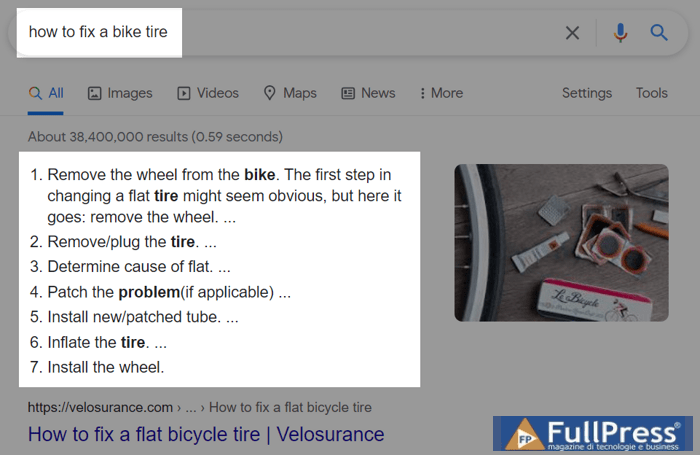
If you ask Google how to fix a bike flat tire, you get a list of steps:
But if you ask Google how to clean a bike chain, you get a video snippet:
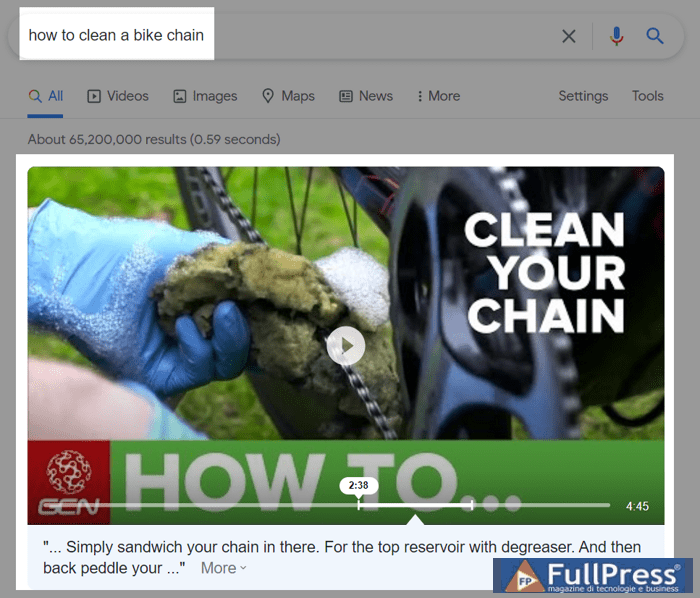
So, even though these two queries are very similar in nature, they will require two different approaches to earn a featured snippet.
A simple way to find out which format you’re going after is to Google each of your queries and take notes of the snippet types in each SERP. But it only makes sense if you are targeting a few very specific keywords. If you are targeting a lot of keywords, or if you don’t even know which of your keywords have the potential to earn a featured snippet, then you’ll need a more thorough approach.
My advice is to launch Rank Tracker, create a project for your website, and go to Target Keywords > Rank Tracking. There, make sure that your workspace includes the Google SERP Features column. This column shows which features are present in the search results:
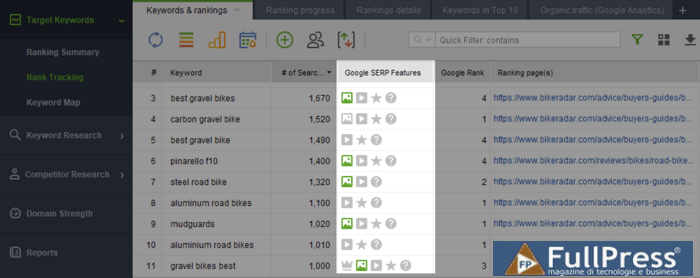
If the feature is green, it means you’ve already earned it – great job! If the feature is gray, it means someone else has it – you need to step up your game.
If you want to prioritize the keyword list in this workspace, you can use filters to find keywords with the highest traffic potential. Click the filter icon and set the filters to show keywords that already rank on the first page, have high search volume, and don’t have a featured snippet yet.
After applying the filters, you’ll get a shortlist of keywords to work with. Review them one by one and edit the corresponding pages to make them more snippet-friendly.
A paragraph is by far the most common type of featured snippet. In fact, nine out of ten featured snippets are paragraph format. Here’s how you can organize your content to compete for a paragraph featured snippet.
Signal relevance with an optimized heading
If you want your paragraph to be chosen for a particular query, then at least one of the page headings should be a very close match to the query. As close to word-for-word as possible.
You might choose to optimize the H1 heading, i.e., the page title, if the entire page is about this topic. Or you might choose to optimize one of the H2 headings, if only part of your page is about the query’s topic.
Just to give you an example, here’s the featured snippet when I search for how to choose a good watermelon:
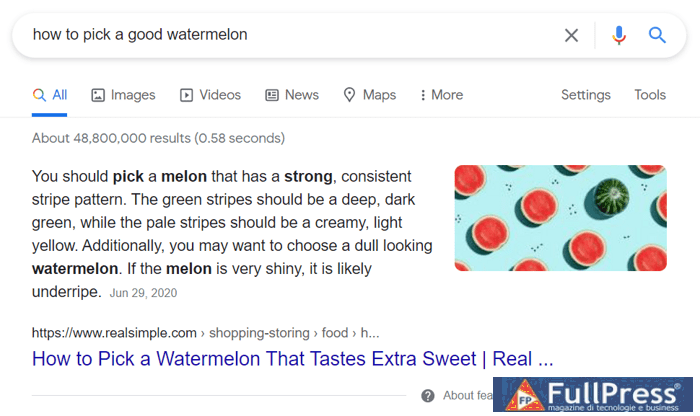
Now, when I visit the page this paragraph was pulled from, I can see that the H1 heading almost perfectly matches my initial query.
With almost no exceptions, you’d see that exact or similar match headings go hand-in-hand with featured snippets. And since most featured snippets are triggered by question-like queries, it pays to use question-like headings on your pages too.
Use keywords throughout the paragraph
With featured snippets, it often seems like Google is using its old algorithm. Keywords are back in play and follow familiar rules: use your primary keyword near the beginning of the copy, a few secondary keywords down the line, and some synonyms throughout:
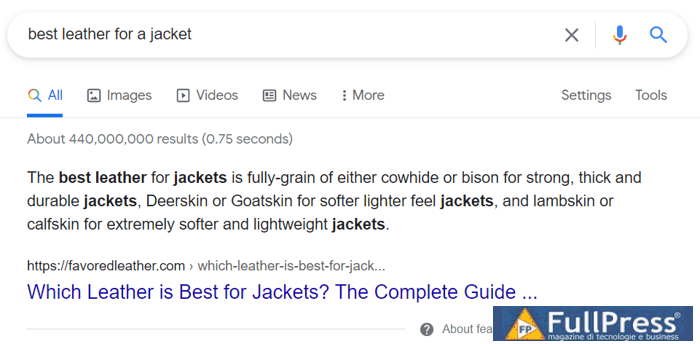
When you look at the way most featured paragraphs are optimized, you’ll notice that most of them follow a very simple formula to have an optimized question in the header and an optimized answer in the paragraph. It’s always something like this:
Title: How to choose a good watermelon?
Paragraph: To choose a good watermelon…
Title: What is the best skin for a jacket?
Paragraph: The best skin for a jacket is…
This basic formula is something to keep in mind when writing blog posts and guides.
Watch out for paragraph length
Most featured paragraphs are between 40 and 50 words long. It’s not exactly a problem if your paragraph is shorter or longer than average. If Google really wants to feature your paragraph, it will cut your paragraph shorter or use other copy to make it longer.
But, if you want to increase your chances of getting a featured snippet, it’s best if your paragraph is optimized for length. Make sure you pack all essential information into a single paragraph, keep it under 50 words, and have it ready to be cut by Google in one piece.
A list is another common type of featured snippet. Featured lists can be of two types: numbered and bulleted.
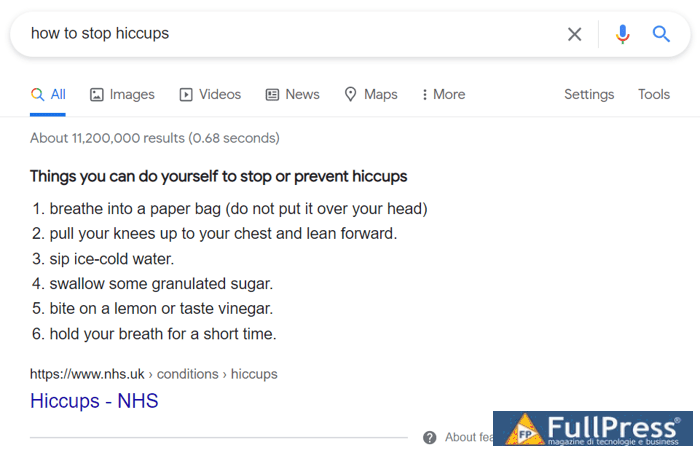
Numbered lists explain how to do something step-by-step: recipes, how-to guides, DIY.
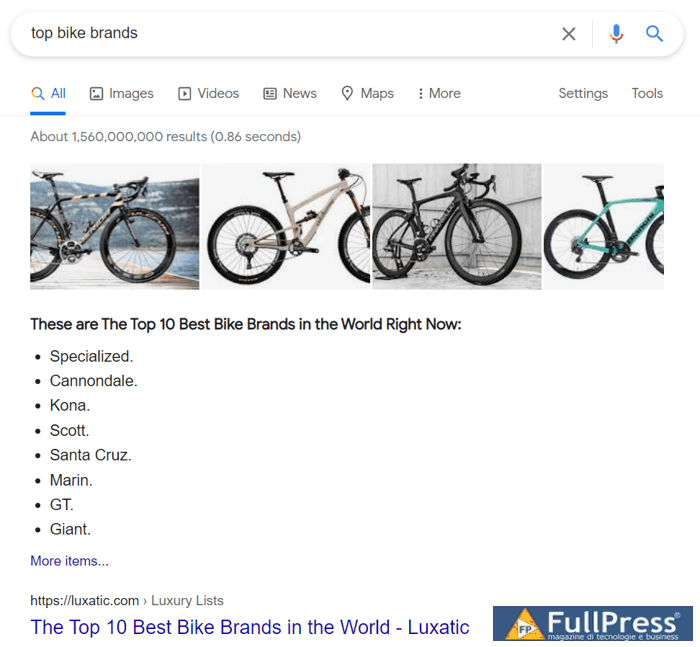
Bulleted snippets will appear when a list doesn’t need to be in any particular order.
Relevancy of the signal with an optimized header
The advice is the same as for featured paragraphs, except that with lists, it’s even more apparent that headings are important. Featured lists use headings or page titles as list titles in the snippet:
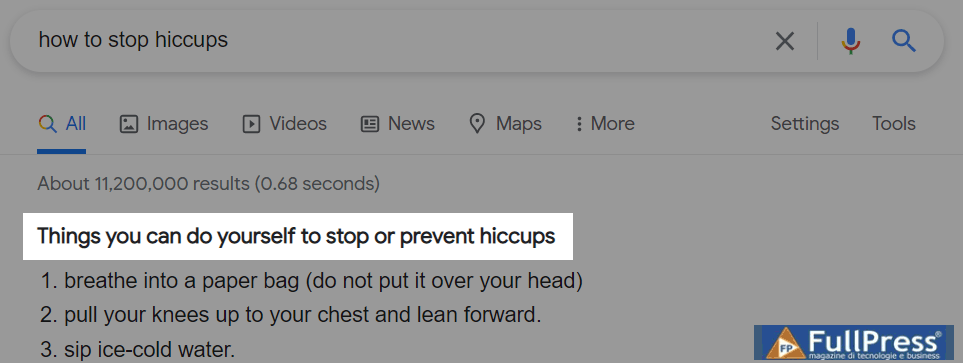
And here’s how the heading looks on the source page:
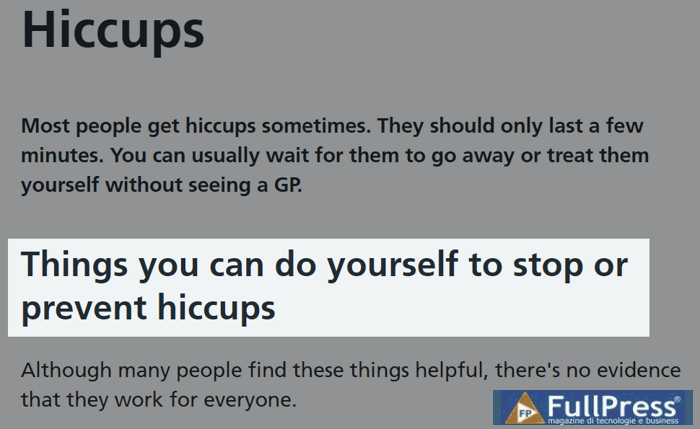
So make sure you have a title or a heading that can be used as a list title in the featured snippet. For a numbered list, it’s best to use question-like queries. For a bulleted list, you might have better luck with typical list headlines starting with “best,” “top,” etc.
Use lower-level headings to mark up list items
There are several ways Google can assemble a featured list. It can use headings as list items, it can use regular lists as they are, or it can even create a list from a paragraph of text, although the latter is rare.
If you want to help Google pull a list from your page, it’s up to you to use appropriate HTML tags to mark up the list items. In case the entire article is a list, the correct markup consists of using H2 headings for each of the list items. For a regular list within your page, use standard HTML tags to create a list.
Follow parallel syntax for every list item
Parallel syntax is when every list item is written using the same syntax structure. Parallel syntax allows Google to identify the items as belonging to the same list.
Just to give you a short example, here’s a list from a featured snippet on how to stop hiccups:
- breathe into a paper bag
- bring your knees to your chest
- sip ice water
- swallow some granulated sugar
- bite into a lemon or taste vinegar
- hold your breath for a short while
You can see how each list item starts with a verb in the same form, the sentences are structured similarly, and they’re also the same length, which isn’t required but is still neat.
Here’s an example of what that list would look like with sloppy syntax:
- paper bag could be used for breathing
- bring knees to your chest
- small sips of ice water
- swallowing some granulated sugar
- biting into a lemon or tasting vinegar
- holding your breath for a little while
In this example, you can see that each list item is written using a different syntax: different verb forms, different sentence types. This kind of inconsistency isn’t grammatically correct and could prevent Google from using your list for a featured snippet.
Create longer lists
One of the issues with featured snippets is that users get all the information without having to visit the page. So, if you manage to get a featured snippet, your exposure increases, but your clicks might actually stay the same or even decrease.
Well, with featured lists you get a bit of a trick. If your list contains more items than Google is willing to show, it will add a link to more items at the end of the list:
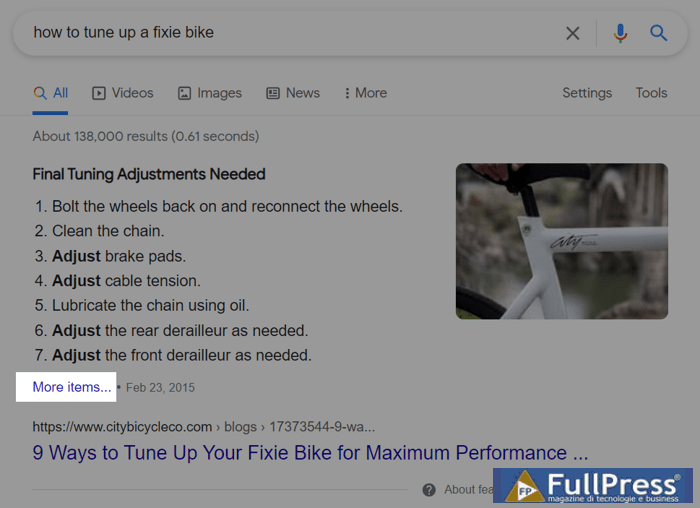
This way users are encouraged to click on your page and learn about the remaining items.
One challenge here is that you can’t always guess how many items Google is willing to show. For some snippets, it’s four or five, but for other snippets it can be as many as twelve. So, as a general rule of thumb, aim for longer lists, at least eight items.
Video snippets are becoming more and more common. This is probably because Google is getting better at interpreting videos and feels more confident using them to answer questions:
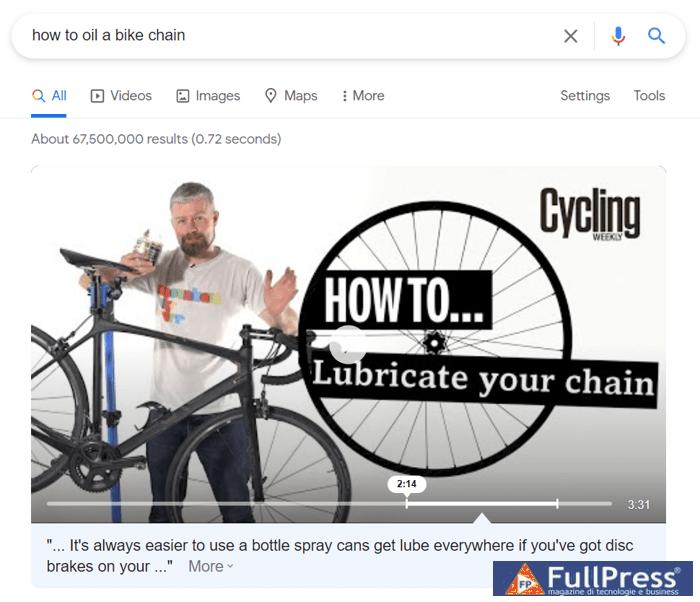
One curious thing about featured video snippets is that Google doesn’t show the entire video. Instead, it highlights the portion of the video that contains the most direct answer to the question. How does Google do that?
Well, it looks at all the metadata provided for the video, uses it to estimate overall relevance, and finds the exact piece that matches the query. Here’s how you can help Google in this process.
Host your videos on YouTube
Google owns YouTube and uses it as its primary source for video results in search. Every now and then you might see videos from other platforms, but it’s very rare, and I’m not sure they ever make it into featured snippets.
Regardless, Google and YouTube are essentially the same thing and use many of the same algorithms to determine relevance. Hosting your video on YouTube puts it on a highway to Google search results, whereas hosting your video on any other platform makes it substantially ineligible for featured snippets.
Use keywords for video metadata
YouTube video metadata includes things like video title, descriptions, and tags. All of these play a significant role in signaling your video’s relevance to the query.
Similar to text content, it’s custom to make the video title very similar to the main keyword and sprinkle secondary keywords throughout the description. Video tags are a bit more complicated to implement, I suggest you check out the instructions in this YouTube video optimization for search guide.
Add captions to your videos
Google uses captions to find the exact portion of the video that is most relevant to the user’s query:
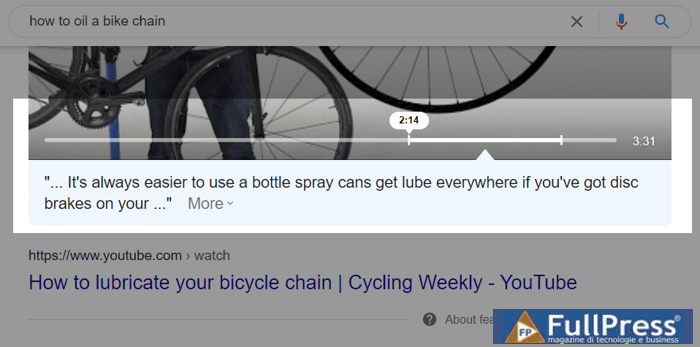
Now, if you don’t add captions to your video, there’s a chance that Google will auto-generate them and still crawl your video. But I wouldn’t leave it to chance, as auto-generated captions aren’t always perfect in terms of language understanding and the timing could be tricky as well. For the best results, I suggest you take the type to write your own captions or to edit the ones that have been auto-generated.
Segment your video
Another way to help Google understand your video is to break it down into segments. You can do this by adding timestamps to your video description. Think of it as a kind of table of contents for the parts of your video:
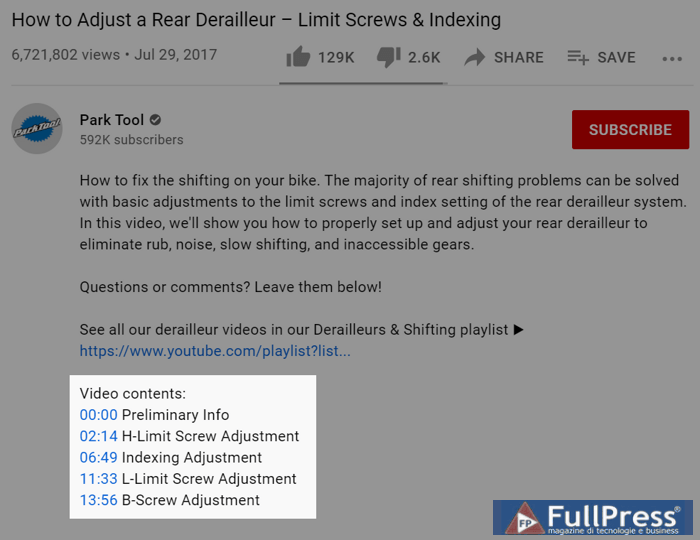
If the timestamps were added correctly, you will see that your video’s progress bar is now divided into chapters, like this:
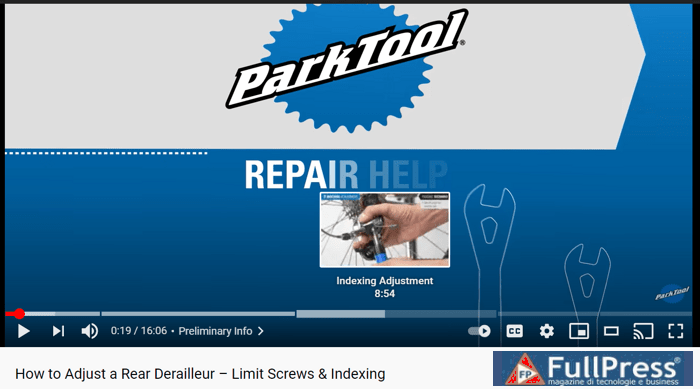
If the progress bar is not divided into chapters, it means something went wrong when adding the timestamp information. When adding timestamp information, always make sure that:
- The information is added to the description, not the comments (a common mistake);
- The first timestamp starts at 00:00;
- There are at least three timestamps;
- The length of each chapter is not less than 10 seconds.
Conclusion
It’s probably not the case that after reading this article you will go back to your website and start editing content for featured snippets. I doubt it’s part of anyone’s SEO process. But knowing what gets you into featured snippets and what doesn’t is something to consider when creating future content. For example, every time I write a new article, I always think about paragraph featured snippets and try to structure my paragraphs in a certain way. Hopefully, it will also become part of your content creation process.
Source Link Assistant
Be the first to comment