
Learn how to optimize your business listing on Google Maps and improve your local SEO with this beginner’s guide to ranking on Google Maps.
Add us to your preferred sources.

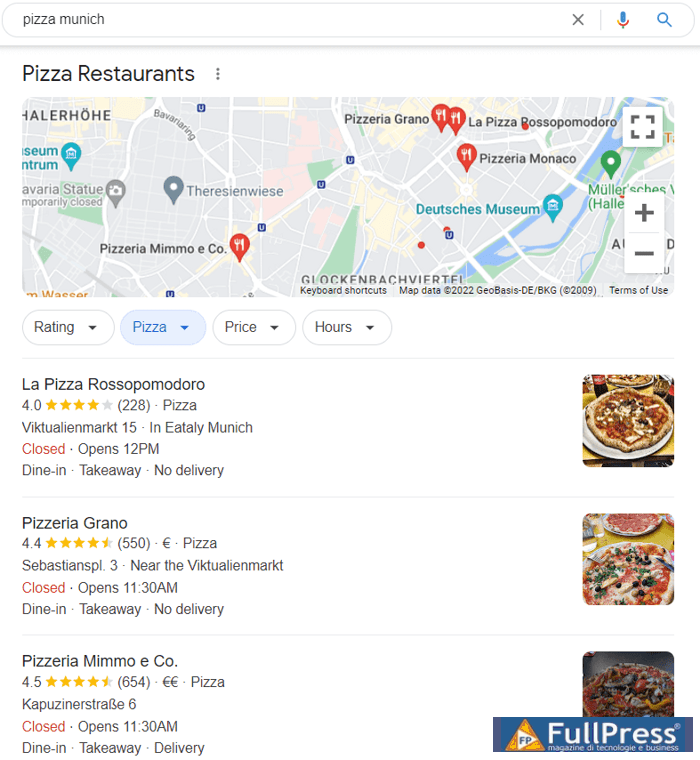
I bet you have seen a Google map like this when searching for places to go. It shows a number of nearby locations on the map itself and the top three choices for the search listed below:
If the three results are not enough, you can click on the map itself and get a wider variety of locations:
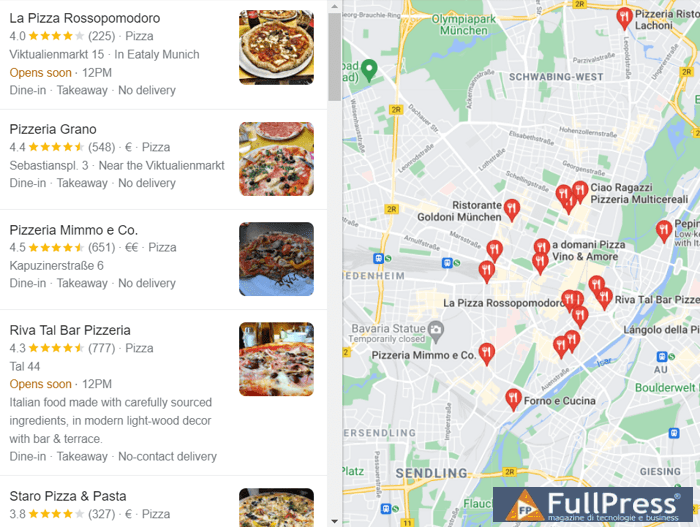
Look at these images once more. The top three positions on the map are the same as the local pack on the SERP. The idea is this: the local pack takes up a lot of space on the SERP and ends up getting more clicks, so if you are a business owner, you need to be there. Therefore, you need to rank in the top 3 on Google Maps. How to do that?
Google Maps Ranking Factors
Google Maps ranking factors are also called local ranking factors, as they are all related to location, both yours and the searcher’s. According to Google’s documentation, the
top three local ranking factors are:
- Relevance: how well your business matches the user’s query.
- Distance: how far you are from the searcher.
- Prominence: how well-known and regarded the business is.
Local Ranking Factors and the Vicinity Update
In December 2021, Google confirmed that it had rolled out a massive local search engine update. That
Vicinity update became the biggest local search algorithm update in the last five years and heavily shifted the balance of the top three ranking factors. Specifically, the distance factor started to play a much more important role than it did in the past. For example, before the update, better-optimized listings could easily outrank those that were actually closer to the searcher. For now, this is almost impossible.
Along with the
Vicinity update, Google started testing the new local pack layout in SERPs. So you might stumble upon a wider block with its map on the right and the three local pack results on the left.
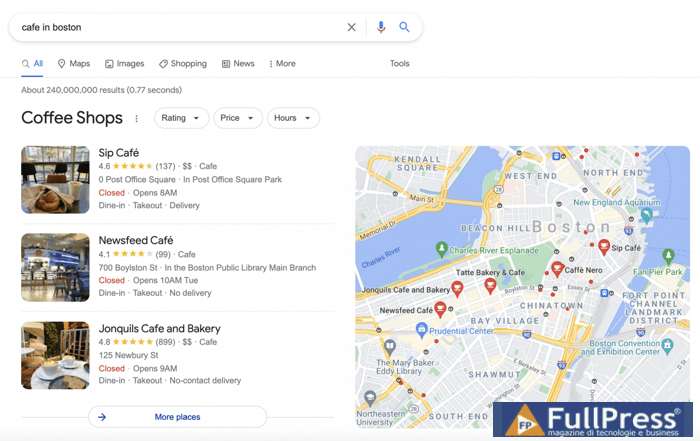
Let’s take a closer look at how the
Vicinity update has affected each local SEO ranking factor.
Relevance Ranking Factor
Relevance is probably the easiest factor to explain. It’s how relevant a business is to the query. And while for quite some time in many niches relevance simply came down to having an exact match keyword in your business name, the power of this factor has been
diminished by the recent update. For now, it’s the category and subcategories of your business listing that seem to matter.
I search on Google for “
melbourne pub.

The local pack now features only one result with the word
pub in the name.
Distance Factor
The distance is probably the only factor you can’t influence. You are where you are, and you can’t move your business or force users to search for it from a certain point.
The update
Vicinity has significantly increased the importance of
distance. As you can see in the screenshot below, even a poorly compiled listing can get into the local pack if it’s close to the searcher.
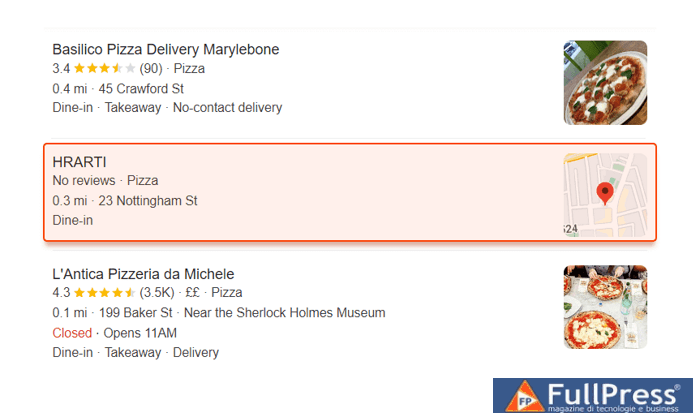
No ratings, reviews, prices. No nothing. However, the snippet made it into the SERP due to location. Why is that possible? Because Google is trying to show users the closest places without making them walk too far to their desired destination. All for the sake of people’s convenience.
Prominence Factor
Now comes
prominence, the most difficult and extremely important ranking factor to define. The
Vicinity update also had some impact here.
Google’s documentation importance relies on how well-known a business is, both offline and online. So your business website’s organic positions, GMB reviews, ratings, and backlinks should all count towards your prominence in Google Maps.
The power of preeminence is clearly seen if you search for a place in a location other than your current one (e.g., you want to find something in another city you plan to visit).
For example, I am not in Rimini right now. And here’s what I get in the local pack for
gelato Rimini:
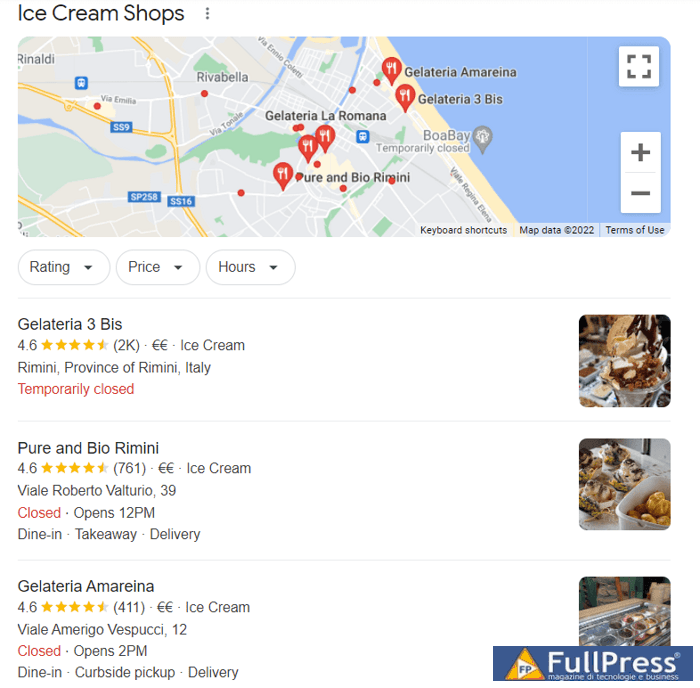
All results have the same 4.6 rating, but the first place has 2,000 reviews, the second has 761, and the third has been reviewed 411 times. The correlation is pretty obvious.
Now, keeping the 3 local ranking factors in mind, let’s move on to the practical part. What do you do to increase your ranking on Google Maps?
1. Add your business to Google Maps
To rank on Google Maps, you need to be present on Google Maps. So you need to go to
Google Maps and type in your business name into the search bar.

If there is no information about your business yet, use the
Add a missing place option. A window will pop up offering you to fill in basic business information like opening hours, category, and location.

Once done, click
Submit. Your request will be reviewed and approved, and you’ll get notified via email.
2. Add Your Business to Google My Business and Optimize the Listing
Technically, you don’t need a GMB listing to rank on Google Maps. But in reality, you do, as GMB counts a lot when it comes to
local ranking factors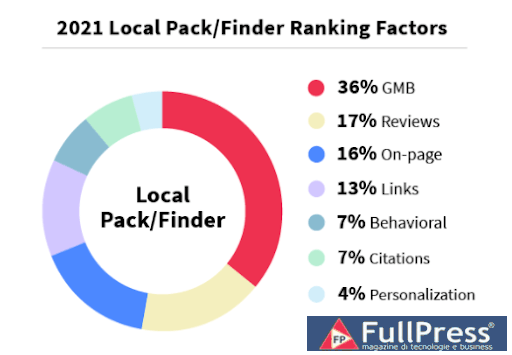
You can create a GMB listing directly when adding your business to Google Maps. To do so, click on Claim this business in the Maps popup. This action will immediately take you to the business profile page on Google, where you can fill out your listing, providing details and information about your company.
When it comes to GMB listing optimization, the rule is simple: carefully fill out every line and section you see.
3. Get more reviews
As mentioned earlier, reviews impact your rankings on Google Maps and in the local pack. Obviously, I mean positive reviews. How do you get them? Firstly, you can encourage your customers to leave reviews. You can launch a social media campaign, offer a discount, or simply send them an email asking for their opinion on your business and requesting them to rate you.
By the way, reviews have their own ranking factors (I bet you’ve seen how Google pushes some of them to the “Most relevant” section):
- Review score. And sometimes Google even goes beyond the star rating. Some SEOs have reported on Google’s sentiment analysis experiments.
- Review quantity. The more reviews you have, the better.
- Keywords in review text. Your reviews are considered better if they contain relevant keywords.
With this in mind, you need to ensure that your business reviews are numerous and contain keywords. And to encourage your customers to use the necessary keywords, consider asking for reviews of specific products or services.
4. Optimize your website
Although it’s not technically required to have a website to appear on Google Maps (just like a GMB listing), neglecting organic SEO can hurt your Google Maps performance, as there is a strong correlation between organic traffic and rising local pack positions.
Add local keywords
To increase your local rankings, enrich your website with local keywords. These are the keywords that allow Google to see your relevance to a specific location. In most cases, you can simply add the name of the location where you operate to your landing pages. For example, use best coffee in New York” instead of just best coffee. Additionally, you might try optimizing for near me.
If you operate in multiple locations, consider creating distinct local landing pages and optimize each for relevant local keywords: these could be names of nearby landmarks and attractions, cities, and so on.
Embed a Google Map
Adding Google Maps directly to your website is another way to allow Google to connect your business with its location. Specifically, you can provide directions to your location from popular nearby places: this could be an airport, a train station, local attractions, etc.
Keep in mind that the Google Maps API is not free” for heavy usage. However, adding Google Maps to your About Us and Contacts (or any other pair of pages you need) is absolutely feasible. Just set up a billing account with Google Cloud Platform to get a $200 credit on Google Maps API every month (you won’t be charged unless your usage exceeds this $200).
Make Your Website Responsive
Website responsiveness means that a website works consistently across any device or screen size. Since Google Maps business listings include a link to your website, and almost 60% of Google searches happen on mobile devices, having a responsive website is a no-brainer.
5. Build Relevant Backlinks
I high-quality backlinks have always been important for SEO, and local search is no exception. However, when trying to boost your local search visibility, make sure to focus not only on thematic backlinks but also on locally relevant ones.
When I look for link-building opportunities, I simply suggest going out and looking around. Start with your physical neighbors. Then, reach out to your business contacts: these may be your partners, suppliers, clients, etc.
Even if a business has nothing in common with you except for location, a backlink from their website will still signal a “connection” to that particular location and benefit your local rankings.
6. Check and Update NAP Citations
Name, address, and phone number (NAP) refer to key business information. The more consistent this information is across your business’s mentions on the internet, the more confident Google is in your business. So it makes sense to check your NAP citations to spot and fix any inconsistent data.
Even though some experts claim that the
role of citations as a ranking signal is diminishing every year. I’d still recommend taking care of how your business is listed at least on the major platforms (like Yelp, Yellow Pages, or Tripadvisor) and on local directories that serve your specific area (like a city-wide review platform or an aggregate marketplace).
7. Add Schema Markup to Your Website
Structured data allows Google to better understand information about your business. Local business schema can be applied to address, opening hours, social media profiles, and so on. As Google crawlers make their way to your website, they’ll easily obtain the vital information, trust you, and rank your listing higher on Google Maps.
Remember to check and validate your schema with Google’s structured data testing tool to ensure everything works correctly.
8. Try Google Maps Ads for Placement
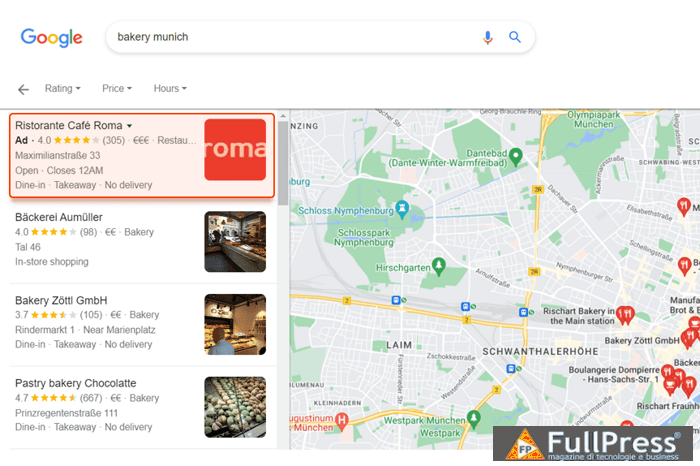
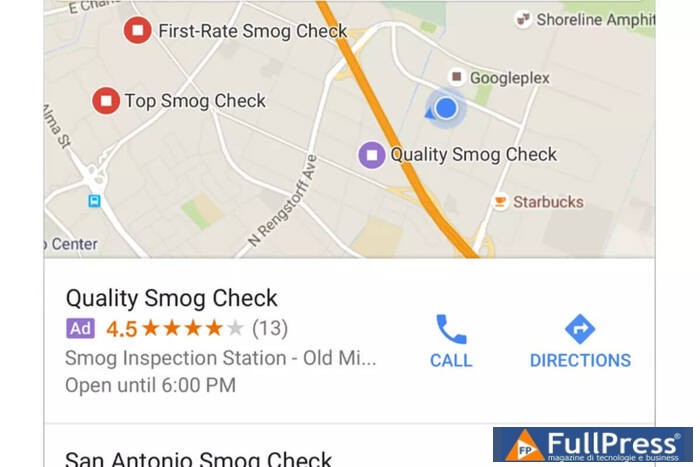
Google Maps Ads are not an organic way of promotion, however, you can still use them as a means to acquire traffic. As with any PPC campaign, ads appear on a Google Maps SERP above organic results, usually one or two at a time. If you want to run an ad for your business in Google Maps, you need to claim your business via your Google Business Profile account and create a Google Ads account.
Ultimately, like any CPC campaign, Google Maps advertising has the obvious benefit of being above other results, only here the ad doesn’t lead to your website, but to your GMB listing. There are a few ways your PPC results can be shown in Google Maps.
Search Results Ads
When you search on a mobile device for a business or service in your area on Google Maps, the closest businesses will be returned based on your physical location and their ratings. If you want to be at the top of these map results in a specific area, Google Maps offers paid local search listings.
This type of result instantly improves any business’s CTR among its peers and drives a lot of new clicks.
Sponsored Pins
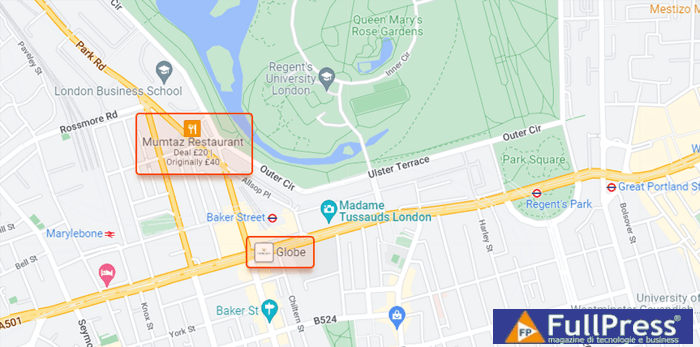
Sponsored pins are another type of paid ad listing and a great way to get noticed as users navigate the Maps app’s areas. Unlike search results ads, these bold placeholders appear right on the map without the user having to search for anything.
The type of business being promoted will determine the color and style of the icons. Furthermore, you can even add a logo to display instead of a standard icon.
In-Store Promotions
In-store promotions are directly inserted into business listings and communicate special ongoing promotions to a user. These promotions can be anything from buy-one-get-one-free offers to discounts on specific products.
In this example, the pin itself is listed as a standard Google My Business store, but when users click on the profile, they will see the special in-store promotion.
Conclusion
Optimizing for Google Maps isn’t the most obvious way your SEO strategycan go. However, with the growth of local business features in the SERP (say hello to the local pack), your business needs it to get views, clicks, and ultimately, paying customers. As you can see, the process isn’t as difficult as it might have seemed before reading this guide. Do you have any more tips to share about ranking on Google Maps? Share them in the comments.
Pubblicato in Digital Marketing, SEO
Be the first to comment