
HTML tags are among the first things we learn in SEO. They are invisible to the naked eye but can work wonders for your ranking, or conversely, be among the reasons why your ranking has dropped.

Add us to your preferred sources.

HTML tags have become so essential that no website can compete in today’s search results if it ignores HTML tags or uses them incorrectly.
What are HTML tags?
HTML tags are code snippets that can be used to describe our content to search engines. We can use HTML tags to highlight important parts of our copy, to describe images, and even to give instructions to search engine bots.
HTML tags are also used to influence how our pages are displayed in search results. With the help of certain tags, we can turn regular search snippets into rich snippets and maybe even featured snippets. Furthermore, as our search snippets become more advanced, they are able to ensure better SERP rankings and attract more traffic.
Are HTML tags still important for SEO today?
Absolutely! And taking care of HTML tags should always be on your website’s SEO checklist. Some say search engines have become too smart for HTML tags. They say search engines don’t need help understanding our content. Well, that’s not the whole truth.
First of all, even though artificial intelligence has made great strides in understanding content, it’s not perfect yet. There’s still considerable room for error, and we still need HTML tags to ensure all of our content is interpreted as it should be.
Secondly, helping search engines understand our content isn’t the only function of HTML tags. They also improve user experience, create beautiful search snippets, resolve duplicate content issues, and enforce crawling rules.These are the HTML tags that are still crucial for your website’s SEO.
Title tags are used by search engines to determine the subject of a page and display it in SERPs. In HTML, a title tag looks like this:
<title>Il tuo titolo va qui</title>
While in SERPs, a title tag looks like this:
SEO Value
Title tags used to be of huge importance to search engines. The page title is its main topic, so Google would look at the title to decide whether the page is relevant to a search query.
Naturally, SEO specialists started stuffing title tags with as many keywords as possible, trying to make their pages relevant to more queries. In response, Google began to penalize keyword stuffing and other outdated SEO techniques, so pages with spammy titles lost their search rankings.
Today, as Google has moved to semantic search, the value of an optimized title tag is even lower. In fact, Google has become so good at understanding our pages that it sometimes rewrites our titles for us. That’s right, you might set a specific title for your page, and then Google displays a different title in the search results. Although it’s still a rare occurrence, it happens when:
- The title is stuffed with keywords.Google might correct a spammy title if the page itself has quality content. There’s no need to waste good content just because you made the mistake of adding a few extra keywords to your title.
- The title does not match a query.Google might pick your page for a certain query even if your title doesn’t match that query. In this case, the title can sometimes be rewritten for the SERP. It’s obvious that you can’t write a title that matches all possible questions. However, if you see that Google rewrites your title for high-volume queries, consider reviewing it.
- The title is too long or too short.In 2021, Google confirmed that it had launched the page title update. Algorithms began replacing titles with something else if titles were too short, too long, or had special punctuation marks, like a semicolon. For example, if a title was too long, the search engine used H1 titles instead. If it was too short, Google added the brand name to it.
- There are some alternative titles.Facebook and Twitter have their own tags in the section of your page, so if you use alternative titles for these social networks, Google might also use them instead of the title tag.
How to optimize
Here’s how to create titles according to Google’s guidelines and best practices in SEO.
Title length
Google has a certain limit on the number of title characters it can display in SERPs. This limit isn’t exact: it changes depending on the screen size. As a rule of thumb, titles ofunder 60 characters in length fit most screens.
If your title doesn’t fit a particular screen, Google will truncate it. It would look like this:

It’s not necessarily bad that your title gets cut short. It can sometimes even have a positive effect on CTR. Truncated titles create a cliffhanger and spark curiosity among users, so they are encouraged to visit the page.
The only case when a truncated title can be a problem is when a visible part of the title doesn’t seem to be relevant to the query. So, it’s not necessary for the entire title to be visible, but it’s important that the visible part includes the main keyword.it’s not necessary for the entire title to be visible but it’s important that the visible part includes the main keyword.
To check title lengths, launchWebSite Auditor, go to Site Structure > Site Audit > On-page and view a complete list of titles exceeding the recommended length:

Title Keywords
Having keywords in the title is still important: it’s how you communicate your page’s relevance to users. However, if you stuff too many keywords, Google will either de-rank your page or rewrite your title to be less spammy.
The current best practice is to include only one keyword or a short keyword phrase per title and then fill out the rest of the title with marketing words. For example, here are two famous title structure examples:
Le 10 migliori bici per qualsiasi budget | BikeExpert
The title has a short key phrase towards the beginning. We also see it’s a listicle, as it says top 10, there’s a brand at the end to communicate authority, and the title says any budget, which is just a generic selling point.
Come scegliere il miglior laptop per il lavoro | 2022
This title has its keyword a bit higher up, but it’s still within the length limit, so it’ll be visible in any SERP. We can see the page will be a guide, as the title says how to, and we can see it’s fresh as it contains the current year.
So when crafting keyword-optimized title tags, remember that having just one target keyword in your title tag is good enough for better ranking.
Brand in a title
In case you have a well-known brand, it’s a good idea to use it in your title. When users scan the results page, they are more likely to pick something they recognize.
If you don’t have an established brand, you won’t see any immediate benefit from including it in your title. But it can help build brand recognition over time, so eventually, you’ll start seeing benefits. We are talking years.
The meta description is a short paragraph of text used to describe your page in the search results. In HTML, a meta description tag looks like this:
<meta name="description" content="La tua descrizione va qui">
While in SERP it looks like this:

SEO Value
The function of the meta description is similar to the title. It provides a bit more detail about your page and helps users decide whether to visit it or not.
While the meta description is not a direct ranking factor, it can still help your search success. If your meta description is relevant and compelling, more users will click on your snippet, and eventually, Google might consider giving you a better ranking position.
Although, just like with titles, Google reserves the right to rewrite your meta description. In fact, it happens quite often: most meta descriptions you see in SERPs have been generated by Google, not by website owners.
As explained by John Mueller, meta descriptions are often adapted to match even the slightest change in the user’s query. So, Google is actually doing you a favor. It shows different meta descriptions to different users and improves the relevance of your search snippets.
How to optimize
Even though meta descriptions are often rewritten by Google, there’s still a fair share of original descriptions being shown in SERPs. Don’t leave it to chance, don’t rely on Google to generate your meta description for you, because it might not. And if it does not, you’re left with a poorly optimized snippet and poor search performance. Last but not least, a well-written and enticing meta description will likely boost your organic click-through rate.
Meta description length
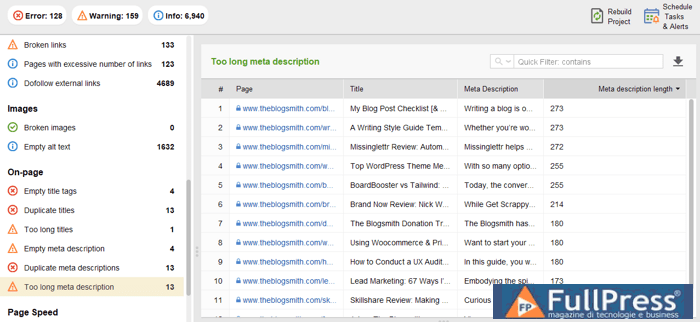
There is no technical limit to the length of a meta description, but Google will generally only display the first 160 characters in your snippet. The advice is the same as for the title tag: make it as long as you want, but make sure your keywords and other important information are mentioned closer to the beginning.
You can check your meta descriptions in WebSite Auditor. In your project, go to Site Structure > Site Audit > On-page and check if any of your meta descriptions exceed the recommended length.
Meta description keywords
There is more room in a meta description, so it’s okay to use more than one keyword. The current best practice is to use variations of the keyword that you included in your title.
For example, if my title is How to choose the best laptop for work, in my description instead of saying laptop for work,I’ll say business laptops. This way I’m covering more ground and there’s a better chance to exactly match the user’s query.
While you can use multiple keywords in the description, it’s advised not to use more than two or three. Keep it natural, don’t go out of your way to stuff another keyword where it doesn’t belong.
No quotation marks in the meta description
When you use double quotes in the meta description HTML, Google will cut off this text between the quotes when displaying it in SERPs. Therefore, it’s best to remove any alphanumeric characters from your meta descriptions.
By the way, to optimize your title tags and meta description, you can use competitive intelligence within the SEO Content Editor in WebSite Auditor.
Go to Page Audit > Content Audit , paste the URL of the page you’re optimizing and the target keyword. The tool will analyze your page alongside the top 10 competitors in the search results. You’ll see how your target keyword is used in the title tags and meta descriptions of your competitors.

Also, you can switch to the content editor and optimize your text right in the app. Here you can write your title and meta description and see how your meta snippet will appear in the search results.

Headers (H1-H2) are used to break down the page into sections or chapters. Each header is like a mini-title within the page. In HTML, a header looks like this:
<h1>La tua direzione va qui</h1>
While on the page they look like this:

SEO Value
The initial function of headers was to improve user experience. When the page is properly organized with titles, users spend more time navigating the content, skipping irrelevant chapters, and finding important things. And if users are happy, Google is happy.
Today, the role of headers is much more advanced. Since the introduction of passage indexing, Google can use certain sections of your page as a separate search result.
For example, let’s say you wrote a guide on
how to remove plaster from a brick wall. And you used proper headers to break down your guide into chapters:
prepare the room, remove plaster, brush the brick, wash the brick and
seal the brick. Now, if someone asks Google how to seal a exposed brick wall, Google will be able to take one of your chapters and present it as a separate search result.
In fact, if your headers are search-optimized, each of them is eligible to become a separate search result. It’s basically like having pages within pages.
How to Optimize
Here are the best practices to follow when optimizing your headers:
Header Hierarchy
Traditionally, there is only one H1 header per page, and it’s your page title. However, it’s not the same as the title tag. The title tag is displayed in the search results, while the H1 header is displayed at the top of the content. A real difference is that there are no character limits for the H1 header, so you can make it longer than the title tag. Or you can make them the same. It’s up to you.
Then there are H2 headers, which are used to break down the content into chapters. Then H3 headers, which are used to break down chapters into subchapters. And you can follow the same logic down to H6, but it’s generally not recommended to go lower than H3-H4. Pages with too many header levels become too messy.
Header Keywords
Do you remember how each of your headings can be a separate search result? To make this happen, you need to write each heading as if it were a page title. Include a keyword relevant to the section of the page and phrase your heading similarly to a query.
For example, let’s go back to our guide on brick walls. On the left, we have headings that are not search-optimized. They work well for in-page navigation, but they will never make it to the SERP. Whereas on the right we have headings that are much more informative and can be used by Google to answer narrow search queries.
| Wrong Titles | Good Headings |
|---|---|
| Removal | Expose brick with a chisel |
| Brushing | Brush exposed brick |
| Washing | Wash brick with soapy solution |
| Sealing | Seal brick with a matte sealer |
Parallel Syntax
Sometimes Google can take your headings and turn them into a list-type featured snippet. To make your headings eligible for a list snippet, they need to follow parallel syntax. This means all your headings must be phrased similarly, e.g., they all need to start with a verb or they all need to be noun phrases. It also helps if all headings of the same level are of similar length and arranged in a numbered list:
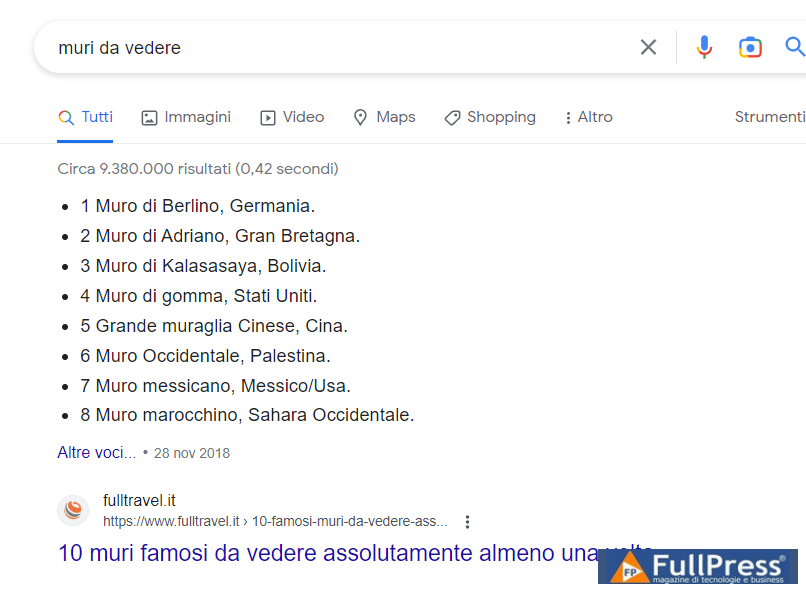
The alt text attribute is part of an image tag and provides a description for an image. In HTML it might look like this:
<img src="url" alt="La descrizione dell'immagine va qui">
SEO Value
Alt text plays a significant role in image optimization. It makes your images accessible to both search engines (by telling them what a particular image is about) and people (by displaying alt text in case a particular image fails to load or by helping screen readers convey images).
The main advantage in terms of search optimization is that optimized alt texts will help your images rank in image search. And while AI has gotten pretty good at reading images, a written description helps bridge the remaining gap.
How to optimize
Here are the best practices to follow when optimizing alt texts:
Don’t leave alt tags empty
If you want to use this additional opportunity to rank higher by optimizing images, first of all, check for empty alt texts. In
WebSite Auditor, go to
Site Structure > Site Audit
and pay attention to the
Images
section.

Prioritize images
If you have thousands of images, you don’t need to optimize them all. Pay attention to those that convey some useful data, not those that are used for entertainment and decoration. Useful images are product images, screenshots of processes, your logo, infographics, diagrams, etc..
Add keywords to your alt attributes
Alt texts are an extra opportunity to use target keywords. Don’t overuse them! Write the description that provides context to your content and use a keyword where it fits. Optimized images for keywords will work great in combination with the factors that search engines take into account when ranking pages.
To quickly check and optimize alt texts for your images, use the content editor. Choose Document
mode to edit your content and you will see your page live right in the app. If you click on any image, you will see a special field where you can enter alt attributes. Once you are done with the text, you can download it in HTML format and add it straight to your web page.

Open Graph (OG) tagsare placed in the
section of a page and let any Web page become a rich object in social networks. It was first introduced by Facebook in 2010 and is further recognized by other major social media platforms (LinkedIn, Twitter, etc.)
In HTML, it may look like this:
<meta name="og:title" property="og:title" content="Il titolo del tuo grafico aperto va qui">
SEO Value
OG tags allow you to control how information about your page is represented when it is shared through social channels. This capability can help you improve the performance of your links on social media, thus generating more click-throughs and increasing conversions.
How to optimize
There are quite a few Open Graph tags, I will give some tips on the most important ones.
Original Title
Yes, this is another tag with the title of your page. So now you have three different titles: one is for search (title tag), one is for your website (H1), and the third is for social networks (OG title). You can copy any of the other titles and keep things simple or you can come up with a separate title for social sharing.
Bear in mind that it should be between 60 and 90 characters, otherwise it might get truncated.
OG Type
Use this tag to describe what kind of object you are sharing: a website, a post, a video, a business, etc. You can check the full list here.
This tag is considered important when your page has the Like button. It might be useful to determine whether your content will appear in the user’s interests section of Facebook in case they ‘Like’ it.
In most cases, the type is “website”, because mostly you are sharing links to websites. In that case, there is no need to specify the type in the code, it will be read as such by default.
OG Description
This is very similar to the meta description tag. However, it will not be displayed in SERPs, it will be shown as a summary when your page is shared. For this reason, there is no point in sneakily stuffing your keywords into this particular description.
Your main task here is to make it speak to your potential audience and generate more clicks.
As for the length, it is considered good practice to keep it around 200 characters.
Original Image
An image will make your shared link much more attractive. Text over the image is acceptable, but try to place it in the center of an image, as some platforms will crop the edges.
The recommended resolution for the OG image is 1200×627 pixels, size – up to 5 MB.
Once you are done with your OG meta tags, you can check how everything looks with the help of Open Graph Object Debugger, a tool created by Facebook.
You can also check for your OG tags with WebSite Auditor. To do this, go to Site Structure > Pages
and switch to the Default Open Graph and Structured Data markup
tab. It will show whether OG markup is available on all your pages, plus, it will collect OG titles, descriptions, and URLs for OG images.

Twitter card
Twitter cards are very similar to OG tags (title, description, image, etc.), but they are used exclusively by Twitter. Although tweets can now exceed 140 characters, these cards are a nice extension that allows your tweet to stand out from the crowd of common text tweets.
There are several Twitter Cards:
Summary Card. In addition to the original tweet, there is a preview of the content of your page, useful for highlighting blog posts, products, news, etc.
Title: 70 characters
Description: 200 characters
Image: 120x120px, up to 1MB
Summary Card with Large Image. This card is similar to the previous one, but it features a larger image. The image can also include text that conveys the main point of your page’s content, a call to action, or something that really provokes clicks.
Title: 70 characters
Description: 200 characters
Image: 280x150px, up to 1MB
Player Card. These cards allow users to play video or audio within a tweet.
These cards allow users to play video or audio within a tweet.
Description: 200 characters
Video: H.264, Baseline Profile, Level 3.0, up to 640 x 480 pixels at 30 fps.
Audio: AAC, Low Complexity Profile
App Card. These cards allow users to download mobile apps directly from a tweet. They feature a name, description, icon, rating, and price.
Title: rendered from app ID
Description: 200 characters
Image: rendered from app ID
Note: Only one card type is supported per page. Once you are ready with your Twitter card elements, you will need to set your cards and then validate them using a card validator.
A robots tag is an element in a page’s HTML that informs search engines which pages on your site should be indexed and which should not. Its functions are similar to robots.txt, but robots.txt provides suggestions. While robots tags give instructions.
In HTML, it can look like this:
<meta name="robots" content="index, follow">
SEO Value
It’s not that a robots tag can help you improve your rankings, but you can use it to save your rankings in case you need to block some pages from indexing.
For example, you might have some pages with pretty thin content that you are not interested in being indexed in search, but you would like to keep them. In this case, you can simply add a noindex tag for this page. I recommend using our SEO tools.
How to Optimize
Here are the best practices to follow when optimizing robots tags:
Address Bots by Name
Use robots if you want to address all bots, but use individual bot names if you want to address a particular bot. Individual bot names are commonly used to prohibit malicious bots from crawling your website.
Know Your Parameters
Google understands and respects the following parameters in your robots tag:
Noindex : prevents search engines from indexing a page;
Nofollow — prevents the search engine from following ALL links on the page (which is why it’s different from the nofollow attribute which is applied at the individual URL level);
Follow : links on the page should be followed even if the page is noindex;
Noimageindex — images on this page will not be indexed;
Noarchive : prevents a cached copy of the page from being displayed in search results;
None — the same as “noindex, nofollow”.
Keep in mind that Google understands any combination of uppercase and lowercase letters you use for parameters of robots tags.
When you have a few pages with identical content, you can use a canonical tag to indicate to search engines which page should be prioritized.
In HTML, it might look like this:
<link href="URL" rel="canonical">
SEO Value
A canonical tag is important for SEO in two ways.
First of all, it prevents you from having duplicate content. Duplicate content is not necessarily a bad thing, but it might be suspicious. Google looks at your pages and they seem to be copies of other pages: something strange is going on.
Secondly, it prevents cannibalization. If you have two similar pages and both are indexed, they start competing with each other in search results. This is a drain on both your resources and your ranking chances.
How to optimize
Launch WebSite Auditor , go to Site Structure > Site Audit , and pay attention to the section On-page , specifically to Duplicate Titles and Duplicate Meta Descriptions .
In case you have some URLs with identical content, specify a element in the page’s HTML.
Would you like to know how else you can boost your website’s SEO? Check out the most comprehensive guide 15 Steps to Use WebSite Auditor.
Last but not least is Schema markup. Schema is actually an entire system of HTML tags. They can be added to your code to communicate all sorts of things to search engines – your contact info, product prices, recipe ingredients, and much more.
SEO Value
Schema markup is used to highlight specific information on a page, and Google can use this information to create rich snippets. For example, if you apply Schema to a recipe page, Google will know the cooking time, ingredients, number of reviews, and even the calorie count of the recipe. And it will use the information to create these:

These are called rich snippets, and as you can see, they make regular snippets explode out of the water. And Google has made more and more of these types of snippets available over the last few years. Today we have articles, products, events, books, movies, and about a dozen other schemas that can improve the appearance of your search.
How to Optimize
Schema can get a bit complicated, and it’s not something you can just write by hand. The best way to apply schema to a page is by using the Structured Data Markup Helper. Here you can pick your schema type, enter your URL, then simply select the text on the page and tag it:

Once you’re done, you can copy the code from the helper and onto your page.
HTML tags are the part of SEO that you can control yourself
I would say that HTML tags are still pretty important to SEO, perhaps even more so than before. And if I had to pick the most important HTML tags, I would definitely pick headers and Schema markup. Google is changing the
SERP quite rapidly, making it more interactive and adding new types of snippets. To take part in all of that, to stay competitive in search, you should start working on your headers and your media results, like, today.
Source Link Assistant
Pubblicato in Digital Marketing, SEO
Be the first to comment