
Facebook Messenger Rooms, a group video calling service that lets you spend quality time with friends, family, and people you share interests with. Rooms have no time limits and will soon be able to host up to 50 people. Here’s how it works.
Add us to your preferred sources.

Facebook Messenger Rooms is a group video calling service that lets you spend quality time with friends, family, and people you share interests with.
Spending time together should be spontaneous, not a chore. To help people feel connected even when they are – or need to be – physically apart, Facebook is announcing new features today that make video calls and live videos simpler and more functional.
How it works Messenger Rooms
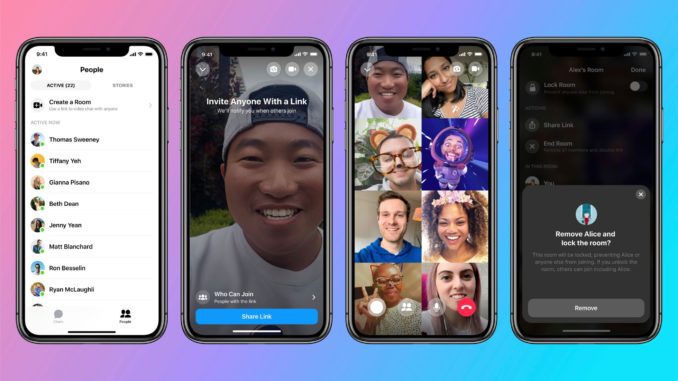
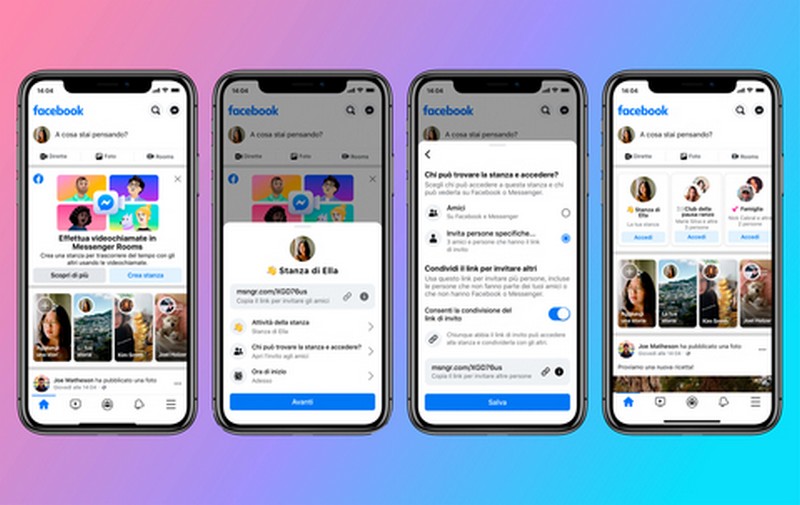
You can create a virtual Room directly from Messenger or Facebook and invite anyone to join, even if they don’t have a Facebook account. Rooms have no time limits and will soon be able to host up to 50 people, much like what already happens on Zoom.

Messenger Rooms Groups
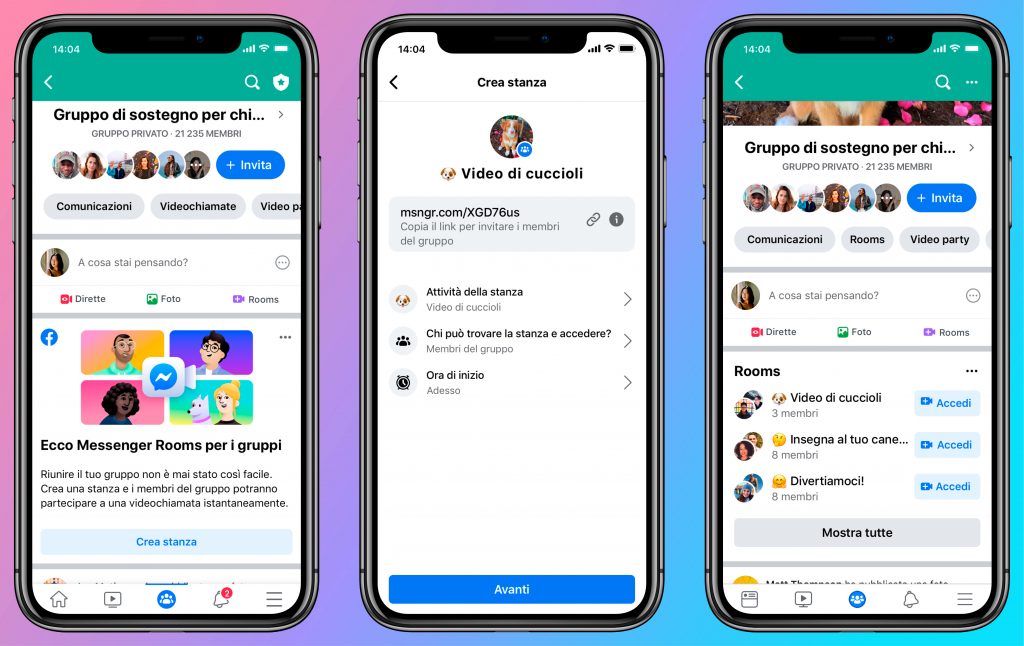
To celebrate an event, organize a book club, or just chat with friends, you no longer need to call ahead or set a calendar appointment. Just open a Room on Facebook and share it via your news feed, Groups, or Events to let people drop in. Soon, you’ll also be able to open a Room from Instagram Direct, WhatsApp, and Portal.
Messenger Rooms Rooms
If friends or community members open Rooms and give you access, you’ll see them on Facebook and can join them. When invited to a Room, you can access it from your smartphone or computer without needing to download anything.
AI-powered atmospheric lighting backgrounds and filters
In addition to the augmented reality effects available from the Messenger app, such as bunny ears e and aliens, Facebook is introducing new AI effects to update Messenger video chats from mobile, such as 360-degree immersive backgrounds that will transport you to iconic locations, from the beach to a luxurious waterfront apartment. There are 14 new filters that provide ambient lighting for your space or to illuminate your face. We’re also adding new Augmented Reality effects, to celebrate birthdays or go virtual camping with friends while staying home.
Messenger Rooms is available in testing in Italy and will be rolled out worldwide in the coming weeks. In the coming months, we will also add new features.
Messenger Rooms Privacy and Security
Messenger Rooms is designed with privacy and security at its core: Facebook does not see or listen to your calls. The person who creates the Room can choose who can see it and who can join, must be present to start the conversation, and can remove guests at any time. You can report a Room or send feedback if you believe it has violated Facebook’s community standards. Since Facebook does not view or listen to calls, reports will not include audio or video from the Room.
Messenger Rooms is a new way to spend time with friends and family via group video calls when you can’t meet in person. Facebook designed Rooms with great attention to privacy and control over your experience.
What are the controls and options available on Messenger Rooms?
You can open a Room from Messenger or Facebook, and very soon, you will be able to do so from Instagram, WhatsApp, and Portal as well. Whoever creates the room also controls who can participate, who can join, how to find it, and whether or not to activate the access link. Default privacy settings are designed to be consistent with what you expect when creating a Room, like posting to a Group versus chatting privately on Messenger. Here are the tools:
- Locking: Rooms can be closed or opened when the call starts. If a room is closed, no one can join, except for a Group administrator if rooms are created through a Group.
- Removing a participant: the room creator can remove any unwanted participants. If they do so or leave the call, the room automatically closes, and only that person can reopen the call so others can join.
- Leaving: if at any time you don’t feel safe in a Room, you can leave. The fact that the Room is closed does not obligate anyone to stay.
- Reporting: You can report a Room or someone you believe is violating Facebook’s Community Standards. It’s important to know that reports do not include audio or video from the room.
- Blocking: you can block someone you don’t like on both Facebook and Messenger without them being notified. When that person accesses Facebook, they will not be able to join a Room created by you, and you will not be able to do the same for a room created by them.
Who can see my information and activity on Messenger Rooms?
Whether you use Rooms from your Facebook account or join as a guest, Facebook will not see or hear your conversations. When you join a room as a guest without logging into Facebook, you will only be asked for your name, which will be displayed to allow the Room owner and their guests to identify you. Like other websites, Facebook receives logging data such as the type of device you connect with or your IP address and uses it essentially to ensure the best Rooms user experience and maintain a secure environment.
When you connect to a Room via Facebook or Messenger, participants who are not your friends on Facebook will be able to see and hear what you say or share in the Room, but they will not have access to other information about you from Facebook. They will only see your name and public information from your Facebook profile, such as your profile picture or posts you’ve made public.
Facebook works with third parties for activities such as reviewing and managing issues reported by users and may share some information with these parties, such as the name of a Room and who is participating, so they can perform these tasks. Facebook asks these partners to adhere to strict data confidentiality and security obligations.
Furthermore, Facebook’s security team has been involved to make Rooms links difficult for hackers to find. Room links display a string of random characters and digits, with numbers and letters. This makes it difficult for hackers to guess the exact combination of characters, and a new link is generated every time a Room is created.
What impact does Messenger Rooms have on data collection and advertising?
Facebook collects information from Rooms whether you connect through one of its Apps or access it without logging into your Facebook account. This information is collected primarily to provide the service and improve the user experience. Just like with other Messenger features, Facebook does not see or listen to conversations within Rooms. This means that neither audio nor video is used to serve advertisements. If you do not have a Facebook account, you will not see advertisements on our platforms, while we may use the collected data to provide targeted ads on our platforms to people who have an account.
Rooms is based on Messenger and therefore uses the same technology to encrypt video and audio conversations while they transit from people’s devices to Facebook servers, located in countries with strict laws in this regard. Rooms does not use end-to-end encryption. There are technical limitations in implementing end-to-end encryption for video calls with more than 50 participants, but as we are working to introduce end-to-end encryption across Messenger, we will explore this possibility for Messenger Rooms as well.
Pubblicato in Social Media
Be the first to comment