
Internal links are essential for improving usability and search engine rankings. Discover how to optimize them to boost your website’s performance and organic traffic.
Add us to your preferred sources.

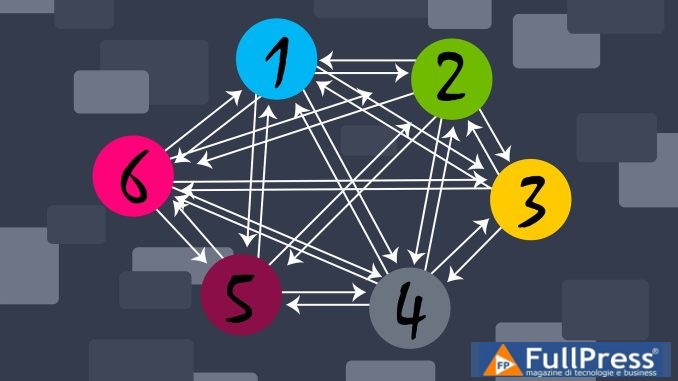
Internal links are a fundamental component of every website’s content marketing strategy. These links, which point to pages within the same domain, not only improve user experience but can also significantly influence search engine rankings. Understanding the importance of internal links and how to optimize them is essential for maximizing page performance and, consequently, organic traffic. In this article, we will explore in detail why internal links are crucial, how to use them effectively, and best practices for their implementation.
What is an internal link?
An internal link is a link that points to another page within the same website. Unlike external links, which point to external sites, internal links help keep visitors within your own domain, facilitating navigation and improving the user experience. These links can be used to guide users to related content, increasing time spent on the site and reducing bounce rate.
Types of internal links
- Contextual links: inserted within the text, they link to relevant content.
- Navigation links: present in menus and sidebars, they facilitate site navigation.
- Footer links: located at the bottom of pages, they can link to important pages.
The importance of optimizing internal links
The optimization ofinternal linksis crucial for several reasons. First of all, it improves site usability, allowing users to easily find related information. Furthermore, internal links help search engines understand the site’s structure and index pages more effectively.
User benefits
- Ease of navigation: internal links make it easier for users to explore related content.
- Increased engagement: by encouraging visitors to stay on the site longer, the likelihood of conversions increases.
Search engine benefits
- Improved indexing: internal links help search engine crawlers discover and index pages.
- Authority distribution: internal links can transfer authority from one page to another, improving the ranking of linked pages.
How internal links affect page performance
Internal links can have a significant impact on page performance. When implemented correctly, they can improveSEO rankingand increaseorganic traffic.
Performance analysis
A study conducted across various platforms has shown that pages with a higher number of internal links tend to achieve better rankings in search results. For example, sites like Wise and Remitly show a positive correlation between the number of internal links and the traffic received.
Practical Examples
- Wise: has an average of 14.4 internal links for its top-performing pages, contributing to smooth navigation and increased traffic.
- Remitly: with an average of 28.8 internal links, has demonstrated that well-linked content can generate a significant increase in organic traffic.
Strategies for Internal Linking Optimization
To maximize the benefits of internal linking, it is essential to adopt effective strategies. Here are some techniques to consider.
Link Audit
A link audit is a fundamental step to understand how internal links are currently impacting your site. Use tools like Screaming Frog o Semrush to analyze existing links and identify improvement opportunities.
Content Cluster Creation
Identifying content clusters is essential for building an effective internal linking network. Clusters are groups of related content that can be linked together. By creating content around central themes, you can facilitate navigation and improve page authority.
Link Selection
When choosing internal links, ensure they are relevant and useful to users. Each link should add value and contribute to a positive user experience. Use descriptive anchor texts to clarify the content being linked to.
Monitoring Internal Link Performance
After implementing an internal linking strategy, it is important to monitor its performance. This will allow you to evaluate the effectiveness of your strategy and make any necessary adjustments.
Using Analytics Tools
Tools like Google Analytics can provide valuable data on user behavior and the effectiveness of internal links. Monitor metrics such as average time on page, bounce rate, and conversions to assess the impact of internal links.
Continuous Optimization
Internal link optimization is not a one-time process. It is important to regularly review and update links to ensure they remain relevant and useful. Add new links as you create fresh content and remove outdated ones.
Common Mistakes to Avoid
When working with internal links, there are some common mistakes it is best to avoid. Being aware of these mistakes can help you maintain an effective linking strategy.
Excessive Linking
Overloading pages with too many internal links can confuse users and compromise the navigation experience. It is best to limit yourself to one or two relevant links per section.
Irrelevant Links
Linking to content that is not relevant to the current page can damage your site’s credibility. Ensure that every link adds value and is pertinent to the content.
Ignoring analysis
Not monitoring internal linking performance is a mistake that can lead to an ineffective strategy. Use analytics tools to stay informed about performance and make changes when necessary.
Conclusion
Internal links are a crucial element for improving page performance and optimizing SEO. By implementing a well-planned internal linking strategy, you can improve user experience, increase organic traffic, and achieve better search engine results. Remember to continuously monitor performance and make adjustments to maximize benefits. With a strategic and targeted approach, internal links can become a powerful tool for your website’s success.
Pubblicato in Digital Marketing, SEO
Be the first to comment