
Add us to your preferred sources.

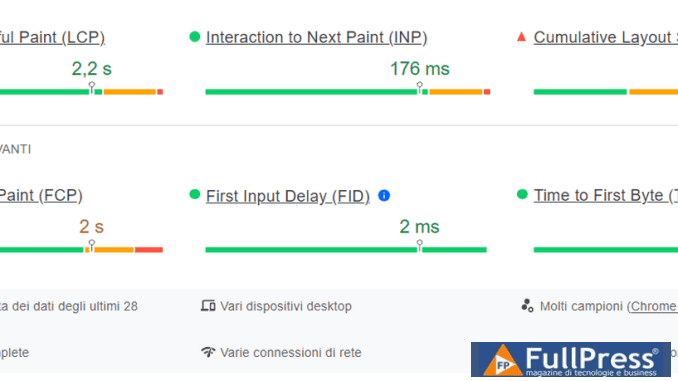
Core Web Vitals (CWV) are a set of metrics that help Google assess the overall performance of web pages.
These three metrics are:
- Largest Contentful Paint (LCP)
- First Input Delay (FID)
- Cumulative Layout Shift (CLS)
Each of the three Core Web Vitals represents a distinct aspect of the user experience.
Together with other web vitals, LCP, FID, and CLS are part of Google’s page experience signals, which are used for ranking purposes.
CWVs measure and evaluate three aspects of web pages: loading, interactivity, and visual stability.
The first Core Web Vital is LCP (Largest Contentful Paint). The LCP metric is used to measure the time it takes for the largest image or text block within a defined viewport to become visible from the moment a page begins to load. Google’s current benchmark for Largest Contentful Paint is less than 2.5 seconds.
Google’s second Core Web Vital is FID (or First Input Delay). The FID metric assesses the page’s responsiveness and measures the time it takes for a page to react to user input (clicks, taps, or key presses). A good First Input Delay is considered less than 100 milliseconds.
Last but not least, the CLS metric measures a page’s visual stability. If web pages have unstable elements during page loading, there will be a poor CLS score. A good Cumulative Layout Shift score should be equal to or less than 0.1.
How Core Web Vitals Correlate with Organic Impressions and Clicks
If you read any of the case studies on Core Web Vitals, you’ll find a lot of conflicting information about how well a good CWV score correlates with organic impressions and clicks. I’ve intentionally placed this section at the beginning of the study to show how CWV optimization has worked for us and why we’ve made it one of our top priorities for the current year.
The CWV report in Google Search Console has a 3-month limit on available data. Therefore, to monitor our progress more conveniently than with Google’s tools, we created an integration between the Google Search Console API and Microsoft’s PowerBI. This way, we were able to combine all the data into a single dashboard and collect all historical data without limitations.
Starting Point
The entire CWV optimization process began with checking our current situation in Google Search Console.
Besides Search Console, you can use Google’s PageSpeed Insights to check the CWVs on your website. However, it’s important to understand the key difference between the two and how they evaluate CWVs.
Search Console relies on field data, meaning data from the Chrome User Experience Report (CrUX), which implies that CWV scores are based on how real users experience the pages. This data is updated every 28 days, so you have to wait that long before you can see the results of performance improvements.
PageSpeed Insights determines scores based on lab data, a simulation of what Google considers an average web user. You can check any page at any time.
Thus, PageSpeed Insights is useful when you want to get a quick estimate of what’s happening with the CWVs on a particular page.
How We Improved Core Web Vitals Metrics
When we first learned about the three Core Web Vitals, optimizing them seemed like a trivial task. We consulted Lighthouse, PageSpeed Insights, and Search Console reports and followed the recommendations provided. What could go wrong?
Only a few weeks later, we realized there could be hundreds of issues leading to poor CWV scores. So, to share our experience and save you a lot of time, I’ve done my best to compile everything that was done in an easily understandable format.
Setting Up Geo-Specific Servers and CDNs
– Metrics affected: TTFB, LCP –
Server response time is crucial and can nullify all CWV optimization efforts if not addressed early. One of the metrics that helps Google assess a server’s response time is called Time to First Byte (TTFB). While not a Core Web Vital, it’s part of other Web Vitals.
TTFB measures the time between when a user lands on a website and when the first “bite” of information is loaded. Typically, TTFB should be under 600 ms.
A poor TTFB negatively affects LCP, so making it as low as possible is paramount. In most cases, the TTFB score can be improved simply by switching to a better hosting provider. However, this was not the case for link-assistant.com.
Link-assistant.com has a global audience, and Google uses Real User Monitoring (RUM) data to determine if a specific page meets Web Vitals criteria. This means that if the TTFB is good for, say, the US, but bad for India, the latter will end up lowering the overall TTFB score.
Before CWVs became so important, we had only one server location, in the US. Obviously, this was not enough for a website that had a multinational audience.
This led us to hypothesize that traffic volumes from India were too high for a single server. Thus, the server was likely overloaded, resulting in a poor TTFB for all locations other than India. We then added two new servers: one in Osaka and another in Singapore.
Since the extra servers were added only about a week ago, we’ll need to wait for the final results to manifest. However, the improvement is already visible for most locations.
The same issue with TTFB was observed in the Americas. Not only did TTFB scores not improve for US locations, but there were also enormously high server response times for users in Brazil and Chile.
Here, we drew a few conclusions. First, our organic traffic in the Americas is as heavy as in India, so two servers are likely insufficient to handle the flow without compromising TTFB.
Second, one of our servers was on Wowrack. Our development team discovered that this server was severely overloaded, had rather dated technical specifications, and was located in the infamous “old internet” zone on the US West Coast, which led to significant connection delays between users and the server itself.
As a final solution, we recently configured an additional AWS server, so we now have three servers in the US. The results of the improvements we’ve made are not yet significant, but we’ll keep an eye on them and update this study later.
Overall, optimizing TTFB for link-assistant.com allowed us to significantly improve this metric, which in turn led to an improvement in LCP as well. A win-win for us.
Additionally, once we were confident that TTFB was good enough, we ensured all our static assets (images, CSS, Javascript) were served from CDNs instead of our own servers. While indirectly, having all static assets on CDNs helps improve TTFB scores because the servers are not overloaded with additional requests to load images, CSS, or JS.
Note
Acquiring additional servers is a costly solution, which is not 100% mandatory in all cases. If your website serves a local audience, you can safely use a single server near your target audience. If you’re experiencing TTFB issues, try less radical solutions, like changing your hosting provider. If problems persist, consult this Google article.
Deferring Third-Party JS
– Metrics affected: LCP –
Third-party JS includes everything from Facebook share buttons to Google Analytics trackers present on a page. These page elements always consume a lot of rendering resources. Moreover, every time a browser encounters such a piece of JS, it pauses HTML rendering until it finishes rendering the JS. All this inevitably leads to a poor LCP.
What we did was first analyze which render-blocking JS we had on our pages. From our research, we saw that the main blockers were social media share buttons, Facebook comment blocks, YouTube embeds, and Sleeknote, which we used for pop-ups.
For example, embedded YouTube videos alone could contribute up to 30% time savings for LCP:
Although not mandatory, we got rid of all third-party scripts where possible to achieve better LCP scores.
At the same time, there were pages where we wanted to keep social media share buttons, Sleeknote, or GA trackers.
To keep these page elements without compromising LCP, we moved them out of the critical rendering path. This was done by adding one of the following attributes to the <script> tag:
- Async. This attribute tells the browser to execute the script asynchronously without pausing page parsing. We used this attribute for scripts that were sensitive to delayed loading (Google Analytics):
<script async src="https://www.google-analytics.com/analytics.js"></script>
</code></div>
</div>
Just for completeness, here's a visual explanation of the defer and async attributes:
It's worth noting that you should avoid using the defer attribute and use async for various tracking scripts. In our case, we missed almost 15% of goal data in Google Analytics after moving the tracking script to the end of the rendering path.
Note
The same technique was also applied to our custom JS. We examined all the JavaScript used on our pages and analyzed which parts were irrelevant to eliminate and which parts needed to be retained; in most cases, we had them load asynchronously with the async attribute.
2. Optimizing Font Usage
– Metrics affected: LCP, CLS –
Web fonts are crucial for attractive design, better readability, and brand identity, but they are also heavy files that can take time to load and harm both LCP and CLS.
If a third-party font is used for a text block that represents the LCP element, the LCP score can be negatively impacted because the browser will take time to download and fetch this font.
Regarding Cumulative Layout Shift, the main issue with third-party fonts is that before a specific font loads, the browser will display a system font. Once the third-party font loads, it may take up more screen space, thus affecting the visual stability of a page, causing a layout shift, and leading to a poor CLS score.
Here's how a layout shift looks:
Before Core Web Vitals became a thing, we had many different fonts on a single page.
Sometimes, these fonts weren't even used but were still loaded. As you can see from the screenshot below.
The Roboto font was used exclusively in the pop-up tooltip, which was not visible on mobile devices, but at the same time, the font was still loaded.
We also used many external fonts, such as Google Fonts, which were hosted off our server.
So, the first thing we did was eliminate all external fonts and switch to system fonts (Arial, Helvetica, Verdana, Tahoma, etc.). This simple solution worked exceptionally well for us, and we saw a significant improvement in both LCP and CLS scores.
We also realized that there might be cases where we'd need to use third-party fonts. For such cases, we make the font self-hosted on our servers and pre-load it in the head section of a page's HTML. As a final touch, we also made sure not to use icon fonts. These are fonts used to replace schematic images, like a magnifying glass, used for search bars. Such icons were replaced with SVG images hosted on our servers so the browser wouldn't have to load them from external sources every time.
Important Note
Self-hosting web fonts might not help improve LCP if your website doesn't use CDNs and HTTP/2. Try experimenting with both self-hosted and third-party fonts to see which solution works best for you.
3. Extracting Critical CSS and JS
– Metrics affected: LCP –
CSS is a render-blocking resource, meaning a page cannot be rendered until the browser fetches and parses all CSS files. If the CSS is heavy, it will take a long time to load, directly impacting the LCP score.
In our case, it wasn't just the size of the CSS we used. Before optimization efforts began, we had a single CSS stylesheet for all pages, with over 70,000 lines. The same heavy CSS was loaded for every page, even if it wasn't actually used there.
To address this, we first consulted the coverage report in Chrome DevTools. We then reviewed all the content of that CSS file and got rid of all irrelevant lines. This allowed us to significantly reduce its actual size and the percentage of unused bytes.
Note
To further reduce the size of our CSS files and ensure they don't negatively impact the LCP score, we also subjected them to a CSS minification process.
CSS stylesheets often contain superfluous comments, spaces, and line breaks, and getting rid of all these can often help reduce the final file size by up to 50%. We used CSS Minifier to reduce our CSS size and JSCompress to do the same for render-blocking JavaScript.
Ultimately, our development team developed a dedicated tool that now handles minification automatically.
Furthermore, just as it was for JS, there was no need to load the same huge CSS for every page every time. So, we extracted only the styles needed for the above-the-fold area of a specific page and added them to that page's HTML file.
4. HTTP Content Compression
– Metrics affected: LCP –
HTTP content compression is an excellent practice for reducing the size of files transferred between the server and the browser. This can significantly reduce page load times and improve the LCP score.
To compress HTTP content, we configured gzip compression on our server. This allowed for a substantial reduction in the size of files sent to the browser, thereby improving LCP.
Gzip compression is a data compression technique that reduces file size without losing information. This enables faster file transfers and thus improves page load times.
5. Image Optimization
– Metrics affected: LCP –
Unoptimized images can slow down page loading and negatively impact the LCP score. Therefore, we paid special attention to optimizing images to improve Core Web Vitals performance.
To optimize images, we followed these steps:
- We resized images to the actual dimensions they need to be displayed on the page. Reducing the physical dimensions of images can significantly decrease their file size and speed up the loading process.
- We used a suitable compression format for each image. For example, images with few details and flat colors were converted to formats like PNG or SVG, which offer better compression for these types of images. Images with many gradients or complex details were converted to JPEG format, which is more suitable for complex images.
- We used image compression tools to further reduce file sizes. These tools reduce file size without losing visual quality.
- We implemented progressive image compression to improve the user experience during page loading. Progressive compression allows a preview of the image to be displayed while it is loading, rather than waiting for it to load completely.
Optimizing images had a significant impact on the LCP score and overall page load times. We noticed a remarkable improvement in performance after implementing these optimizations.
6. Final Adjustments
After completing the previous steps, we made final adjustments to further optimize Core Web Vitals.
We performed a thorough analysis of our pages to identify any other issues that might be affecting the CWV score. For example, we checked if there were any additional render-blocking scripts or resources causing interactivity delays.
We also reviewed cookie usage on our website and minimized the number of cookies used to avoid performance slowdowns.
Finally, we conducted numerous tests and continuously monitored Core Web Vitals performance using tools like Google Search Console, PageSpeed Insights, and Lighthouse.
Core Web Vitals Optimization Results
After implementing all the optimizations described above, we observed a significant improvement in Core Web Vitals scores.
The LCP score improved substantially, with a loading time under 2.5 seconds. The FID score decreased to less than 100 milliseconds, making the page more responsive to user input. The CLS score remained below 0.1, ensuring greater visual stability.
These improvements directly impacted the overall performance of the pages. We noticed a significant increase in organic clicks and impressions, indicating an improved user experience and better ranking positions in Google.
Core Web Vitals Optimization is an Ongoing Process
It is important to emphasize that Core Web Vitals optimization is an ongoing process. Page performance can degrade over time due to new changes or updates, so it's crucial to continuously monitor CWVs and make any necessary corrections or improvements.
We will continue to keep an eye on link-assistant.com's Core Web Vitals and implement further optimizations if needed. Maintaining a good user experience and high Google rankings is vital for our website's success.
Final Thoughts
Core Web Vitals have become an essential ranking factor for Google. Optimizing CWVs can significantly impact page performance, user experience, and Google rankings.
In our Core Web Vitals case study, we demonstrated how we improved CWVs for link-assistant.com and how this helped us recover from a sudden drop in rankings.
The optimizations we implemented include setting up geo-specific servers and CDNs, deferring third-party JS, optimizing font usage, extracting critical CSS and JS, HTTP content compression, image optimization, and final adjustments.
These optimizations led to a significant improvement in Core Web Vitals and had a positive impact on page performance and organic results.
Remember that Core Web Vitals optimization is an ongoing process. It's important to continuously monitor page performance, make corrections or improvements, and stay updated on Google's latest guidelines and best practices to ensure an optimal user experience and high rankings.
Article adapted from Link-Assistant
Pubblicato in Digital Marketing, SEO
Be the first to comment